What is Supplemental Content?
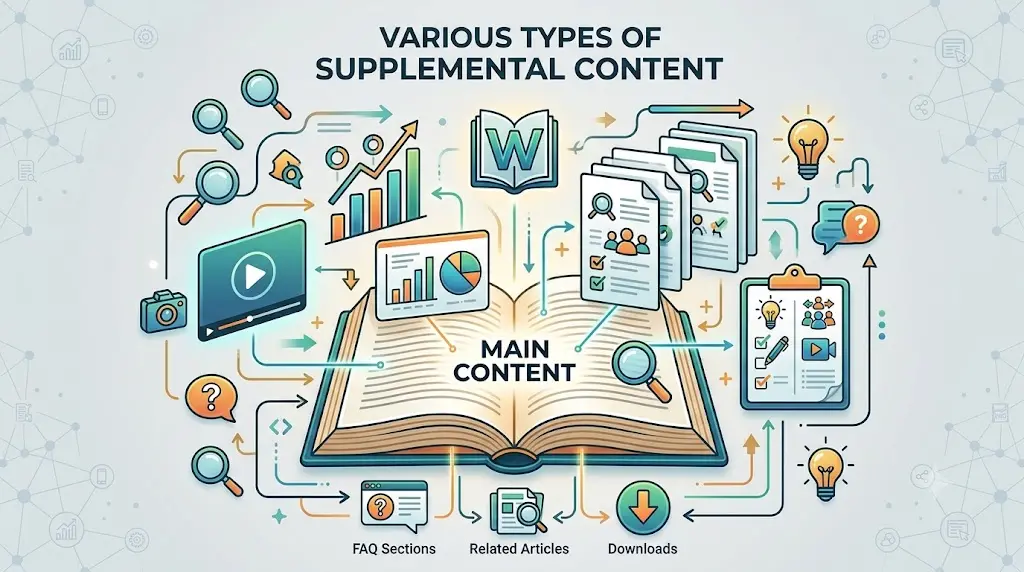
Supplemental content (SC) refers to secondary webpage elements—such as related resource links, navigation sidebars, calculators, and FAQ accordions—that support the main content (MC) without serving as the primary focus. Originally codified in Google's Search Quality Rater Guidelines, high-quality supplemental content helps users navigate complex topics and discover related context, while low-quality or distracting SC can dilute page authority and user experience. So what is supplemental content? This guide dives in and explains everything about what it is and how to use it with examples.
Key Takeaways
- Supplemental content enhances user experience by providing additional context and information
- It is crucial for improving user engagement, conversion rate, and retention on your website
- Understanding the difference between main and supplemental content helps optimize your pages
- Effective supplemental content can significantly impact SEO and search rankings
- Avoid common mistakes to maximize the benefits of supplemental content
What Is Supplemental Content, and Why Should You Care?
Supplemental content serves as the perfect sidekick to your main content. It adds depth, context, and value, ensuring that your audience not only consumes information but enjoys doing so. For content creators, supplemental content is an essential tool that offers extra context or details, enhancing the overall narrative. Website owners find it particularly beneficial as it can boost user engagement and retention.
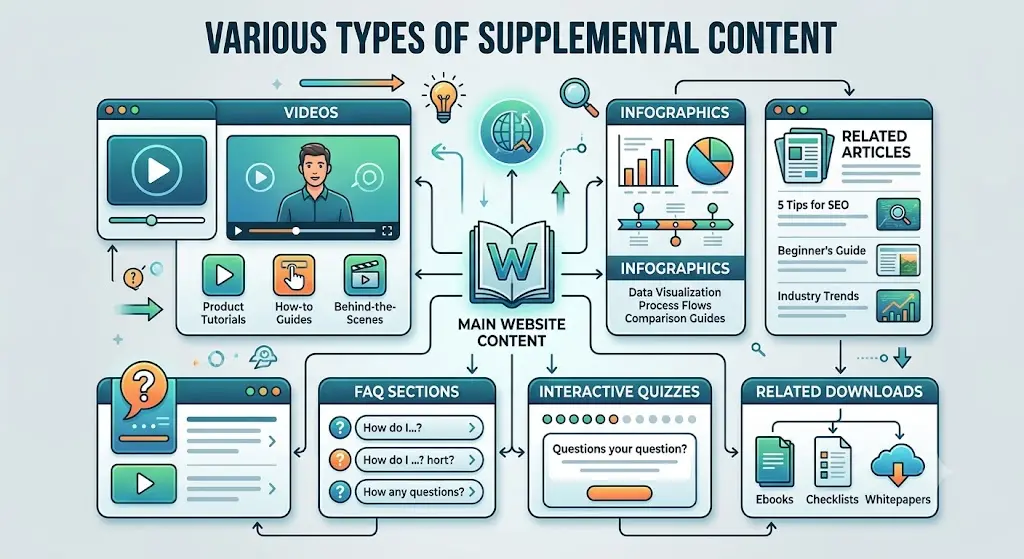
Supplemental content is not just extra fluff; it's a strategic asset. Picture it as the notes in the margins of a great book, offering insights and connections that the main narrative might overlook. It includes elements like sidebars, related articles, and FAQ sections. These pieces not only enrich the user's journey but also help in keeping readers engaged longer on your site.
Digital marketers recognize the potential of supplemental content to guide users through their websites. By strategically placing this additional information, marketers can guide users from one piece of content to another, increasing conversion rates. Search engines appreciate this effort too, often favoring sites with well-structured supplemental content, which can ultimately boost your site's visibility and ranking.
Think of supplemental content as the unsung hero of your website's user experience. It ensures your main content stands out while providing the support needed to make the user's journey seamless and enjoyable. As you delve deeper into understanding and using supplemental content, you'll discover its immense potential for creating high-quality content that resonates with your audience.
What Is the Difference Between Main Content (MC) and Supplemental Content (SC)?
Main Content (MC) directly fulfills the primary purpose of a webpage, while Supplemental Content (SC) provides supporting elements that enhance the user experience without directly achieving that primary goal. Here is a direct comparison of the differences between the two:
| Feature | Main Content (MC) | Supplemental Content (SC) |
|---|---|---|
| Primary Purpose | To directly satisfy the user's intent and the page's core goal. | To help users navigate, find related info, or use extra features. |
| Examples | The text of a blog post, a recipe, a product description, or a video. | Navigation menus, sidebars, related links, and comment sections. |
| SEO Impact | Heavily weighted; determines the core quality and relevance of the page. | Secondary; enhances user experience but cannot save a page with poor MC. |
| Control | Usually unique to the specific page. | Often templated and repeated across multiple pages of a website. |
How Supplemental Content Enhances User Experience
Supplemental content significantly improves navigation, making it easier for users to find related information. For content creators, supplemental content is a golden opportunity to simplify complex topics. By including diagrams, infographics, files, or even videos, you can clarify intricate subjects, making them more accessible and engaging for your audience. This not only enhances the user experience but also increases the time users spend on your website, a key Google engagement metric.
Website owners often notice improved user satisfaction when supplemental content is well-implemented. When users find what they're looking for with ease, they're likely to return. Digital marketers find that effective supplemental content can also reduce bounce rates, keeping users engaged and interested in exploring more.
Overall, supplemental content enhances user experience by providing context and convenience. When users interact with a site that feels intuitive and informative, they're more likely to engage, share, and return. This not only benefits your audience but also contributes positively to the overall success of your website.
How Does Supplemental Content Affect Search Quality and SEO?
Supplemental Content (SC) heavily impacts search quality and SEO by shaping the overall user experience and demonstrating website authority.
While Google's core algorithms prioritize Main Content (MC) to determine search relevance, they also evaluate SC using human evaluators guided by the Google Search Quality Rater Guidelines. High-quality SC helps a website rank better, while poor SC actively harms its search visibility.
1. How Good Supplemental Content Benefits SEO
When implemented correctly, SC acts as a major signal of quality, trust, and usability:
- Enhances User Engagement: Well-placed SC elements like interactive tools, related content links, and multimedia can keep users engaged longer, signaling to search engines that your site provides valuable content.
- Reinforces E-E-A-T: According to Google's Search Quality Guidelines, the overall page quality assessment includes evaluating the MC, the SC, and the creator's reputation. Adding robust SC—such as author bios, linked citations, or functional calculators—demonstrates your Experience, Expertise, Authoritativeness, and Trustworthiness (E-E-A-T).
- Improves Dwell Time and Decreases Bounce Rates: Features like "related posts" sidebars or embedded tool widgets encourage users to click around and stay on your site longer. This continuous user engagement signals to search engines that your site is providing high value.
- Passes Internal Link Equity: Navigation headers, footers, and relevant internal cross-links help search engine crawlers discover, index, and understand the structural relationships between your pages.
- Earns Backlinks and Social Shares: Content that features well-structured supplementary tools or reference material receives significantly higher backlink rates and social media traction than bare, unpolished content.
2. How Poor Supplemental Content Destroys Rankings
If SC is neglected or abused, it can result in a manual algorithmic suppression or a low-quality score from Google Search Raters:
- Distracting or Malicious SC: If your SC is overly aggressive—such as full-screen pop-ups that block the MC, non-functional widgets, or excessive ads that hijack the viewport—Google will classify the page as low-quality.
- Automated or Spammy SC: Having an "unrelated posts" widget filled with clickbait links, spam comments, or scraped content compromises the site's contextual authority.
- Bloated Code and Slow Load Times: Massive, unoptimized sidebars or slow-loading JavaScript widgets ruin page speed, directly harming your Core Web Vitals and search rankings.
Summary for SEO Strategy
You cannot use great SC to rank a page that has terrible or plagiarized Main Content. However, once you have written a high-quality, intent-satisfying piece of Main Content, structuring deliberate, helpful Supplemental Content is what elevates a page from an ordinary result to a top-tier ranking position.
Examples of Effective Supplemental Content for Web Pages
When it comes to supplemental content, there are numerous ways to incorporate it effectively on your website. For instance, a "Related Articles" section can guide users to explore more content on your site, keeping them engaged and informed.
FAQ sections are another powerful tool. They provide quick answers to common questions, enhancing user satisfaction by addressing them up front. This not only simplifies the user experience but also builds trust and credibility with your audience. This is a huge factor in E.E.A.T as it highlights your expertise on the subject.
Interactive elements like quizzes or polls can engage users and encourage further interaction. Content creators often use video or audio clips as supplemental content to enrich the main message, adding a dynamic element to the user experience.
Digital marketers find that testimonials or reviews are effective supplemental content. This not only provides social proof but also adds a layer of authenticity to your website. By strategically incorporating these elements, you can create a more engaging and informative site that keeps users coming back for more.
What Are Common Supplemental Content Mistakes to Avoid?
When creating or optimizing web pages, webmasters often focus entirely on the Main Content (MC) and treat the Supplemental Content (SC) as an afterthought.
According to Google's Search Quality Rater Guidelines, poorly executed SC can single-handedly tank a page's quality score. Avoid these common supplemental content pitfalls:
1. The "Ad Hijack" (Distracting Layouts)
- The Mistake: Placing aggressive ads, newsletter pop-ups, or affiliate link grids so close to the Main Content that they blend together or push the MC down the page.
- The SEO Harm: Google actively flags layouts where SC distracts from or disrupts the page's primary purpose. If users must scroll through a wall of sidebars and widgets just to read an article, search engines will treat the page as low-quality.
2. Contextual Mismatch (Irrelevant Recommendations)
- The Mistake: Using automated "Related Articles" or "Products You May Like" widgets that display completely unrelated content. For example, featuring links to celebrity gossip sidebars on a serious medical or financial advice page.
- The SEO Harm: SC should actively help the user find more value related to their intent. Irrelevant links dilute your site's topical authority, confuse search engine crawlers trying to understand your site's structure, and increase bounce rates.
3. Complete Lack of Helpful SC
- The Mistake: Publishing pages with absolutely zero supplementary elements—no navigation menu, no footer, no internal links, and no way for a user to explore the rest of the site.
- The SEO Harm: Except for small, personal, or amateur websites, Google's guidelines explicitly note that lacking helpful supplementary content is a primary reason for a Low Quality rating. It signals a lack of professional depth and poor site architecture.
4. Code Bloat and Widget Overload
- The Mistake: Overloading sidebars and footers with non-essential third-party JavaScript widgets, such as local weather trackers, excessive social media feeds, or complex animations.
- The SEO Harm: Every heavy widget slows down your page speed. This destroys your Core Web Vitals, a set of critical user-experience metrics that Google uses as a direct ranking factor.
5. Neglecting Mobile Layouts
- The Mistake: Designing a beautiful desktop sidebar packed with useful tools (like calculators or navigation indexes), but letting it collapse into a chaotic, endless block of text at the very bottom of the page on mobile.
- The SEO Harm: Google indexes websites based entirely on their mobile versions. If your SC creates an incredibly frustrating, cluttered user experience on mobile screens, your search visibility will suffer.
Learn more about 10 Best Free Design Resources in 2026.
How can supplemental content be used to enhance user engagement?
Supplemental Content (SC) drives user engagement by turning passive readers into active participants. While Main Content (MC) gets users to your page, high-quality SC keeps them there, lowers bounce rates, and guides them deeper into your conversion funnel.
The most effective ways to use SC to boost user engagement include:
1. Interactive Tools and Calculators
- How to use it: Embed functional, context-aware widgets directly alongside your content. Examples include a mortgage calculator on a real estate guide, a BMI calculator on a fitness blog, or a currency converter on a travel site.
- Engagement impact: These tools transform a static reading experience into an interactive one. Users spend significantly more time on the page interacting with the tool, sending strong, positive user-dwell signals to search engines.
2. Tailored Visual Content Hubs
- How to use it: Replace basic text links with highly visual, dynamic sidebar grids showcasing trending items, user galleries, or styled lookbooks.
- Engagement impact: For visual niches like fashion, home decor, or recipes, presenting a curated grid of images or designs naturally triggers user inspiration. It seamlessly encourages them to click through to other relevant pages on your site.
3. Contextual Navigation (Sticky Tables of Contents)
- How to use it: Implement a sidebar Table of Contents (ToC) that remains visible ("sticky") as the user scrolls, highlighting exactly which section they are currently reading.
- Engagement impact: A dynamic ToC improves readability for long-form guides. It allows users to instantly jump to the exact information they need, preventing frustration and lowering mobile bounce rates.
4. Smart "Next Step" Micro-Modules
- How to use it: Instead of generic "recent posts" widgets, create highly specialized content clusters. If a user is reading a beginner's guide to SEO, the SC module should explicitly display a checklist titled "Step 2: Advanced On-Page Checklist" or a related product match.
- Engagement impact: By anticipating the user's natural next question and offering an immediate, hyper-relevant solution, you eliminate friction and drastically increase your site's internal click-through rate.
5. Social Proof and Community Corners
- How to use it: Dedicate a specific area of your SC for filtered, high-quality user-generated reviews, top-voted community comments, or a live FAQ accordion.
- Engagement impact: Showcasing a thriving community builds instant trust and psychological reassurance. Users are much more likely to stay on-page to read real peer reviews or contribute their own thoughts to the discussion.
What tips are useful for creating high-quality supplemental content?
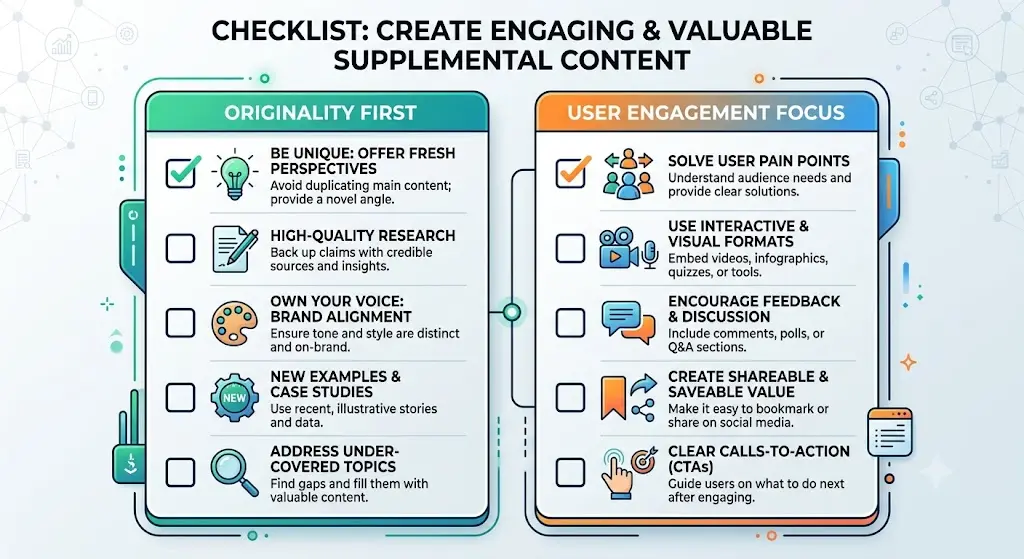
Creating high-quality Supplemental Content (SC) requires a balance of user-experience (UX) design and technical optimization. High-quality SC should always feel like an intentional part of the page, not a collection of random widgets.
1. Match the User's Intent (Contextual Relevance)
- Map SC to the user's journey: Never use a generic, site-wide sidebar. Customize your SC based on the page topic. For example, if a page is about a specific product, the SC should include sizing charts, user reviews, or related accessories—not your latest corporate blog posts.
- Solve the "Next Step" problem: Good SC anticipates what the user wants to do after they finish reading the Main Content. Provide tools, downloads, or navigation links that keep them moving smoothly down your conversion funnel.
2. Prioritize a Mobile-First Layout
- Design for stacking: On desktop, SC sits beautifully in a sidebar. On mobile, that sidebar usually drops below the Main Content. Make sure your SC is clean, lightweight, and structured so it doesn't create an infinite, frustrating scroll at the bottom of a mobile screen.
- Use collapsible menus: For long navigation lists, complex filters, or large FAQs in your SC, use accordions or mobile-drawer menus to keep the screen uncluttered.
3. Ensure Strict Visual Separation
- Contrast your containers: Use light background shading, borders, or clear spacing to visually separate the Main Content from the Supplemental Content.
- Prevent "Ad-Blending": If your SC includes ads, label them clearly. Google's guidelines explicitly penalize sites that camouflage ads or affiliate widgets to look exactly like the Main Content.
4. Optimize for Page Speed and Code Efficiency
- Lazy load heavy widgets: If your SC uses third-party scripts (like a social media feed feed or a complex interactive map), configure them to lazy load. They should only load when a user scrolls down to them, preventing them from slowing down your initial page load time.
- Keep CSS and JavaScript clean: Avoid bloated widget plugins that inject unnecessary code into your site, which can hurt your Core Web Vitals and lower your search rankings.
5. Keep It Dynamic and Fresh
- Automate smart updates: Use dynamic widgets that automatically display your most popular or highest-converting content within that specific category, rather than manually updating static links that eventually break or become outdated.
- Monitor user engagement: Use heatmaps or click-tracking tools to see if anyone is actually clicking your SC. If a sidebar widget gets zero clicks over a month, remove it to clear up visual clutter and speed up your page.
What role does supplemental content play in e-commerce websites?
On e-commerce websites, Supplemental Content (SC) plays a transformative role by bridging the gap between basic product information and a seamless shopping experience.
While the Main Content (MC) of an e-commerce page consists of the core product title, primary image, price, and "Add to Cart" button, the SC is everything else on the screen that turns browsing into buying. From a business perspective, it is a vital catalyst for cross-selling, keeping shoppers on the site, and improving search visibility.
According to extensive e-commerce usability research by organizations like the Baymard Institute, one of the primary roles of SC is enabling scope-jumping.
- The Problem: Accessories (like a lens for a camera or a protective case for a phone) are usually buried deep in completely different category menus.
- The SC Solution: By using product recommendation carousels ("Frequently Bought Together" or "Complete the Look") as SC directly on the page, you create an instant shortcut.
- The Impact: Even if the exact accessory shown isn't perfect, it builds instant awareness of your broader catalog and allows the user to immediately jump into that department without hitting the back button.
Before checking out, online shoppers face a variety of psychological barriers (e.g., “Will this fit me?”, “When will it arrive?”, “Can I trust this seller?”). High-quality SC acts as the ultimate digital sales assistant to resolve these doubts right next to the checkout zone:
- Interactive Sizing & Fitment Guides: Dynamic fitment widgets or sizing calculators allow users to personalize their choices.
- Shipping & Return Policy Accordions: Collapsible tabs detailing shipping costs and return windows provide transactional clarity.
- Filtered Review Summary Blocks: Showing a visual breakdown of user ratings, top pros/cons, and common community questions.
In e-commerce SEO, category pages are heavily favored by search engines for broad, high-volume terms (like "women's pajamas"), while specific product pages rank for exact, long-tail terms. SC heavily supports this structure:
- Faceted Navigation and Dynamic Filters: Sidebars that let users filter by color, price, size, and material are categorized as SC. They organize complex catalogs into clean, indexable architectures for search crawlers.
- In-Context FAQs: Placing an FAQ accordion at the bottom of a category page answers informational questions (e.g., "What is the difference between organic cotton and satin?"). This helps your page capture informational search traffic right before the user transitions into a transactional mindset.
For e-commerce, Google classifies the buying process under YMYL (Your Money or Your Life) because financial transactions are taking place. Google's search algorithms and human raters look closely at your SC to determine if your business is legitimate and trustworthy:
- Global Trust Signals: Persistent website headers and footers containing direct links to a customer support portal, physical store locators, corporate transparency pages, and secure checkout trust badges.
- Lack of SC is a Red Flag: Google's Search Quality Rater Guidelines explicitly state that an e-commerce site completely lacking helpful supplementary navigation or merchant details should be flagged as low-quality.
E-Commerce Content Breakdown
| Page Element | Component Type | Strategic Role in E-Commerce |
|---|---|---|
| Product Description, Price, Cart Button | Main Content (MC) | Satisfies the immediate intent of buying that exact item. |
| Faceted Sidebar Filters | Supplemental Content (SC) | Lowers bounce rates by letting users quickly narrow down options. |
| "Customers Also Viewed" Grid | Supplemental Content (SC) | Drives cross-category awareness and boosts Average Order Value (AOV). |
| Footer (Support Links, Address) | Supplemental Content (SC) | Builds algorithmic trust and verifies merchant legitimacy (E-E-A-T). |
| In-Context FAQs | Supplemental Content (SC) | Captures informational search traffic and addresses common user questions, enhancing both SEO and user experience. |
How do you measure the success of your supplemental content strategy?
To gauge the effectiveness of your supplemental content strategy, you need the right tools and metrics. Website analytics tools can track user interaction with supplemental content, providing valuable data on engagement and user behavior.
Content creators should evaluate engagement metrics to assess the effectiveness of supplemental content. Metrics such as time spent on page, click-through rate, and bounce rate can provide insights into how well your supplemental content is performing. Learn How to Rank Content in AI Overviews: Strategies for 2026.
A/B testing can help digital marketers determine which supplemental content formats perform best. By experimenting with different approaches, you can identify what resonates most with your audience and refine your strategy accordingly. User feedback can also provide valuable insights into how well supplemental content meets user needs, offering opportunities for improvement and refinement.
Regularly reviewing and refining your supplemental content strategies based on performance data is key to long-term success. By staying informed and adaptable, you can continue to enhance your website's user experience and drive meaningful engagement.
In conclusion, supplemental content is a powerful tool that can significantly enhance your website's user experience, SEO, and overall success. By understanding its importance and implementing it effectively, you can create a more engaging and informative site that resonates with your audience.
Frequently Asked Questions about Supplemental Content
What does supplemental content mean?
Supplemental content refers to any additional information or features on a webpage that enhance the user experience but aren't the primary focus. This can include sidebars, navigation links, related articles, or even comment sections. While it isn't the main attraction, it plays a crucial role in keeping visitors engaged and helping them navigate your site effectively.
What are the 4 types of content?
The four types of content typically found on a website are: main content, supplemental content, navigational content, and interactive content. Main content is the core material that fulfills the user's primary purpose for visiting. Supplemental content enhances this experience. Navigational content helps users find their way around the site, while interactive content engages users directly, encouraging participation.
What does supplemental mean?
In the context of a website, supplemental means "additional" or "extra." It refers to elements that complement the main content but aren't essential to the page's core purpose. Supplemental content supports the user journey, offering more information, context, or resources to enrich the experience without overwhelming the main focus.
What is the main content and the supplementary content?
Main content is the primary material on a webpage, such as articles, videos, or products, that fulfills the user's primary intent. Supplementary content, on the other hand, includes additional elements like related articles, links, or sidebars that enhance the user's experience. Together, they work to provide a comprehensive and engaging visit.
What counts as supplemental content?
Supplemental content can include a variety of elements, such as related article links, sidebars, navigation menus, comment sections, and even ads. These components serve to enrich the user's experience by providing additional information, facilitating navigation, or offering related resources. They support the main content's purpose by enhancing the site's overall usability and engagement.
About the Author

Brian Keary
Founder & Lead Developer
Brian is the founder of BKThemes with over 20 years of experience in web development. He specializes in WordPress, Shopify, and SEO optimization. A proud alumnus of the University of Wisconsin-Green Bay, Brian has been creating exceptional digital solutions since 2003.
Expertise
Writing since 2003