
Modern businesses rely on data efficiency to maintain competitive advantages in a crowded digital marketplace. According to Salesforce research, companies that leverage integrated Customer Relationship Management (CRM) tools report an average revenue increase of 29%. Implementing a robust CRM strategy allows teams to organize lead pipelines, automate communication, and track customer lifecycles effectively. Many enterprise-grade solutions offer free tiers that provide significant functionality for startups and small-to-medium enterprises. This guide evaluates five industry-leading platforms to help you streamline your operations.
Key Takeaways for CRM Success
- Audit your needs: Identify whether you prioritize marketing automation, sales pipeline visualization, or internal project management before selecting a tool.
- Prioritize data hygiene: Clean your datasets before migration to prevent cluttering your new system with outdated or duplicate information.
- Leverage integrations: Connect your CRM to your website and e-commerce platforms to automate lead capture and customer profile updates.
- Test before scaling: Always conduct a small-scale pilot test when migrating data or configuring new automated workflows.
- Monitor performance: Regularly review your CRM analytics to identify bottlenecks in your sales funnel and optimize your outreach tactics.
Understanding CRM Value for Modern Enterprises
Customer Relationship Management systems function as the central nervous system for any organization. These platforms store interaction history, contact details, and purchase records in a unified database. By centralizing this information, businesses reduce data silos and improve inter-departmental collaboration. Successful implementation requires selecting a platform that aligns with your specific sales velocity and technical infrastructure. Organizations often struggle with manual data entry; however, modern free-tier CRMs include automation features that mitigate these administrative burdens. Choosing the right tool early prevents costly migration processes as your business scales.
Data Residency Requirements
Free customer relationship management (CRM) software generally handles data residency requirements by storing information in default centralized servers—often located in the United States—without offering geographic hosting choices. Because regional data selection is typically locked behind expensive enterprise tiers, free tiers rarely guarantee local storage or processing.
Hosting and Infrastructure Limits
- Default U.S. Servers: Free plans route all data, logs, and backups to the provider's standard multi-tenant cloud region.
- No Region Choice: Users cannot pin data storage to local zones like the European Union or Canada.
- Shared Subprocessors: Background tasks and third-party tools linked to free accounts may process data across international borders.
Compliance and Agreements
- Standard Terms: Free users sign standard online terms of service rather than custom Data Processing Agreements (DPAs) with regional guarantees.
- Transfer Mechanisms: Cross-border data flows rely on basic Standard Contractual Clauses (SCCs) embedded in the general user agreement rather than localized infrastructure.
- AI and Third-Party Risk: Free AI features or plugin integrations may send text and contact details outside the primary region for external processing
The Top 5 Free CRM Solutions for Growth
Selecting the appropriate software involves evaluating contact limits, feature access, and integration ecosystem. The following five platforms consistently rank as the top choices for businesses seeking high-value, cost-effective solutions.
1. HubSpot CRM
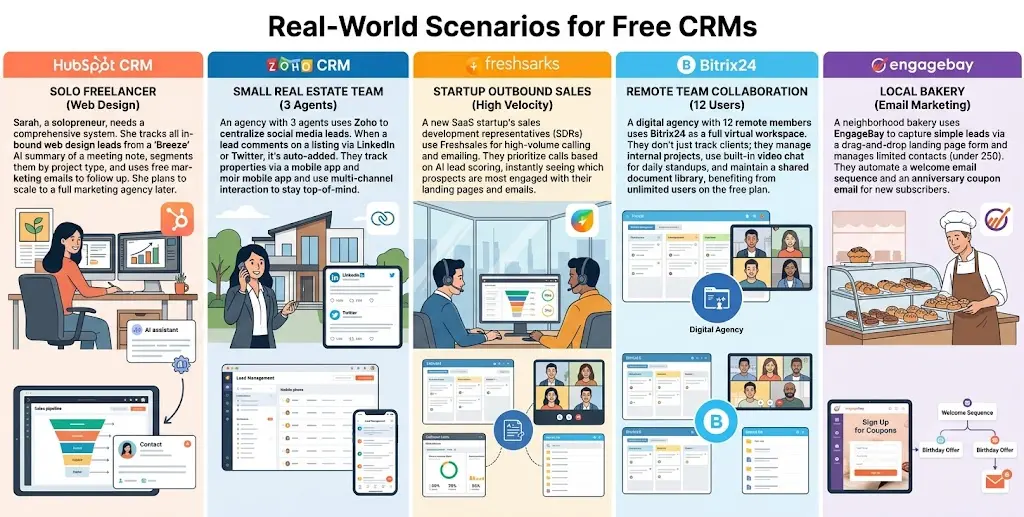
HubSpot remains the gold standard for inbound marketing integration. Its free tier offers unlimited users and up to 1,000,000 contacts, making it ideal for high-growth firms. The interface provides a clear view of your sales funnel, enabling real-time pipeline management. Furthermore, the platform integrates seamlessly with WordPress through dedicated plugins, allowing you to capture lead data directly from your website forms.
Explore 7 Signs You're Losing Leads to see if a CRM could help you capture more business.
2. Zoho CRM
Zoho offers a highly customizable environment for businesses that require granular control over their sales process. The free edition supports up to three users and provides essential lead, document, and task management tools. Zoho excels in automation, allowing users to create custom workflows that trigger emails or notifications based on specific customer actions.
3. Bitrix24
Bitrix24 serves as a comprehensive suite that combines CRM functionality with project management and internal communication tools. This software is particularly useful for teams that need to keep their sales pipeline and project tasks in one location. The free plan includes unlimited users, which makes it a standout option for larger teams with limited budgets.
4. Pipedrive (Trial-to-Free Hybrid)
While Pipedrive is primarily a premium tool, its trial and specialized light versions offer excellent visual pipeline management. Sales teams often prefer this interface because it simplifies the complex process of moving leads through various stages of the sales cycle. Its focus on activity-based selling helps representatives stay organized and proactive.
5. Freshsales
Freshsales provides an intuitive user experience with built-in email and phone capabilities. The free tier is perfect for small businesses that need to track customer engagement without the complexity of enterprise systems. Its AI-powered insights help teams identify the most promising leads, ensuring that sales efforts focus on prospects with the highest conversion potential.
Comparison at a Glance
To assist your decision-making process, the following matrix highlights the critical differences between these platforms based on 2026 benchmarks.
| CRM Platform | User Limit | Contact Limit | Integration Ease | Migration Score |
|---|---|---|---|---|
| HubSpot | Unlimited | 1,000,000 | High | 9/10 |
| Zoho | 3 Users | 5,000 | Medium | 7/10 |
| Bitrix24 | Unlimited | 5GB Storage | Medium | 6/10 |
| Freshsales | Unlimited | 10,000 | High | 8/10 |
| Pipedrive | Limited | N/A | High | 9/10 |
Step-by-Step: Safely Migrating Your Data to a New CRM
Data migration often presents the greatest technical challenge during a CRM transition. You must ensure that no records are lost or corrupted during the transfer process. First, perform a thorough audit of your current data. Clean your CSV or Excel files by removing duplicate entries and fixing formatting errors. Second, map your existing fields to the new system's architecture. Most platforms provide a standard template that requires matching your columns to their internal database fields.
Third, execute a test import with a small sample size—usually 50 to 100 records. Once the test succeeds, verify the data integrity in the new dashboard. Finally, perform the full import during off-peak hours to minimize operational disruption. You should always maintain a secure backup of your original data until you confirm that the new system functions correctly. For complex migrations, consider using dedicated data migration tools that automate field mapping and validation.
Technical Integration: Connecting Your CRM to WordPress and Shopify
Integrating your CRM with your e-commerce stack is essential for capturing behavioral data. If you operate a WordPress site, use native plugins to sync contact forms. This ensures that every inquiry flows automatically into your pipeline. For Shopify users, the integration process typically involves installing a connector app that syncs customer purchase history and abandoned cart data.
These integrations allow you to trigger automated follow-up emails based on specific customer milestones. For example, when a user completes a purchase on Shopify, the CRM can update their status and initiate a post-purchase nurturing sequence. This level of automation reduces manual labor and improves the customer experience. Always test the API connection after installation to ensure that data packets transmit correctly between your storefront and your CRM database.
Enhancing Business Efficiency with CRM Automation
Automation transforms a passive database into an active sales engine. By setting up automated lead scoring, your team can prioritize high-intent prospects immediately. Furthermore, automated email cadences ensure that no lead remains ignored for too long. According to Harvard Business Review, responding to inquiries within five minutes increases the likelihood of conversion by several orders of magnitude.
You should also implement automated task reminders for your sales representatives. These reminders ensure that follow-ups occur exactly when scheduled. Additionally, use the CRM to track lead sources. By understanding which marketing channels drive the most qualified traffic, you can allocate your budget more effectively. This data-driven approach removes guesswork from your growth strategy and provides a scalable framework for your business.
Frequently Asked Questions
Is free CRM software actually secure for my business?
Yes, reputable CRM providers invest heavily in data security, including SSL encryption and GDPR compliance. However, you must ensure that your team utilizes strong, unique passwords and enables multi-factor authentication on all user accounts to prevent unauthorized access to your sensitive customer information.
Can I migrate my data from a spreadsheet to a CRM?
Absolutely. Most CRMs allow you to import data via CSV or Excel files. You must map your spreadsheet headers to the CRM's internal fields, such as "First Name," "Email," and "Lead Status." Ensure your spreadsheet is well-formatted to avoid import errors during the mapping process.
Does using a free CRM limit my ability to scale?
While free tiers have specific limits on user counts or record storage, they provide a strong foundation for scaling. As your business grows, these platforms offer seamless upgrade paths to paid tiers, allowing you to increase your capacity without needing to migrate to an entirely new software ecosystem.
How do I integrate my CRM with WordPress?
Most CRM providers offer official plugins available in the WordPress repository. Once installed, these plugins typically provide shortcodes or blocks that connect your existing contact forms to the CRM database. This setup ensures that all form submissions are automatically logged as new leads in your system.
Which CRM is best for e-commerce businesses?
The best CRM for e-commerce depends on your platform. If you use Shopify, look for CRMs that offer direct, native integrations to sync purchase data. HubSpot and Freshsales are often cited as top choices for e-commerce due to their robust third-party app stores and deep integration capabilities.
Conclusion
Implementing a CRM is a strategic investment in the long-term scalability of your business. By moving away from manual spreadsheets and adopting a structured digital platform, you gain clarity over your sales processes and improve your ability to convert leads into loyal customers. Whether you choose HubSpot, Zoho, Bitrix24, Pipedrive, or Freshsales, the key lies in consistent data management and the strategic use of integrations. Start by auditing your current workflow, select the tool that aligns with your technical requirements, and prioritize a clean migration. Once your system is operational, focus on automating repetitive tasks to free up your team for high-value interactions. By following these steps and utilizing the resources provided, you will successfully streamline your business operations and establish a foundation for sustained growth throughout 2026 and beyond. For further assistance with your digital infrastructure, explore our coding services or browse our collection of premium themes designed to optimize your online presence.
By taking these proactive steps today, you ensure that your business remains agile and data-driven in an increasingly competitive digital marketplace. Remember that technology is only as effective as the strategy behind it; maintain clean data, optimize your automation workflows, and keep your customer journey at the forefront of your implementation. As you continue to scale, regularly revisit your CRM analytics to identify new growth opportunities and refine your outreach tactics. Success in business operations is an iterative process, and your choice of CRM is the most important foundation you can build.
About the Author

Brian Keary
Founder & Lead Developer
Brian is the founder of BKThemes with over 20 years of experience in web development. He specializes in WordPress, Shopify, and SEO optimization. A proud alumnus of the University of Wisconsin-Green Bay, Brian has been creating exceptional digital solutions since 2003.
Expertise
Writing since 2003