Google Search Console (GSC) is a free webmaster tool by Google that monitors indexing status, organic search queries, technical crawl errors, and Core Web Vitals performance. Verifying your property grants direct access to first-party search performance data, identifying which search queries generate impressions and clicks while diagnosing indexing blockers across your domain. This guide will walk you through the essential features, common mistakes to avoid, and best practices for leveraging GSC to improve your website's search performance in 2026.
Key Takeaways
- Google Search Console is essential for monitoring your site's health and search visibility.
- Verification is the first, mandatory step to accessing your site's performance data.
- Focus on long-term trends rather than daily fluctuations in your metrics.
- Use the URL inspection tool to troubleshoot specific pages and request indexing.
- Core Web Vitals and mobile usability are critical ranking factors in 2026.
- Leverage query data to find new content opportunities for your blog.
- Regular maintenance of your sitemap ensures Google always knows about your latest content.
Who Should Use Google Search Console?
Google Search Console is beneficial for a wide range of users, including small business owners, content creators, digital marketers, and SEO professionals. If you manage a website and want to understand how it performs in Google search, GSC provides invaluable insights into indexing status, search queries, and technical health. It is particularly useful for those looking to improve organic traffic, diagnose issues, and make data-driven decisions to enhance their site's visibility.
When Is Advanced Tooling Needed Instead of Basic GSC?
For example, enterprise-level SEO teams often use tools like Screaming Frog, Ahrefs, or SEMrush in conjunction with GSC to conduct comprehensive audits, track competitive landscapes, and manage large-scale content strategies. If your website is growing rapidly or you have complex SEO needs, supplementing GSC with these advanced tools can provide a more complete picture of your search ecosystem.
What Are the Most Common Google Search Console Mistakes?
Common mistakes include:
- Ignoring the "Coverage" or "Indexing" reports until a site-wide issue arises.
- Treating GSC as a set-and-forget tool rather than integrating it into regular SEO audits.
- Obsessing over daily fluctuations instead of focusing on long-term trends.
- Failing to properly verify your domain, leading to incomplete data and potential security risks.
- Neglecting the manual actions report, which can alert you to policy violations that may impact your search visibility.
How Do You Verify Domain Ownership in Google Search Console?
You verify your site by proving ownership through DNS records, HTML file uploads, or Google Analytics. This is the foundational step that unlocks every other feature in the dashboard. Without verification, Google will not share your site’s private performance data with you. Once you have completed this, you are effectively "in the club." I always recommend the DNS method because it is the most robust and does not require you to clutter your site with extra verification files. See Google Search Console help for more information.
There a a couple of ways to verify your domain in Google Search Console. The most common methods are:
- DNS Verification: Add a TXT record to your domain's DNS settings. This is the most robust method and works for all types of domains.
- HTML File Upload: Upload a specific HTML file to your website's root directory.
- Google Analytics: Use your existing Google Analytics tracking code to verify ownership.
Choose the method that best fits your technical comfort level and website setup.
How do you Understand performance reports?
Performance reports tell you exactly how many people are seeing your pages and which specific queries they typed into the search bar. This is the heart of the tool, showing you clicks, impressions, average click-through rate (CTR), and average position. You can slice this data by date, page, country, device, and search appearance. If you want to dive deeper into these metrics, unlocking gsc mastery how to use google search console for deep audit insights is a great way to ensure you are not missing hidden opportunities in your data. It is fascinating to see which pages bring in the most traffic versus which ones have high impressions but low clicks.
The data in the performance report is kept for 16 months, allowing you to analyze trends over a significant period. This retention period is longer than what is available in Google Analytics, making GSC particularly valuable for long-term SEO strategy and performance tracking.
How does the URL inspection tool work?
The URL inspection tool is your best friend when you publish a new blog post or update an existing page. By entering a specific link, you can see if Google has crawled it, if it is indexed, and if there are any mobile usability issues. If you notice your site is dragging, you should also look at speed wins how to optimize your shopify store for lightning fast speed to ensure your technical foundation is not holding your search rankings back. This tool is like a magnifying glass for your content, allowing you to request indexing if a page is missing from the search results.
How to use the index coverage report
The index coverage report shows you which pages are successfully crawled and which ones are hitting roadblocks. It categorizes your pages into "Valid," "Warning," or "Error" buckets so you can prioritize your fixes. A high number of "Excluded" pages is not always a bad thing; sometimes it just means Google correctly identified that these pages do not need to be in the index. Use this report to hunt down 404 errors or server issues that might be preventing your best content from being discovered.
How Do You Submit and Monitor XML Sitemaps in GSC?
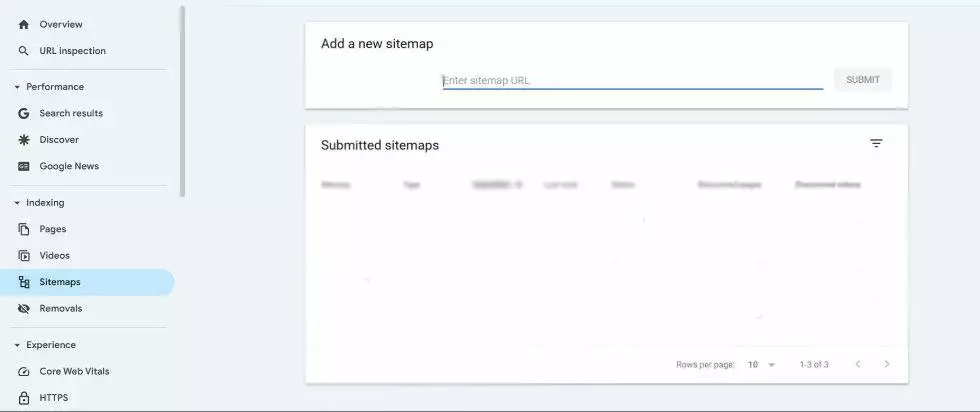
You submit a sitemap to Google to provide a clear roadmap of your website structure. A sitemap is essentially an XML file that lists every URL you want Google to consider for ranking. By submitting this, you reduce the time it takes for new content to be discovered by the search crawler. If you manage an e-commerce site, keeping this updated is crucial for how to customize your shopify store for maximum conversions because it ensures your product pages are always accessible to search engines.
Actionable checklist for GSC success
- Verify your domain property immediately upon site launch.
- Submit your XML sitemap and monitor it for processing errors.
- Check the "Performance" tab weekly to identify content trends.
- Use the URL inspection tool whenever you push major updates.
- Review the "Security and Manual Actions" section once a month.
- Filter by "Queries" to find new keyword opportunities for future content.
- Monitor mobile usability reports to ensure your site is responsive.
Why data accuracy matters
In 2026, search algorithms are prioritizing user experience and intent more than ever before. If your data in GSC shows a high bounce rate or a low CTR, it is a clear signal that your content is not answering the user's question. You have to be willing to iterate. Treat your GSC data as a set of clues for a mystery you are trying to solve. Every dip in traffic is just a nudge to look at your site from the perspective of someone who has never heard of your brand.
Comparing GSC with other analytics tools
It is common to ask why you need GSC if you already have Google Analytics or third-party SEO tools. The reality is that GSC provides the "before the click" data, while other tools focus on "after the click" behavior. You cannot build a complete picture without both.
| Feature | Google Search Console | Google Analytics |
|---|---|---|
| Primary focus | Search visibility & health | User behavior & conversion |
| Data source | Google search engine | Site-wide tracking code |
| Key metrics | Impressions, CTR, Position | Bounce rate, Time on page, Sales |
| Best for | Technical SEO & indexing | Marketing ROI & UX testing |
How Does Google Search Console Handle Mobile Usability?
Mobile-first indexing is the standard in 2026, meaning Google looks at the mobile version of your site to determine its rank. If your mobile site is clunky or has text that is too small to read, GSC will flag it under "Mobile Usability." Do not ignore these warnings. A site that works on desktop but breaks on mobile is like a store that sells great products but keeps its front door locked.
How Does Google Search Console Measure Core Web Vitals (LCP, INP, CLS)?
Core Web Vitals measure how fast your pages load and how stable they are while a user interacts with them. These metrics are official ranking factors, so keeping them in the "Good" range is non-negotiable. If you find your scores are failing, you might need to reconsider your hosting or your site's theme. Many developers find that optimizing their infrastructure is the key to unlocking better engagement metrics.
Google officially replaced FID (First Input Delay) with INP (Interaction to Next Paint) as part of the Core Web Vitals metrics. INP provides a more comprehensive view of a page's interactivity by measuring the latency of all user interactions, not just the first one. This change emphasizes the importance of a consistently responsive user experience throughout the entire page lifecycle.
Frequently Asked Questions (FAQ)
What is the difference between an impression and a click?
An impression occurs when your link appears in the search results, even if the user never scrolls down to see it. A click happens when the user actually selects your link and visits your site. A high number of impressions with a low number of clicks usually suggests that your title or meta description is not compelling enough to earn the user's attention.
How often should I check my dashboard?
While you don't need to check it every hour, a weekly review is the sweet spot for most business owners. This allows you to spot sudden drops in traffic before they become long-term issues. If you are running a major promotion or launching a new product, you might check it daily for a few days to ensure everything is being indexed correctly.
Can I use GSC to find new keyword ideas?
Absolutely, and it is one of the most underutilized features of the platform. By looking at the queries that bring users to your site, you can identify phrases you are already ranking for but haven't fully optimized for yet. If you see a query with high impressions but a low position, consider writing a dedicated article around that topic to capture more traffic. This is a classic SEO strategy that works wonders for organic growth.
What should I do if I get a manual action?
A manual action is a penalty from Google for violating their guidelines, such as spammy link building or cloaking. If you receive one, you must fix the underlying issue immediately. Once corrected, you can submit a "Request Review" through the dashboard. It is a stressful experience, but if you are honest and thorough in your cleanup, you can usually recover your rankings. See Google's Spam Policies to understand what is considered spam.
Why is my traffic dropping?
Traffic drops can stem from seasonal changes, algorithm updates, or technical issues on your site. Start by checking the performance report to see if the drop is across the whole site or just specific pages. If it is site-wide, look at the "Security and Manual Actions" tab to ensure you haven't been penalized. If it is page-specific, check the URL inspection tool to see if the page has been de-indexed or if there is a technical error blocking access.
Conclusion
Mastering Google Search Console is the ultimate way to demystify the search engine experience. You have the tools to see what is working, what is broken, and where your next big opportunity lies. By consistently checking your data, fixing technical errors, and creating content that serves your audience, you will build a site that stands the test of time. Don't let the technical jargon intimidate you; the insights you gain from this platform are worth every minute of effort. Start small, stay consistent, and keep your eye on the long-term trends. Your website is a living, breathing entity, and GSC is the heartbeat monitor that tells you exactly how it is doing.
About the Author

Brian Keary
Founder & Lead Developer
Brian is the founder of BKThemes with over 20 years of experience in web development. He specializes in WordPress, Shopify, and SEO optimization. A proud alumnus of the University of Wisconsin-Green Bay, Brian has been creating exceptional digital solutions since 2003.
Expertise
Writing since 2003