Optimizing Shopify store speed is critical for reducing cart abandonment, improving mobile conversions, and meeting Google's Core Web Vitals thresholds. This guide covers actionable image optimization techniques, script deferral, app audits, and CDN configurations to minimize store latency.
Why is Website Speed Critical for Your Shopify Store?
Imagine this. Someone comes to your site eager to buy. But the page takes forever to load. What do they do? They bounce. Every second kills you. It's not just impatience; it's money. Slow pages mean abandoned carts, soaring bounce rates, and plummeting conversion rates.
And it's not just sales you're losing. Google's Core Web Vitals, which measure user experience, include Largest Contentful Paint (LCP), First Input Delay (FID), and Cumulative Layout Shift (CLS) is a ranking factor. If you have a slow site Google penalizes you. If you fall in the rankings you become invisible. Speed is not optional for Shopify speed optimization; it's essential to being discoverable.
Updated Core Web Vitals & Responsiveness (INP)
Google officially replaced First Input Delay (FID) with Interaction to Next Paint (INP) as a core responsiveness metric.
- What INP Measures: Unlike FID (which only measured the delay of the first interaction), INP evaluates the overall latency and responsiveness of all user interactions throughout a session—such as tapping product color swatches, opening drop-down navigation, or clicking the "Add to Cart" button.
- The 200ms Target Threshold: To provide a good user experience and meet Google's Core Web Vitals benchmarks, pages should maintain an INP score of 200 milliseconds or less.
- Impact on E-Commerce: Sluggish main-thread performance caused by unoptimized app scripts or heavy JavaScript execution degrades your INP score, causing noticeable input lag that frustrates mobile shoppers and risks search engine ranking penalties.
Then there's trust. A fast site screams professionalism. It builds trust. A slow site whispers doubt. Question begin to form like "is this store legit?" or "can I trust them with my card number?" After that, the business starts to lose sales and conversions.
Everyone's shopping on their phones. Mobile devices account for roughly 60% to 70% of total e-commerce transactions globally. With smartphones dominating traffic, businesses must prioritize a mobile-first approach. To optimize the mobile buying experience, brands should focus on streamlining checkouts and adopting dedicated shopping apps to reduce cart abandonment.
What are the Hidden Costs of a Slow Shopify Store?
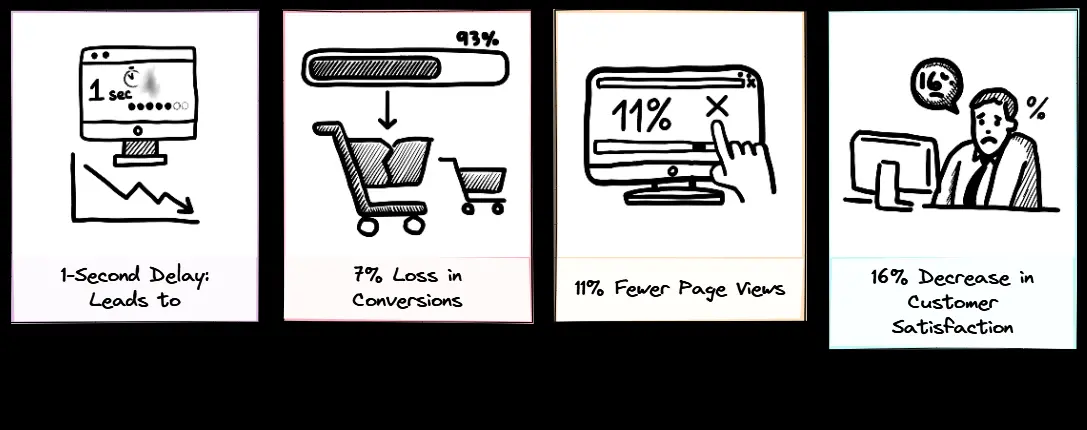
There are numerous hidden costs to having a slow store. Many of these most do not realize, such as:
- Lost Sales: Every extra second means fewer sales. Customers don't wait around. They leave.
- Trust eroded: a slow site makes you look sloppy. Customers won't come back. They'll go to your faster competitors.
- SEO Damage: Google cares about speed. If you have poor Core Web Vitals scores you'll rank lower. You'll get fewer clicks.
You've worked hard to attract customers. Don't let a slow store steal them. Speed is not a luxury. It's your bottom line.
How Can You Design Your Shopify Store for Optimal Speed?
Speed starts with design. Your Shopify website design isn't merely about looking good. It's about speed. Think of it as the engine of your store. Here's how to strip out the bloat and rev it up.
1. How Does Selecting a Lightweight Shopify Theme Improve Speed?
Your theme sets the tone. Most Shopify themes promise flashy features and animations. But under the hood they're often bloated with tons of repeated code blocks. They make you slow. Get a lightweight theme or switch to a headless Shopify. The time your site takes to loads matters.
2. How Does Optimizing Images Improve Speed?
Images are often the fattest part of your site. They're essential for showing off products, but unoptimized they'll kill you. Here's how to fix that.
- Compress and resize: Use TinyPNG or Kraken.io Make files smaller without making them look worse.
- Modern Formats: switch to WebP or AVIF and you'll get smaller files with the same visual punch.
- Lazy Loading: Only load images that are visible on the screen. Let the rest wait till they're scrolled into view.
Every pixel counts. Don't let gorgeous pictures become anchors.
3. How Does Optimizing Fonts and Media Improve Speed?
Fonts add personality, but custom fonts are so heavy. Use system fonts for instant loading, or optimize custom fonts with subsetting and preloading. Videos? Don't upload them to Shopify. Embed from YouTube or Vimeo. You'll stream them much more efficiently. Don't use fat media. You want engagement, not lag.
4. How Does Removing Visual Clutter Improve Speed?
Flashy animations and decorative images may look cool. But do they do anything? In most cases they're mere bloat. Be ruthless. If it doesn't do something—direct navigation, or explain the product—throw it out. Simplicity is speed. Concentrate on what you care about.
Unlock higher conversion with smart web design. Explore CRO fundamentals, UX best practices, responsive design, and CTA optimization to turn visitors into customers.
What Technical Adjustments Improve Shopify Store Speed?
Design is step one. Now let's get technical. These tweaks turbocharge your Shopify speed optimization efforts.
1. Minimize HTTP Requests on Shopify
Every file—images, scripts, stylesheets—takes a browser request. Too many requests? Your site crawls. Combine CSS and Javascript files to minimize trips. And beware of app bloat. Audit your Shopify apps. Get rid of the ones you don't need. Social proof widgets, popups, extra analytics—be ruthless. Fewer requests, faster loads.
2. Optimize Script Loading
Scripts drive your store, but also block loading. Inline critical CSS for instant above-the-fold. Defer JavaScript that isn't critical till after the main content loads. Minify code to remove gratuitous characters. Smaller files, faster downloads. It's like cutting fat for a leaner, meaner site.
3. Browser Caching and CDNs
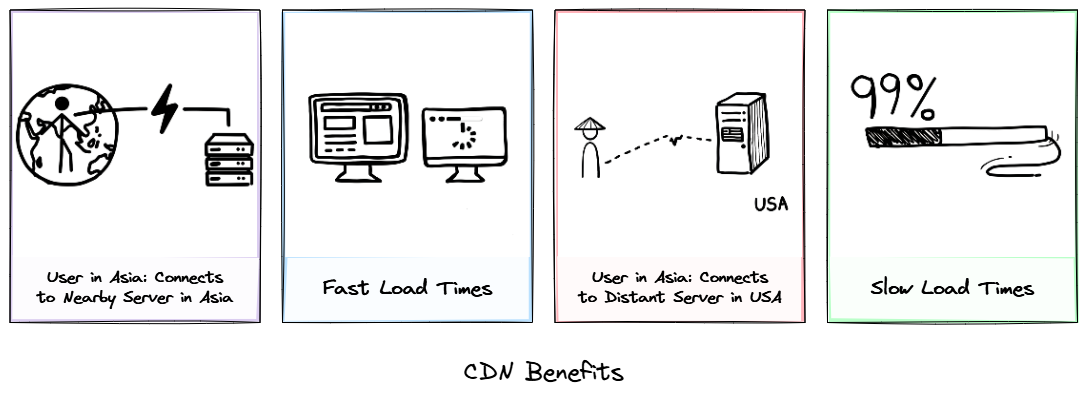
Browser caching stores files locally, so their next visit is instantaneous. Shopify takes care of most of this for you. And their built-in CDN delivers your content worldwide. A customer in Paris loads from a server in Paris, not halfway around the world. Global speed, no effort.
4. Optimizing Time to First Byte (TTFB) & Server Responsiveness
Time to First Byte (TTFB) measures the time it takes for a user's browser to receive the very first byte of data back from the web server after making an HTTP request.
- The Role of Server Response Time: Before a browser can begin downloading stylesheets, scripts, or rendering images, the server must process the backend request. High TTFB delays every subsequent step in the rendering process, directly dragging down your Largest Contentful Paint (LCP) metric.
- Impact of Shopify’s CDN Edge Caching: Shopify addresses server latency through its built-in, global Content Delivery Network (CDN) infrastructure (powered by Fastly and Cloudflare). By caching static page HTML, product images, and theme assets on edge servers (Points of Presence / PoPs) globally, request round-trips are dramatically shortened.
- Reducing Server-Side Latency: Rather than sending every visitor's request back to a single primary origin server, edge caching allows international shoppers to fetch cached content from a server in their local region—slashing TTFB down to a fraction of a second and ensuring instant page starts.
If your website is sluggish or you just want a speed tune-up our Speed Me Up is just what you need. We go in and optimize all these items for you.
When Should You Hire Experts for Shopify Speed Optimization?
You should never be ashamed of not having enough time. Your business needs to come first and hiring an expert to handle the optimization of images, apps, and themes can be a huge benefit.
Which is where you want a partner like BKThemes. We're Shopify experts who go deep on speed optimization, custom development, and SEO. 5-star ratings and a passion for making clients happy. We take hard problems and turn them into something that works smoothly. So when your store needs more than a tuneup, we've got you covered.
How Can You Maintain Your Shopify Store's Speed Over Time?
Optimization is not a one-shot thing. It's a path. Your store changes—new products, new features, new apps. Keep on top of it.
- Monitor regularly: Use Google PageSpeed Insights or GTmetrix. Catch bottlenecks before they bite you.
- Audit Apps: Once a month, go through the apps you have installed. Get rid of the dead weight.
- Optimize New Content: Every new image you upload, compress it. Use WebP. Lazy load. Make it a habit.
- Keep up to date: Keep your theme, apps, and Shopify platform up to date. Updates often improve performance and security.
Your store is not a static thing. Treat it like a living system. Regular maintenance keeps it fast.
Summary: Key Steps to Accelerate Your Shopify Store
Slow load times kill sales. They drive customers crazy. They kill SEO. And yet you have the power to change that. From lightweight themes to image optimization, from technical tweaks to on-going maintenance, every step you take makes your store faster.
Why should you care? Because a fast Shopify store means more sales, higher conversions, better rankings, happy customers who keep coming back. Trust grows. Your brand shines.
Don't let a slow site drag you down. Start implementing these techniques today. And if you need a complete overhaul, or the most sophisticated Shopify speed optimization, hire experts like BKThemes. We'll take your store to the next level.
So here's the bottom line. In the digital world, a fast, well-designed store isn't a luxury. It's a requirement. So what are you waiting for? Start your Shopify engine and blow the competition away.
FAQs About Shopify Store Speed Optimization
Why is website speed so critical for my Shopify store's success?
Speed is your secret weapon; it directly impacts sales by reducing abandoned carts, improves SEO rankings by meeting Google's Core Web Vitals, and builds customer trust by signaling professionalism and efficiency.
What are the most common elements that slow down a Shopify store?
Unoptimized images, bloated themes with excessive features, too many apps, and inefficiently loaded scripts are the primary culprits that can make your store sluggish.
How can I optimize images to prevent them from slowing down my store?
Compress and resize your images using tools like TinyPNG, switch to modern formats like WebP for smaller file sizes, and implement lazy loading so images only load when they are visible on screen.
What are the key technical adjustments I can make to improve my Shopify store's loading speed?
Minimize HTTP requests by combining files, optimize script loading by deferring non-critical JavaScript, and leverage browser caching and a Content Delivery Network (CDN) for faster delivery.
When should I consider hiring experts for Shopify speed optimization?
It's advisable to seek professional help for complex custom themes, persistent speed issues that DIY methods can't resolve, or if your store has a very large product catalog.
How can I maintain my Shopify store's speed over time?
Regularly monitor your store's performance using tools like Google PageSpeed Insights, audit and remove unnecessary apps monthly, optimize all new content, and keep your theme, apps, and platform updated.
What are the main benefits of having a fast and well-optimized Shopify store?
A fast store leads to more sales, higher conversion rates, better search engine visibility, happier customers who return, and a stronger, more trustworthy brand.
About the Author

Brian Keary
Founder & Lead Developer
Brian is the founder of BKThemes with over 20 years of experience in web development. He specializes in WordPress, Shopify, and SEO optimization. A proud alumnus of the University of Wisconsin-Green Bay, Brian has been creating exceptional digital solutions since 2003.
Expertise
Writing since 2003