Shopify app performance optimization is the systematic process of auditing, pruning, and configuring third-party scripts to minimize storefront render delays. While apps provide critical marketing and conversion features, unoptimized app scripts frequently degrade Google Core Web Vitals, including Largest Contentful Paint (LCP) and Interaction to Next Paint (INP). Below is an architectural breakdown of how to identify app bloat, safely purge legacy code, and preserve sub-second load times.
What Causes App Bloat in Shopify Stores?
The accumulation of unnecessary apps and scripts is a primary contributor to performance degradation in Shopify stores. Each installed app can introduce additional JavaScript, CSS, and network requests, which collectively increase page load times and strain browser resources.
External scripts can introduce additional downloads and browser processing. When multiple apps load tracking pixels, chat widgets, review elements, or other features simultaneously, they may compete for the browser’s available resources. Store owners should routinely audit their environments to determine whether each app and third-party script provides enough business value to justify its possible performance cost. For practical guidance, merchants can consult Shopify’s recommendations for improving web performance.
How Do You Audit Shopify Third-Party App Performance?
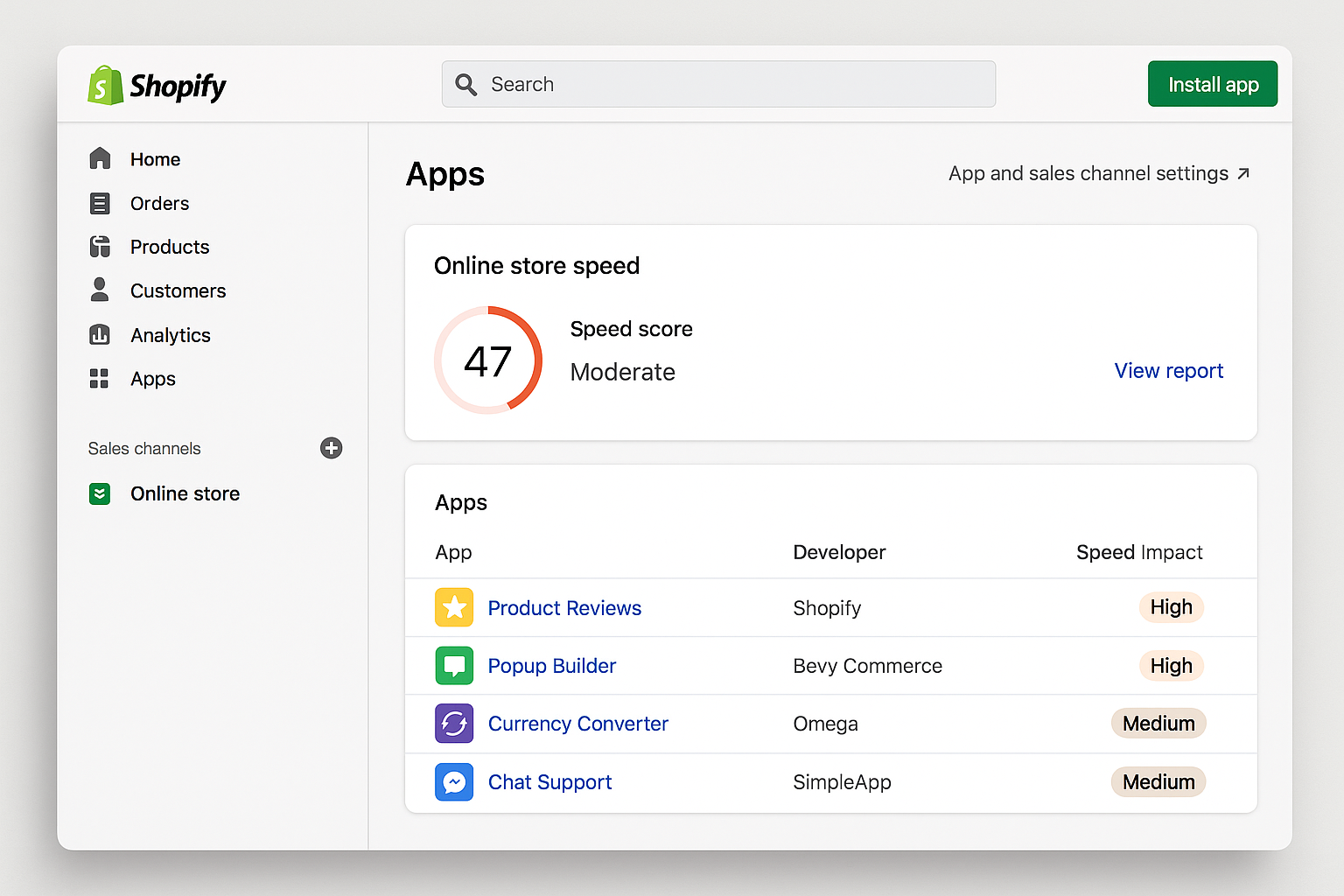
Merchants can start by reviewing the store’s performance metrics in Shopify’s admin dashboard, including the store speed report and web vitals. Browser developer tools, such as Chrome DevTools, can help identify slow-loading scripts, large assets, and network bottlenecks. Additionally, third-party performance monitoring tools can provide insights into how apps impact page load times and user interactions.
Shopify’s performance reporting provides another useful source of information. When evaluating store metrics, it is vital to account for reporting delays. Shopify notes that web-performance data can be delayed by up to 36 hours, meaning immediate comparisons after removing an app or changing a theme may not be reliable. Regular audits help establish baseline metrics and reveal whether recent changes improved the shopping experience.
Does Uninstalling an App Leave Residual Code in Theme Files?
Yes, uninstalling an app does not always remove all of its code from the theme files. Residual scripts, snippets, or other assets may remain, potentially affecting performance and causing conflicts with other apps or theme functionality. Merchants should be aware that simply removing an app from the admin interface may not fully clean up its footprint in the storefront.
Cleaning up such code requires careful inspection of theme files and third-party integrations, or assistance from a developer who understands theme architecture. Shopify explains that theme app extensions can help preserve theme-code integrity, while app embed blocks can load scripts only on relevant pages. This approach can reduce unnecessary storefront work when apps are properly configured. More information is available in Shopify’s guidance on storefront app performance.
How Can Merchants Implement App Optimization Routines?
Merchants can implement app optimization routines by first establishing a clear understanding of their store’s performance baseline. This involves regularly reviewing performance metrics, identifying slow-loading apps or scripts, and prioritizing optimizations based on business impact. Documenting these routines ensures consistency and helps track improvements over time.
Achieving and maintaining fast load times requires consistent systems rather than one-time fixes. Merchants should establish regular maintenance schedules to review active software, evaluate business value, and remove unused or low-value tags. Shopify specifically recommends evaluating whether each app and third-party script justifies its possible performance cost. For more guidance, see our Speed Me Up service.
Theme and template choices also matter. Shopify recommends current, performance-optimized themes, fewer sections per template, pagination for very large collections, and caution with page transitions or animations. Optimizing media assets and selecting a lightweight theme can further support a responsive storefront. For deeper insights into monitoring these metrics over time, you can review the Shopify store speed report documentation. Consistent execution of these routines supports a more stable shopping experience.
Frequently Asked Questions
What causes a Shopify store to slow down over time?
A Shopify store can slow down as more apps, third-party code, analytics tags, theme features, and large media assets are added. Unused or low-value tags may also continue contributing unnecessary work if they are not removed or disabled.
How do third-party apps affect Core Web Vitals?
Third-party apps can add scripts, assets, and browser processing to the storefront. Depending on how they are implemented and where they load, they may contribute to slower loading, layout movement, or delayed interaction. Shopify recommends assessing whether each app provides enough business value to justify its possible performance cost.
Does uninstalling an app completely remove its code?
Merchants should review their theme code and manually added third-party integrations after removing an app. Shopify’s guidance emphasizes theme app extensions and app embed blocks as ways to support cleaner app integration and page-specific loading.
How often should a store performance audit be conducted?
Store performance audits should be conducted regularly. A recurring review helps teams identify newly introduced bottlenecks, evaluate the ongoing utility of installed apps, and maintain awareness of performance as the storefront changes.
Why is my Shopify speed score not updating immediately after removing an app?
Shopify uses real-user performance data, and its web-performance data can be delayed by up to 36 hours. Immediate changes after removing an app may therefore not appear in official metrics right away. The performance summary also reflects data from the relevant storefront pages over its stated measurement period.
Maintaining Long-Term Speed Through Structured Workflows
Achieving strong site performance is not a one-time project; it demands ongoing discipline. As businesses grow, new campaigns, seasonal promotions, and fresh feature requirements can encourage teams to add more code. Without clear internal protocols, unnecessary storefront work can accumulate again.
Conclusion
Successful merchants treat speed optimization as an operational habit rather than an emergency fix. During recurring reviews, stakeholders can evaluate every active app, script, and tag against its actual business value. If an integration no longer provides sufficient value, it becomes a candidate for removal or revision.
Consolidating overlapping functionality can offer another practical path forward. Instead of running several separate tools for related storefront tasks, merchants can review whether fewer integrations meet their needs. Reducing unnecessary scripts and loading functionality only where it is relevant can help limit browser work.
Executing these changes requires collaboration between marketers and developers. When marketing teams understand that every added tag or widget may affect storefront performance, they can make more deliberate decisions about what goes live. Pairing that mindset with a current, performance-optimized theme, fewer sections where appropriate, pagination for very large collections, and optimized media assets supports a more responsive storefront.
Taking control of your technical foundation protects the user experience and builds lasting trust with your audience. A careful audit of apps, theme code, third-party scripts, analytics, and media can reveal opportunities to create a faster and more maintainable online presence. Let us help you optimize your Shopify site for maximum speed.
About the Author

Brian Keary
Founder & Lead Developer
Brian is the founder of BKThemes with over 20 years of experience in web development. He specializes in WordPress, Shopify, and SEO optimization. A proud alumnus of the University of Wisconsin-Green Bay, Brian has been creating exceptional digital solutions since 2003.
Expertise
Writing since 2003