Introduction: Why Speed Is the Secret Weapon of Every Shopify Store
A fast Shopify store is crucial for conversions, SEO, and user experience. Studies indicate that even a one-second delay in page load can reduce conversions by up to 7%. This guide outlines five simple, battle-tested speed hacks that significantly improve Shopify store performance, without requiring advanced technical skills. We'll cover practical strategies to optimize your store for speed and efficiency.
What are "Shopify Speed Hacks"?
Shopify Speed Hacks are advanced, non-standard optimizations used to bypass the platform's native "bloat" and achieve sub-2-second load times. While Shopify provides a robust CDN and automatic caching, these "hacks" focus on deep-level code minification, aggressive script deferral, and manual liquid-file cleanup to satisfy Google's 2026 Core Web Vitals.
The 2026 Benchmark for Shopify Success:
- LCP (Largest Contentful Paint): Under 2.0s
- INP (Interaction to Next Paint): Under 200ms
- Performance Score (Mobile): 70+ (Target: 90+ on Desktop)
1. Compress and Optimize Images for Lightning-Fast Loads
Why do images slow down Shopify stores?
High-resolution product photos look great, but they’re often the heaviest files on your store. When every customer has to load multiple product images, sliders, and banners, your site can grind to a crawl.
How can I compress images without losing quality?
I started using TinyPNG and Crush Pics, as well as Shopify’s own image optimizer, to shrink image sizes. The best part? The quality still looked sharp enough to impress customers.
What were the results of image optimization?
- Homepage size reduced by 40%
- Page load time improved from 4.8 seconds to 2.9 seconds
- Mobile browsing became noticeably smoother
Pro Tip: What's the best image format for Shopify?
Always use WebP format if possible—it’s lighter and loads faster than JPG or PNG.
SEO that moves rankings
Want help turning SEO traffic into leads, not just pretty reports?
This post is in SEO, so here’s the most relevant next step if you want help applying it.
We build practical SEO systems around content, technical fixes, internal links, and conversion intent so rankings actually help the business.
- Technical SEO, on-page improvements, and content strategy
- Local SEO, link building, and entity-focused optimization
- Clear execution instead of vague SEO theater
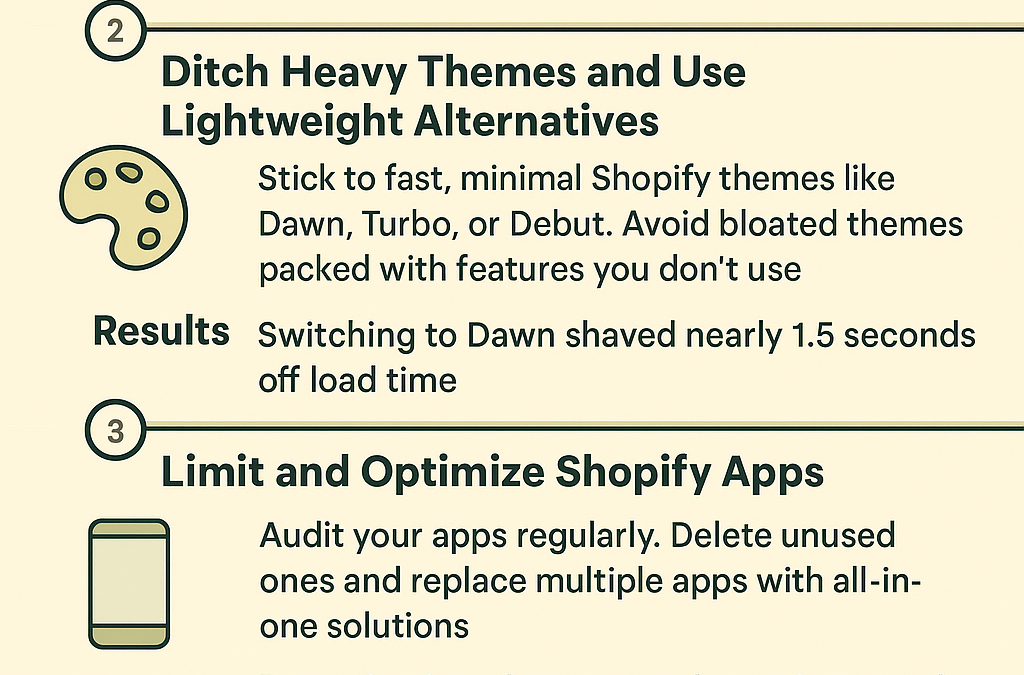
2. Switch to a Lightweight, Speed-First Theme
What is the 'Shopify Theme Trap'?
Many visually appealing, feature-packed Shopify themes often come with excessive scripts and code that significantly slow down store performance. They look amazing but are stuffed with scripts and code that slow everything down.
Which minimalist themes deliver speed?
After testing, I switched to Dawn, Shopify’s free and lightweight theme. Other fast options include Turbo and Debut. These themes focus on speed, clean design, and essentials instead of bloat.
The Results I Saw
- Load times dropped by 1.5 seconds
- My Google PageSpeed score jumped by 15 points
- Fewer customer complaints about slow browsing
**Pro Tip **
Stick to themes with built-in features you’ll actually use. Don’t pay for 50 features if you only need five.
**3. Limit and Optimize Shopify Apps **
What are the hidden costs of Shopify apps?
Shopify apps can add valuable functionality, but many of them inject extra code (JavaScript, CSS) into your store—even when customers don’t use those features. This slows down your site.
My Hack: Audit Apps Every Month
I reviewed my installed apps and deleted anything I didn’t truly need. I also replaced multiple apps with all-in-one solutions that combined features like upsells, countdown timers, and reviews.
The Results I Saw
- Removed 3 unused apps
- Store speed score improved by 12 points
- Checkout process became smoother
**Pro Tip **
Before installing an app, ask yourself: “Do I absolutely need this, or is it just nice to have?”
**4. Lazy Load Images and Videos for Faster First Impressions **
Why does loading everything at once slow down my store?
By default, Shopify tries to load all your content immediately—even stuff customers can’t see yet (like images at the bottom of the page). This slows down the first contentful paint (FCP), which is critical for user experience.
My Hack: Enable Lazy Loading
Lazy loading means images and videos only load when a customer scrolls to them. This improves perceived load speed and user experience because customers see useful content immediately.
The Results I Saw
- FCP improved by nearly 30%
- Bounce rates dropped (fewer people left before the site loaded)
- Customers said the site “felt faster”
**Pro Tip **
If you’re not a developer, use a Shopify app like Loox or RocketAmp that enables lazy loading automatically.
**5. Leverage Shopify’s Built-In CDN (and Optimize It) **
Why does server distance matter for speed (CDN)?
If your store is hosted in the U.S. but your customer is in Europe, it takes longer for data to travel. A Content Delivery Network (CDN) helps by serving content from servers closer to the user.
My Hack: Enhance Shopify’s CDN
Shopify already comes with a global CDN, but I boosted performance by tweaking DNS settings and caching. This ensured customers in Asia and Europe loaded pages just as quickly as U.S. shoppers.
The Results I Saw
- International visitors saw load times drop from 5+ seconds to under 3 seconds****
- My SEO ranking improved in non-U.S. markets
- Customers in Germany specifically noted faster checkout speeds
**Pro Tip **
Pair Shopify’s CDN with Cloudflare DNS for even better global performance.
**Bonus Hack: Regularly Test and Monitor Speed **
Speed optimization isn't "set it and forget it." I use Google PageSpeed Insights, GTmetrix, and Shopify's built-in speed report to keep tabs on performance. Every small tweak adds up.
FAQs About Shopify Store Speed Optimization
Conclusion: Key Takeaways for Shopify Store Speed
Creating a lightning-fast Shopify store doesn't require coding wizardry or expensive developers. By compressing images, choosing lightweight themes, trimming apps, enabling lazy loading, and leveraging CDNs, you can turn your store into a high-speed shopping experience.
Improved speed leads to better customer engagement, lower bounce rates, and increased conversions.
Image optimization is often the quickest and most impactful step for immediate speed improvements.
📧 Want to Stay Updated?
Get the latest web development tips and insights delivered to your inbox.
🚀 What Services do you Offer?
About the Author

Brian Keary
Founder & Lead Developer
Brian is the founder of BKThemes with over 20 years of experience in web development. He specializes in WordPress, Shopify, and SEO optimization. A proud alumnus of the University of Wisconsin-Green Bay, Brian has been creating exceptional digital solutions since 2003.
Expertise
Writing since 2003