Nearly seventy percent of major store migrations suffer measurable search traffic drops during the first three months. That drop happens when merchants treat launch day as the finish line. A migration isn't finished just because your new store is live and looks great. The real work begins when search engines recrawl your URLs and test your authority. Without ongoing technical oversight, subtle redirect gaps can turn into expensive visibility losses before you even notice. You can have a modern theme and clear product photos while your organic revenue quietly collapses.
Search bots do not judge your storefront by visual appeal. They evaluate underlying architecture, server response codes, structured data, and content distribution. Protecting your revenue requires disciplined, post-launch attention. This guide outlines how to protect your rankings, retain market reach, and stabilize your store after moving to Shopify.
Why Launch Day Is Only the Beginning of Re-evaluation
Going live simply reveals your new site structure to crawlers. It does not mean search engines have accepted or understood your changes. When you switch platforms, your URL taxonomy changes. Shopify forces specific path conventions, such as inserting /products/ and /collections/ into web addresses.
Platforms like WordPress or Magento allow custom URL structures without those subdirectories. The sudden shift forces Google to rebuild its index from scratch. Bots from Google Search Central must re-crawl thousands of addresses, process redirect chains, and recalculate internal relationships. That entire recalculation phase takes weeks or even months.
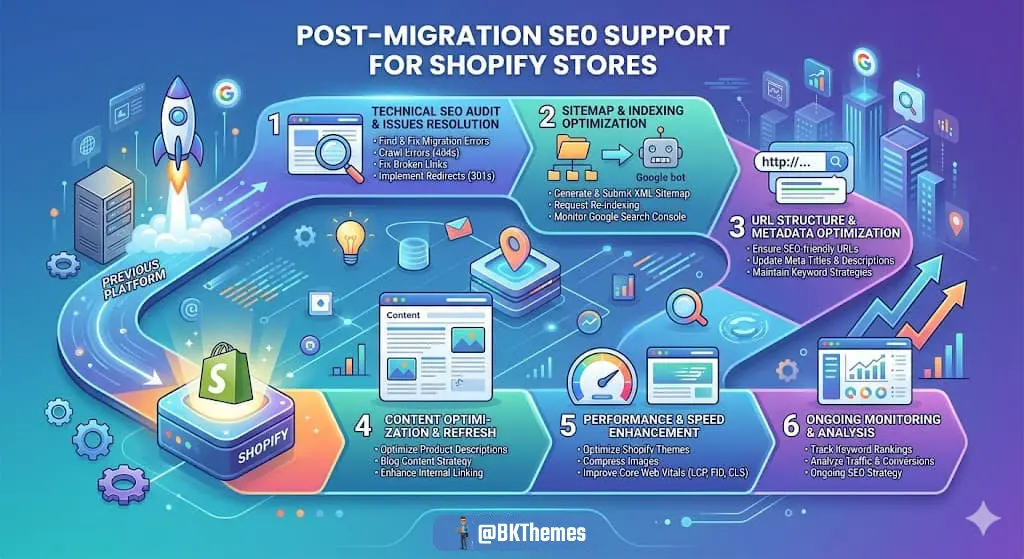
During this evaluation window, search bots test your pages against user queries. If bots encounter broken paths, missing text, or slow response times, your positions slip. Adding redirects alone is not enough; you must continuously monitor their effectiveness and ensure that all critical pages are properly indexed. Active technical surveillance catches crawl errors before algorithms demote your catalog. You must actively inspect bot behavior every day following deployment.
The Cost of Unseen Post-Migration Pitfalls
Stores rarely lose rankings because of one massive technical failure. Instead, they bleed organic traffic through dozens of small, unaddressed discrepancies. A catalog might look complete to your shoppers while failing automated audits. These technical oversights prevent search engines from passing value to your money pages.
- Redirect gaps on deep subpages, tag filters, and retired blog articles.
- Weakened internal linking structures caused by simplified default navigation.
- Lost search intent match from shortened or missing category descriptions.
- Templated metadata overlaps across paginated collection pages.
- Dropped structured data properties for product availability and reviews.
- Broken image file references and uncompressed media uploads.
Each missed redirect erodes historical trust. When search engines hit broken paths, they discard accumulated signals instead of transferring them to your replacement pages. Continuous monitoring and prompt correction of these errors are essential to maintain your site's authority and rankings. Fixing these errors requires continuous data review. Routine log checks ensure bots reach active catalog items without running into dead ends.
Auditing Crawlability and Indexation in Google Search Console
Your primary monitoring tool after deployment is Google Search Console. It provides immediate alerts regarding how bots interact with your new site layout. Do not rely on passive weekly summaries. You need active oversight of index coverage reports, page status classifications, and submission pipelines.
Shopify automatically generates sitemaps for products, collections, pages, and blog posts. However, search engines do not always discover or prioritize them automatically.
- Inspect submitted sitemap status to verify error-free processing.
- Monitor "Crawled - currently not indexed" charts for inventory collection pages.
- Check "Discovered - currently not indexed" lists for crawl budget issues.
- Review server response 5xx error notifications during traffic spikes.
- Track 404 page increases within the Page Indexing report daily.
- Submit high-priority collection URLs manually for accelerated crawling.
Sudden increases in unindexed URLs show that Google doubts page value or struggles with crawlability. If Google stops visiting deep pages, your long-tail product terms fall out of index listings. Consistent monitoring reveals which sections of your catalog need architectural adjustments. Addressing these errors preserves your store's organic reach.
Preserving Link Equity and Managing 301 Redirect Gaps
Backlinks from third-party websites provide foundational search trust. When another website references your old page, it passes link equity directly to your brand. If that old page changes address without a permanent 301 redirect, that authority disappears. A 404 error tells bots the resource is permanently gone, breaking historical ranking signals.
Moving to Shopify requires precise URL mapping across your entire database. You cannot redirect every old link to the homepage and call the project done. Sending specific subpage links to your homepage frustrates visitors and triggers soft-404 flags from Google. The algorithm views broad homepage redirects as unhelpful and discards the incoming value.
- Map every legacy URL to its exact modern counterpart.
- Point retired product models directly to current replacement versions.
- Route historical blog articles to updated informational posts.
- Eliminate internal redirect chains that waste search bot budgets.
- Run external backlink inventories to capture incoming press mentions.
- Audit redirect files regularly to catch typos and syntax errors.
A single broken link from a top industry publication can cost you a primary search placement. Ongoing maintenance validates that every valuable inbound link lands on an active, relevant page. You must run recurrent link scans to verify that server headers return clear 200 and 301 responses. This vigilance protects your accumulated authority against accidental decay.
Rebuilding Internal Linking Across Shopify Collections
Platform changes frequently break internal architecture. Default themes on Shopify often feature simpler navigation structures than previous custom platforms. If your legacy store linked out to sixty specialized collections from custom menus, shrinking to six top categories damages crawl paths. Search engines depend on contextual text links to determine which pages matter most. Deep catalog pages need consistent pathways from higher-level categories. Without adequate connections, your best revenue drivers become isolated crawl islands.
- Embed contextual text links within collection introductory copy.
- Maintain breadcrumb navigation trails on every product template.
- Configure automated related-product blocks across complementary lines.
- Cross-link informational buying guides directly into relevant category pages.
- Implement structured footer link groups pointing to priority subcategories.
- Audit product pages to guarantee search bots can reach them within three clicks.
Strong internal linking passes page weight from high-traffic hubs down to specific variant listings. It signals topical relationships across your entire merchandise inventory. Post-launch restructuring balances link equity across your store. This keeps older inventory competitive against aggressive competitors in active search results.
Protecting Topical Relevance and Search Intent Alignment
Technical paths matter, but relevance wins conversions. Changing platforms often alters how text copy appears across templates. Shopify collection templates frequently hide or displace long-form category text to improve mobile visual design. Shortening or removing that copy can damage your topical relevance for critical commercial queries.
Algorithms analyze written copy to verify that your pages match shopper expectations. If your previous store featured six hundred words of expert buying advice, removing it invites search drops. Review historical search console performance to see which search queries drove revenue to specific URLs. Match that user intent on your new Shopify layouts without cluttering the screen.
- Retain core educational copy on collection landing pages.
- Preserve targeted heading structures across all primary category views.
- Verify title tags and meta descriptions match previous high-performing assets.
- Migrate historical user reviews and customer feedback accurately.
- Structure FAQ sections on product pages to address common search questions.
- Review old blog archives to keep authoritative research materials live.
Topical relevance requires ongoing alignment between user questions and page content. If search patterns shift after launch, you must update page copy to maintain alignment. Careful content governance prevents unexpected ranking drops on core commercial phrases. It ensures search engines recognize your brand as the best answer for targeted buyer queries.
Monitoring Core Web Vitals and Liquid Code Performance
Fast stores convert more visitors into buyers. Google incorporates real-world speed metrics into its evaluation algorithms through Core Web Vitals documentation standards. Moving to Shopify introduces a completely new technical hosting environment. While Shopify handles core server hosting, theme Liquid code and third-party apps impact browser rendering.
Installing tracking scripts, review plugins, and promotional banners degrades mobile speed rapidly. Merchants often watch page performance decline within weeks of launch as marketing teams add third-party apps.
- Measure Largest Contentful Paint to guarantee visual products render quickly.
- Check Cumulative Layout Shift to prevent page jumping during element loading.
- Track Interaction to Next Paint to keep clicks responsive across devices.
- Audit third-party script tags regularly to identify slow external requests.
- Compress visual media and use modern responsive image formats.
- Review Liquid rendering loops to prevent unnecessary server calculation delays.
Technical speed adjustments protect both organic search positioning and on-site conversion rates. If your checkout or landing pages lag on mobile networks, search visibility drops. Dedicated technical reviews catch app bloat before it hurts sales. Keeping your code clean maintains snappy performance across every customer touchpoint.
Ongoing SEO Support Protocols for Long-Term Stability
Treating search preparation as a one-time project invites revenue decline. True search protection requires recurring monthly maintenance and structured audits. Establishing documented verification routines keeps your technical foundation secure. These ongoing maintenance tasks reveal hidden issues before they influence bottom-line performance.
- Run weekly automated crawl tests to catch newly generated 404 response codes.
- Audit Google Search Console weekly for index drops and excluded URL changes.
- Track ranking fluctuations across target commercial keyword groups.
- Review monthly log files to monitor bot behavior across seasonal collections.
- Clean theme code regularly to remove orphan script snippets from uninstalled apps.
- Validate structured data schema across product variations and discount deals.
- Refresh seasonal collection internal links to direct crawlers toward current stock.
Without steady support, small store modifications slowly erode search performance. A developer adds a promotional app, a marketer alters collection tags, and crawl paths fail silently. Over time, these minor disruptions accumulate, leading to significant drops in organic traffic and revenue. Proactive, ongoing SEO support stops small technical discrepancies from becoming major visibility disasters. It provides continuous oversight so your e-commerce operations run smoothly.
Validating Platform Changes with Experienced Technical Guidance
Recovering lost search traffic requires deep technical familiarity with storefront architecture. Not every developer understands the nuances of indexation, canonical handling, and Liquid performance. Without this expertise, even minor platform changes can inadvertently harm search visibility and organic revenue. Working with experienced professionals prevents the costly trial-and-error approach that damages high-volume brands. Direct technical oversight protects your catalog against systemic ranking losses.
When you invest in proven technical maintenance, you safeguard your customer acquisition pipelines. Stable infrastructure provides the base your merchandising team needs to succeed. Understanding foundational search engine optimization principles helps you recognize structural flaws before they disrupt cash flow. Regular expert audits keep your store resilient against ongoing search algorithm updates.
Achieving True Stability After Going Live
A migration is only considered complete once the right pages are indexed, traffic is stable or growing, and rankings are preserved. Do not celebrate just because the checkout works and the design looks sharp. Real platform success is measured through steady organic revenue, healthy indexation numbers, and preserved search visibility. Take immediate ownership of your post-migration technical maintenance. Audit your logs, resolve lingering redirect gaps, and monitor your indexing metrics every week. With steady oversight and disciplined technical hygiene, your Shopify store will thrive. Protect your digital equity, maintain your competitive edge, and keep your business growing.
Frequently Asked Questions (FAQ)
When Is a Shopify Migration Truly Complete?
A migration is complete only after search engines fully index the new store, organic traffic matches or exceeds previous levels, and rankings stabilize. Checking out orders and confirming visual layouts does not mean the migration succeeded. Launch day simply marks the start of technical validation. True completion requires months of sustained monitoring, consistent indexation, and stable organic revenue across all major product lines.
Why Did Organic Traffic Drop Right After Launching Shopify?
A post-launch drop usually indicates redirect gaps, unindexed collections, or differences in on-page content. Shopify changes URL paths automatically. If old URLs lack 301 redirects to the exact new locations, search engines cannot pass authority over. Additionally, simplified theme layouts often remove valuable text copy, which damages how algorithms interpret search intent.
What Is the Most Common Redirect Mistake on Shopify?
The most common redirect mistake is routing all retired addresses directly to the storefront homepage. Sending specific product or collection links to your homepage creates soft-404 errors in Google Search Console. Search engines stop passing accumulated link equity when redirects do not lead to relevant, matching content. Always map old URLs directly to their exact modern equivalents.
How Does Shopify URL Structure Impact Historical Rankings?
Shopify enforces rigid URL structures by requiring paths like /products/ and /collections/ for catalog navigation. If your previous website used flat URL paths, every address changes during deployment. This total path overhaul forces search engines to crawl, process, and re-evaluate every listing from scratch. Without proper 301 redirect mapping, historical rankings drop instantly.
How Long Does Post-Migration SEO Recovery Take on Shopify?
Full search recovery typically requires between four and twelve weeks, depending on store size and crawl frequency. Large catalogs with tens of thousands of variant links take longer for search engines to process completely. Continuous crawl testing, rapid error correction, and manual sitemap submissions speed up recovery by helping bots index priority pages faster.
How Do Third-Party Apps Affect Shopify Search Visibility?
Third-party apps inject extra JavaScript files and external requests that slow down mobile rendering speeds. Excessive code reduces your Core Web Vitals scores, which directly harms your performance in mobile search results. Apps can also modify theme templates unexpectedly, introducing duplicate title tags, broken links, or conflicting structured data markup. Regular audits of installed apps and their impact on your theme are essential to maintain search visibility and prevent unforeseen SEO issues.
About the Author

Brian Keary
Founder & Lead Developer
Brian is the founder of BKThemes with over 20 years of experience in web development. He specializes in WordPress, Shopify, and SEO optimization. A proud alumnus of the University of Wisconsin-Green Bay, Brian has been creating exceptional digital solutions since 2003.
Expertise
Writing since 2003