Proven strategies to protect your rankings, revenue, and customer trust during critical site transitions
Learn the complete framework for migrating high-traffic websites without sacrificing uptime or SEO. Covers migration timing, redirect implementation, and post-launch verification for WordPress and Shopify sites.
TL;DR
- Downtime costs are severe - Average downtime costs $14,056 per minute, making proper migration planning essential for protecting revenue and rankings.
- Audit before anything else - Document every URL, ranking position, and technical configuration to create your recovery baseline and redirect map.
- Database optimization reduces risk - Clean and optimize your database before migration to reduce transfer time and improve post-migration performance.
- Load test your staging environment - Verify your new environment handles 150% of peak traffic before going live to prevent performance failures under real conditions.
- Monitor actively for 30 days - SEO impacts from migration errors often take weeks to surface, so maintain vigilant monitoring and rapid response throughout the critical post-migration window.
Guide Orientation: What This Covers and Who It's For
This guide delivers a complete framework for executing high-traffic website migration without sacrificing search rankings or revenue. You'll learn proven downtime management strategies, database optimization techniques, and SEO preservation methods that protect your investment.
Written for small business owners, marketing managers, and founders managing WordPress or Shopify sites with significant organic traffic. By the end, you'll understand how to plan migration timing, implement proper redirects, and verify SEO integrity post-launch.
This guide covers hosting migrations, platform migrations, and domain changes. It does not cover basic site setup or content creation strategies.
Why Downtime Management Matters More Than Ever
The stakes for high-traffic website migration have never been higher. In 2024, the average minute of downtime cost organizations $14,056, with large enterprises averaging $23,750 per minute. For online retailers during peak season, that figure can reach $4.5 million per hour.
These numbers represent more than lost sales. Every minute your site is down, Google's crawlers encounter errors. Your competitors capture your search traffic. Customer trust erodes with each failed page load.
Global online retail sales reached a record $1.2 trillion in 2024, making website availability a direct revenue driver. A botched migration doesn't just cost you during the outage. It can damage rankings for weeks or months as search engines re-evaluate your site's reliability.
The cost of inaction is equally severe. Outdated hosting, poor database optimization, and legacy platform limitations create compounding performance debt. Sites that delay necessary migrations often face emergency situations with even higher risk profiles.
Core Concepts: Understanding Migration Risk
Migration Types and Risk Profiles
Not all migrations carry equal risk. Hosting-to-hosting migration typically presents the lowest complexity since URLs and content remain unchanged. Platform migration (WordPress to Shopify, for example) introduces significant SEO risk because URL structures, metadata handling, and internal linking patterns all change.
Domain migration carries the highest risk profile. You're asking search engines to transfer all trust signals from one domain to another. Even perfect execution results in temporary ranking fluctuations.
Common Misconceptions
Many business owners believe that faster hosting automatically improves rankings. Speed matters, but only if you preserve existing SEO equity during the transition. A faster site with broken redirects will underperform a slower site with intact link equity.
Another misconception: staging environments perfectly replicate production behavior. They don't. 76% of bot traffic is unverified, and your staging site won't experience the same traffic patterns, caching behavior, or database load as your live environment.
The SEO Preservation Framework
Think of migration SEO in three phases: pre-migration baseline, transition integrity, and post-migration verification. Each phase requires specific documentation, testing, and validation steps. Skip any phase, and you're gambling with your organic traffic.
The Zero-Downtime Migration Method
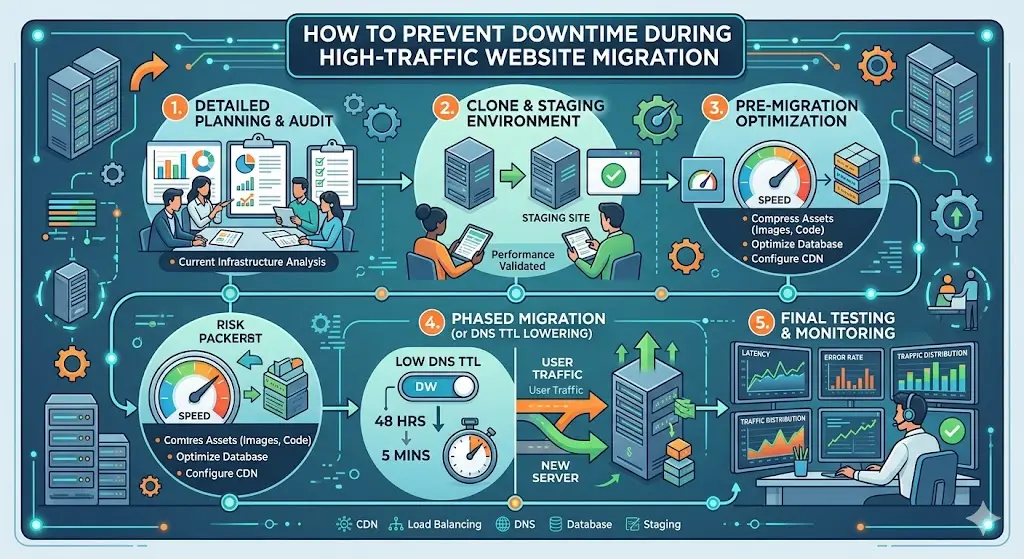
This framework structures migration into five interconnected phases: Audit, Prepare, Stage, Execute, and Verify. Each phase builds on the previous one, creating checkpoints that prevent cascading failures.
The Audit phase establishes your baseline. Prepare handles technical setup and redirect mapping. Stage creates your parallel environment for testing. Execute manages the actual cutover with minimal exposure. Verify confirms SEO integrity and performance benchmarks.
These phases aren't strictly sequential. Preparation work often reveals audit gaps. Staging may require returning to preparation. Build flexibility into your timeline while maintaining phase discipline.
Step 1: Comprehensive Pre-Migration Audit
Objective
Document every URL, ranking position, and technical configuration before touching anything. This baseline becomes your recovery reference if problems emerge.
Execution Guidance
Export complete URL lists from Google Search Console, your sitemap, and server logs. Record current rankings for your top 50 keywords using your preferred rank tracking tool. Document Core Web Vitals scores, especially Largest Contentful Paint (LCP) performance.
Catalog all 301 redirects currently in place. Many sites have legacy redirects that must transfer to the new environment. Missing these creates redirect chains or, worse, 404 errors for previously redirected URLs.
Map your internal linking structure. Tools like Screaming Frog reveal how pages connect and which pages carry the most internal link equity. This information guides redirect prioritization.
Anti-Patterns to Avoid
Don't rely solely on analytics data. Your analytics may miss pages that receive search traffic but have tracking issues. Don't assume your current sitemap is complete. Crawl your site independently to verify.
Avoid starting migration planning before audit completion. Incomplete audits lead to missed redirects and preventable traffic loss.
Success Indicators
You have a complete URL inventory with current status codes. Ranking baselines exist for all target keywords. Technical configurations (robots.txt, canonical tags, structured data) are documented and exportable.
Step 2: Database Optimization and Technical Preparation
Database Optimization and Technical Preparation Objective
Optimize database performance and prepare technical infrastructure to handle migration load without degradation.
Database Optimization and Technical Preparation Execution Guidance
Database optimization should happen before migration, not during. Clean up post revisions, spam comments, and transient data. Optimize database tables and remove orphaned metadata. This reduces migration time and improves post-migration performance.
Configure your new environment with proper caching layers. Sites leveraging a CDN see approximately 20% improvement in LCP compared to those without. Implement CDN configuration before migration to ensure immediate performance benefits.
Set up HTTPS properly on the new environment. Sites serving traffic exclusively over HTTPS are 1-5 seconds faster in LCP than those using HTTP. This isn't just security; it's measurable performance improvement.
Create your redirect map. Every old URL must point to its new equivalent. For platform migrations, this often means hundreds or thousands of individual redirect rules. Use spreadsheets with formulas to generate redirect syntax for your server configuration.
Database Optimization and Technical Preparation Anti-Patterns to Avoid
Don't optimize the database on your live site right before migration. Do this work days or weeks in advance, with proper backups. Avoid generic redirect rules that rely on pattern matching when specific URLs are known. Precision prevents edge case failures.
Database Optimization and Technical Preparation Success Indicators
Database size is reduced and optimized. New environment matches or exceeds current performance benchmarks. Complete redirect map exists with verified syntax for your server type.
Step 3: Staging Environment and Load Testing
Staging Environment and Load Testing Objective
Create a production-equivalent environment and verify it handles expected traffic without performance degradation.
Staging Environment and Load Testing Execution Guidance
Deploy your complete site to staging with all redirects, caching, and configurations active. This isn't a development environment; it's a production rehearsal. Every plugin, theme file, and database record should mirror your intended final state.
Run load testing that simulates your actual traffic patterns. Use tools like k6, Gatling, or LoadRunner to generate realistic concurrent user loads. Test beyond your normal traffic levels since migrations often coincide with marketing pushes or seasonal peaks.
Verify all redirects function correctly. Crawl the staging environment and check that old URLs return proper 301 responses pointing to correct destinations. Test edge cases: URLs with query parameters, trailing slashes, mixed case variations.
Check Core Web Vitals on staging. Performance issues are far easier to resolve before migration than after. Address any LCP, CLS, or FID problems now.
Staging Environment and Load Testing Anti-Patterns to Avoid
Don't skip load testing because "we know our traffic levels." Unexpected traffic spikes during migration are common, especially if you're also launching new features or content. Don't test redirects manually by spot-checking a few URLs. Automated crawling catches problems manual testing misses.
Staging Environment and Load Testing Success Indicators
Staging environment handles 150% of peak traffic without degradation. All redirects verified via automated crawl. Core Web Vitals meet or exceed current production scores.
Step 4: Migration Execution with Minimal Exposure
Migration Execution with Minimal Exposure Objective
Execute the actual cutover during your lowest-traffic window with immediate rollback capability.
Migration Execution with Minimal Exposure Execution Guidance
Schedule migration during your lowest traffic period. For most B2B sites, this means late Saturday night or early Sunday morning. For e-commerce, avoid any period near promotions, holidays, or paydays. Check your analytics for your specific low-traffic windows.
Implement a maintenance page that returns a 503 status code, not 200. This tells search engines the downtime is temporary, preventing them from indexing error states. Keep the maintenance window as short as possible.
Use DNS TTL reduction 24-48 hours before migration. Lower your TTL to 300 seconds (5 minutes) so DNS changes propagate quickly. This minimizes the window where some users see old content while others see new.
Execute your migration checklist in order. Database migration first, then file transfer, then DNS cutover. Verify each step before proceeding. Have your rollback procedure documented and ready.
For comprehensive website management, maintain detailed logs of every action taken during migration. These logs prove invaluable for troubleshooting and future migrations.
Migration Execution with Minimal Exposure Anti-Patterns to Avoid
Don't migrate during business hours to "monitor more easily." The traffic exposure risk outweighs monitoring convenience. Don't skip the maintenance page; users hitting a broken site during transition creates support burden and trust damage.
Avoid making additional changes during migration. If you discover an unrelated issue, document it for later. Migration is not the time for scope expansion.
Migration Execution with Minimal Exposure Success Indicators
Total downtime under 30 minutes for most migrations. DNS propagation complete within 2 hours. No 5xx errors in server logs post-cutover.
Step 5: Post-Migration SEO Verification
Post-Migration SEO Verification Objective
Confirm all SEO elements transferred correctly and establish monitoring for the critical 30-day post-migration window.
Post-Migration SEO Verification Execution Guidance
Immediately submit your updated sitemap to Google Search Console. Request indexing for your most important pages. This accelerates Google's discovery of your new environment.
Crawl your live site and compare against your pre-migration audit. Check for status code changes, missing pages, and redirect accuracy. Any URL returning 404 that previously returned 200 requires immediate attention.
Monitor Search Console for crawl errors over the following days. Google will report issues as it re-crawls your site. Address errors within 24 hours when possible. The faster you fix problems, the less ranking impact you'll experience.
Verify canonical tags point to correct URLs. Platform migrations often introduce canonical issues where pages self-reference incorrectly or point to staging URLs. These errors can persist for weeks before causing visible ranking damage.
Check that structured data remains intact and valid. Use Google's Rich Results Test on your key page templates. Image URL structure also deserves verification since image search traffic often gets overlooked during migration validation.
Post-Migration SEO Verification Anti-Patterns to Avoid
Don't declare success after 24 hours. SEO impacts from migration errors often take 2-4 weeks to manifest in rankings. Don't stop monitoring after the first week. The 30-day window is critical for catching slow-developing issues.
Post-Migration SEO Verification Success Indicators
Zero increase in crawl errors within Search Console. Organic traffic within 10% of pre-migration baseline after two weeks. All redirects returning proper 301 status codes.
Step 6: Post-Migration Performance Baseline and Ongoing Monitoring
Post-Migration Performance Baseline and Ongoing Monitoring Objective
Establish new performance baselines and create monitoring systems that catch degradation before it impacts rankings.
Post-Migration Performance Baseline and Ongoing Monitoring Execution Guidance
Document post-migration Core Web Vitals as your new baseline. These should meet or exceed pre-migration scores. If they don't, prioritize performance optimization before focusing on other post-migration tasks.
Set up uptime monitoring with alerting. Services like Pingdom, UptimeRobot, or your hosting provider's tools should notify you immediately of any availability issues. High-impact cloud outages have a median annual downtime of 77 hours, so ongoing monitoring isn't optional.
Configure rank tracking for your baseline keywords. Daily monitoring for the first 30 days, then weekly thereafter. Significant ranking drops warrant investigation, though minor fluctuations are normal post-migration.
Review server logs weekly for the first month. Look for unusual patterns: excessive bot traffic, repeated 404 errors, or unexpected traffic sources. These patterns often indicate issues that don't surface in standard analytics.
Post-Migration Performance Baseline and Ongoing Monitoring Anti-Patterns to Avoid
Don't assume stable rankings at day 30 mean permanent success. Some migration issues surface during Google's next major algorithm update. Don't disable monitoring after the initial period. Ongoing vigilance prevents small issues from becoming ranking emergencies.
Post-Migration Performance Baseline and Ongoing Monitoring Success Indicators
Core Web Vitals stable or improved versus pre-migration. Uptime exceeds 99.9% for first 30 days. Organic traffic recovers to baseline within 30 days.
Common Mistakes and How to Avoid Them
The most damaging migration mistakes stem from incomplete preparation, not technical failures. Missing redirects for high-traffic pages causes immediate ranking loss. Forgetting to update internal links creates redirect chains that dilute link equity. Launching without load testing leads to performance issues under real traffic.
Many teams underestimate timeline requirements. A proper migration for a high-traffic site takes 4-8 weeks of preparation, not days. Rushing this process creates errors that take months to recover from.
Another common failure: treating migration as a one-time event rather than a process requiring ongoing attention. The 30-day post-migration window demands active monitoring and rapid response to emerging issues.
These mistakes are recoverable, but prevention costs far less than remediation. Website redesign challenges often compound when migration planning gets compressed or deprioritized.
What to Do Next
Start with your pre-migration audit. Export your URL inventory and current rankings this week. This baseline work requires no technical changes and creates the foundation for everything else.
Use this guide as a reference throughout your migration process, not a one-time read. Return to each phase section as you reach that stage. The checklist approach prevents skipped steps that create problems later.
If your migration involves platform changes, domain moves, or traffic levels exceeding 100,000 monthly sessions, consider professional support. The cost of expert guidance is typically a fraction of potential traffic loss from preventable errors.
Migration success comes from methodical preparation and disciplined execution. Take the time to do it right.
Frequently Asked Questions
Sources
- https://www.xurrent.com/blog/it-outages
- https://www.yugabyte.com/blog/zero-downtime-meeting-2025-retail-traffic-spikes/
- https://wpengine.com/blog/wp-engine-releases-website-traffic-trends-report/
- https://bkthemes.design/blog/comprehensive-website-management-best-practices/
- https://bkthemes.design/blog/why-your-image-urls-are-quietly-killing-your-rankings
- https://bkthemes.design/blog/top-5-hurdles-website-redesign-your-expert-guide/
About the Author

Brian Keary
Founder & Lead Developer
Brian is the founder of BKThemes with over 20 years of experience in web development. He specializes in WordPress, Shopify, and SEO optimization. A proud alumnus of the University of Wisconsin-Green Bay, Brian has been creating exceptional digital solutions since 2003.
Expertise
Writing since 2003