WordPress powers over 40% of all websites on the internet. That’s a staggering number, isn't it? This open-source platform’s flexibility and user-friendliness have made it a global favorite for everyone from solo bloggers to massive enterprises. However, even with its intuitive design, diving into WordPress without understanding common pitfalls can lead to a frustrating experience. Many users stumble, making avoidable errors that can impact their site’s performance, security, and overall success. This guide will illuminate those common blunders, helping you navigate your WordPress journey with confidence and skill. We’ll cover everything from initial setup to ongoing maintenance, ensuring your website is robust, secure, and achieves its intended goals.
Key Takeaways
- Hosting is foundational: Choose a reliable, performance-oriented hosting provider.
- Updates are non-negotiable: Keep WordPress core, themes, and plugins current for security and functionality.
- Plugins: Use wisely: Opt for quality over quantity, and remove unused extensions.
- SEO from day one: Integrate search engine optimization principles early in your site's development.
- Theme matters: Select well-coded, responsive, and regularly updated themes.
- Security first: Employ strong passwords, 2FA, and manage user roles diligently.
- Backup religiously: Implement a robust, off-site backup strategy and test restores.
- Speed is essential: Optimize images, use caching, and minimize code bloat.
- Content is crucial: Develop a strategy for high-quality, engaging, and relevant content.
- Mobile is mandatory: Ensure your site is fully responsive across all devices.
- HTTPS is standard: Install and enforce an SSL certificate for security and trust.
- Maintenance is ongoing: Regularly update, monitor, and clean your website.
Who This Is For
This article is tailor-made for anyone using or planning to use WordPress for their website. Whether you're a complete beginner setting up your very first blog, a small business owner looking to enhance your online presence, a seasoned developer managing multiple client sites, or an e-commerce entrepreneur aiming to boost sales, these insights are invaluable. If you've ever felt overwhelmed by settings, worried about security, or experienced slow loading times, this guide will provide clarity and actionable solutions. It’s for those who want to build a WordPress site that not only looks great but also functions flawlessly and ranks well in search results. We’re talking about individuals and teams who are serious about their online presence and want to harness the full power of WordPress without the common frustrations.
Who This Is NOT For
This guide isn't for individuals who are entirely unfamiliar with the concept of websites or the internet. If you're not yet at the stage of understanding what a domain name or hosting is, you might find some of the technical jargon a bit dense. It’s also not for those who are looking for a magic bullet solution that requires zero effort. WordPress, like any powerful tool, demands a degree of learning and engagement. If you expect to launch a successful site without any learning curve or strategic input, this article might not align with your expectations. Furthermore, this guide focuses on common user errors within the WordPress ecosystem itself. It won’t delve into advanced custom coding solutions or server administration nuances that are beyond the scope of typical WordPress usage.
Mistake 1: Choosing the Wrong Hosting Provider
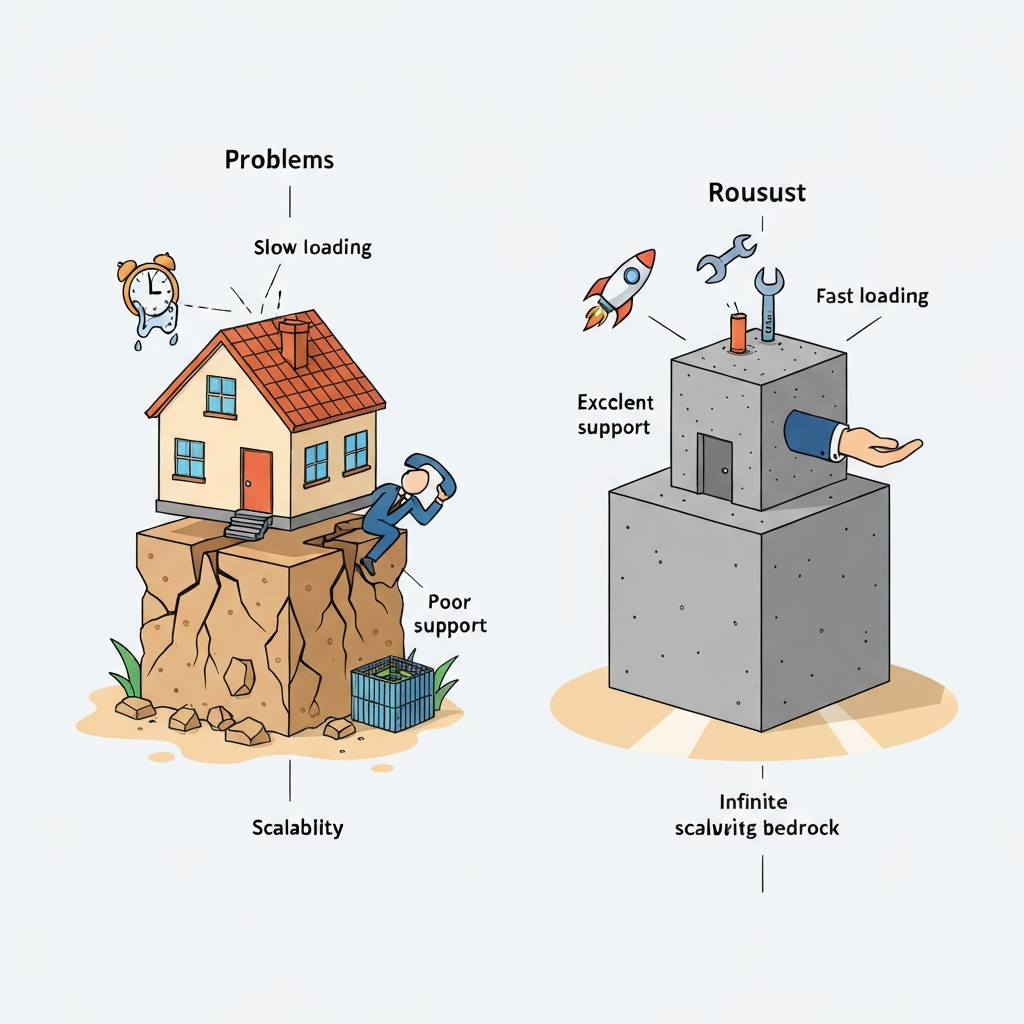
One of the most fundamental, yet often overlooked, mistakes is selecting subpar web hosting. Your hosting provider is the bedrock of your website; a shaky foundation guarantees instability. Many opt for the cheapest option available, only to discover later that it comes with crippling performance issues, poor customer support, and limited scalability. Slow loading times are a major turn-off for visitors and are a significant negative factor for search engine rankings. A slow website can dramatically increase bounce rates. PageSpeed and SEO: How Loading Times Impact Your SEO.
Why it matters: Your hosting impacts site speed, uptime (how often your site is accessible), security, and your ability to handle traffic spikes. Cheap, shared hosting environments can be slow and unreliable, especially as your site grows.
How to avoid it: Research hosting providers thoroughly. Look for managed WordPress hosting solutions, which are optimized specifically for the platform. Consider factors like server location, SSD storage, caching mechanisms, security features (like SSL certificates and firewalls), and the quality of their customer support. Reputable providers often offer better performance and peace of mind. When setting up an e-commerce store on WordPress, robust hosting becomes even more critical due to the increased demands on the server.
Mistake 2: Neglecting Security Updates
WordPress, its themes, and plugins are regularly updated to patch security vulnerabilities and introduce new features. Failing to keep everything updated is akin to leaving your front door unlocked in a busy neighborhood. This is a prime target for hackers. A compromised site can lead to data breaches, malware infections, and significant damage to your reputation.
Why it matters: Outdated software is a hacker's playground. Vulnerabilities are discovered and exploited constantly. Updates are not just about new features; they are critical for maintaining the integrity and safety of your website.
How to avoid it: Enable automatic updates for WordPress core, themes, and plugins whenever possible. For critical sites, consider a staging environment to test updates before applying them to your live site. Regularly check your WordPress dashboard for available updates. If you're managing multiple sites, use a management tool to streamline the update process. Think of it like regular maintenance for your car; neglecting it leads to bigger, more expensive problems down the line.
Mistake 3: Overloading Your Site with Too Many Plugins
Plugins are fantastic for extending WordPress functionality, but using too many, or poorly coded ones, can cripple your site. Each plugin adds code that your server must process, increasing load times and potentially introducing conflicts or security risks. It's easy to get carried away, downloading every plugin that offers a seemingly useful feature.
Why it matters: Excessive plugins slow down your website, increase the risk of security vulnerabilities, and can lead to plugin conflicts that break your site's functionality. Quality over quantity is the mantra here.
How to avoid it: Be selective. Only install plugins you genuinely need. Before installing, check reviews, update history, and compatibility information. Deactivate and delete any plugins you’re no longer using. Regularly audit your installed plugins and remove any that are redundant or underperforming. For example, instead of using separate plugins for SEO, social sharing, and contact forms, see if a single, well-regarded plugin can handle multiple functions effectively.
Mistake 4: Ignoring SEO Best Practices from the Start
Search Engine Optimization (SEO) is crucial for driving organic traffic to your website. Many users build their site without considering SEO, only to realize later that they aren't appearing in search results. This often requires significant rework to implement foundational SEO elements.
Why it matters: Without SEO, your website might be invisible to potential visitors searching for your products or services. It’s the engine that drives discoverability.
How to avoid it: Install a reputable SEO plugin like Yoast SEO or Rank Math. Use it to optimize your content, meta descriptions, and titles. Research relevant keywords and incorporate them naturally into your posts and pages. Ensure your site structure is logical and easy for search engines to crawl. Building your site with SEO in mind from day one is far more efficient than trying to retrofit it later. Consider how your content strategy aligns with what your target audience is searching for.
Mistake 5: Using Default Themes or Poorly Coded Themes
Your theme dictates the visual appearance and, to a large extent, the user experience of your website. Relying solely on the default WordPress themes or choosing a theme that is outdated, bloated, or not well-coded can lead to a site that looks unprofessional and performs poorly. Many free themes, while attractive, may lack proper optimization or security.
Why it matters: A theme’s quality directly impacts your site’s aesthetics, responsiveness (how it looks on different devices), loading speed, and even its SEO performance.
How to avoid it: Invest in a premium theme from a reputable developer or choose a well-supported free theme from the official WordPress repository. Look for themes that are regularly updated, have good reviews, and are optimized for speed and SEO. Page builders like Elementor and Divi offer immense design flexibility, but ensure you're using them efficiently. Understanding Wordpress design trends using elementor 2025 can help you create a modern, engaging site. Always check theme demos on various devices before committing.
Mistake 6: Weak Passwords and Poor User Role Management

Security is paramount, and weak passwords are an open invitation for unauthorized access. This applies not only to your WordPress admin account but also to FTP, database, and hosting control panel credentials. Furthermore, assigning administrative privileges to users who don't strictly require them increases the attack surface.
Why it matters: Compromised credentials can lead to your entire site being taken over, defaced, or used for malicious purposes.
How to avoid it: Use strong, unique passwords for all your online accounts. Employ a password manager to generate and store complex passwords. Implement two-factor authentication (2FA) wherever possible. Carefully manage user roles within WordPress, granting only the necessary permissions for each user. For instance, an author only needs the 'Author' role, not 'Administrator'.
Mistake 7: Not Backing Up Your Website Regularly
Imagine spending weeks or months building a beautiful website, only to lose it all due to a server crash, hack, or accidental deletion. This nightmare scenario is entirely preventable with regular backups. Many users assume their hosting provider handles this comprehensively, but often, their backup solutions are insufficient or not granular enough.
Why it matters: Backups are your safety net. They allow you to restore your site to a previous working state if anything goes wrong. Without them, data loss can be catastrophic.
How to avoid it: Implement a robust backup strategy. Use a reliable backup plugin or a managed WordPress hosting service that offers frequent, automated backups. Store your backups in a secure, off-site location (e.g., cloud storage like Google Drive, Dropbox, or a dedicated backup service). Test your backups periodically to ensure they are restorable. Think of backups as digital insurance for your online asset.
Mistake 8: Ignoring Website Performance and Speed Optimization
A slow-loading website is a conversion killer. Visitors have short attention spans; if your pages take too long to load, they’ll leave. This impacts user experience, SEO rankings, and ultimately, your business goals. Common culprits include unoptimized images, bloated code, excessive HTTP requests, and poor server configuration.
Why it matters: Speed is a critical factor for user satisfaction and search engine ranking. Faster sites generally see higher engagement and better conversion rates. For e-commerce, speed is directly tied to revenue.
How to avoid it: Optimize your images before uploading them. Use a caching plugin to serve static versions of your pages. Choose a quality theme and limit the number of plugins. Consider using a Content Delivery Network (CDN) to serve assets from servers closer to your visitors. Regularly test your site speed using tools like Google PageSpeed Insights or GTmetrix. If you have a powerful shopify store my top five speed hacks can offer insights applicable to WordPress optimization as well.
Mistake 9: Poor Content Strategy and Quality
A website without valuable, relevant content is like a shop with empty shelves. Many users focus heavily on design and technical aspects but neglect the core of their website: the content. Poorly written, irrelevant, or infrequent content fails to engage visitors and won't attract search engines.
Why it matters: Content is king. High-quality, engaging content attracts and retains visitors, builds authority, and is essential for SEO.
How to avoid it: Develop a clear content strategy aligned with your target audience's needs and interests. Focus on creating original, informative, and engaging content. Use clear language, good formatting (headings, bullet points), and compelling visuals. Publish content regularly and promote it effectively. Understanding your audience allows you to create content that truly resonates, much like the thoughtful curation you'd find at a place like the Phantom bookstore.
Mistake 10: Lack of Mobile Responsiveness
With the majority of internet traffic now coming from mobile devices, a website that isn't mobile-friendly is alienating a huge portion of its potential audience. Google also prioritizes mobile-first indexing, meaning your site's mobile version is what they primarily use for ranking.
Why it matters: A non-responsive site provides a terrible user experience on smartphones and tablets, leading to high bounce rates and lost opportunities. Search engines penalize such sites.
How to avoid it: Choose a responsive WordPress theme that automatically adjusts its layout to fit any screen size. Test your website thoroughly on various mobile devices and screen resolutions. Ensure that navigation is easy, text is readable, and buttons are clickable on smaller screens. Modern themes and page builders generally handle responsiveness well, but always double-check.
Mistake 11: Not Using an SSL Certificate
An SSL (Secure Sockets Layer) certificate encrypts the connection between a user's browser and your website, indicated by "https://" and a padlock icon in the address bar. Browsers increasingly flag non-HTTPS sites as "Not Secure," deterring visitors, especially if they plan to enter sensitive information.
Why it matters: SSL is crucial for security, builds trust with your visitors, and is a minor ranking signal for search engines like Google. It's essential for any site collecting user data, especially e-commerce.
How to avoid it: Obtain an SSL certificate for your domain. Many hosting providers offer free SSL certificates (e.g., Let's Encrypt). Ensure your WordPress installation is configured to use HTTPS exclusively. You can use plugins to help manage the transition and fix any mixed content issues. This is a non-negotiable step for any serious website in 2026.
Get your Free SSL certificate at Let's Encrypt
Mistake 12: Overlooking Website Maintenance
Launching a website is not the end; it's just the beginning. Many users neglect ongoing maintenance, leading to performance degradation, security vulnerabilities, and outdated content. This includes updating software, monitoring performance, checking for broken links, and clearing out old data.
Why it matters: Regular maintenance ensures your website remains secure, performs optimally, and continues to meet user needs and search engine requirements. It’s the difference between a thriving online presence and a neglected digital ghost town.
How to avoid it: Schedule regular maintenance tasks. This includes updating WordPress core, themes, and plugins; checking for and fixing broken links; monitoring site speed and uptime; cleaning up your database; and reviewing your content for relevance and accuracy. Consider the Top 5 common issues to expect in any web development project and proactively address potential maintenance needs.
Comparison: Common WordPress Setup Choices
| Feature | Cheap Shared Hosting | Managed WordPress Hosting | VPS Hosting |
|---|---|---|---|
| Performance | Often slow, inconsistent | Optimized for WordPress, generally fast | Good, scalable |
| Security | Basic, shared environment risks | Enhanced, specialized WordPress security | Requires user configuration, good potential |
| Ease of Use | Can be complex, requires technical knowledge | Very user-friendly, often WP-specific tools | Moderate to high, requires server admin skills |
| Scalability | Limited | Good, easy upgrades | Excellent, but requires management |
| Cost | Lowest | Mid-range | Mid-range to high |
| Best For | Hobby blogs, very small sites with low traffic | Most WordPress users, businesses, e-commerce | Growing sites, developers, high-traffic sites |
FAQ Section
What is the most critical mistake to avoid when starting with WordPress?
The most critical mistake is often choosing inadequate web hosting. Your hosting is the foundation of your entire online presence. Selecting the cheapest option without considering performance, security, and support can lead to a cascade of problems, including slow loading speeds, frequent downtime, and vulnerability to attacks. It’s akin to building a magnificent house on quicksand; it’s destined for trouble.
How often should I update my WordPress site?
You should update your WordPress core, themes, and plugins as soon as stable updates become available. Security patches are often released urgently, and delaying these updates leaves your site exposed. While it's wise to test updates on a staging site first if possible, don't let the fear of breakage prevent you from applying critical security fixes promptly. Regular maintenance checks should happen at least weekly.
Can I use too many plugins?
Yes, absolutely. While plugins extend WordPress functionality, each one adds code that needs to be processed. Too many plugins, or even a few poorly coded ones, can significantly slow down your website, increase the chances of security vulnerabilities, and lead to conflicts that break your site. It’s best to be selective, uninstalling any plugins you don’t actively use. Reviewing your plugins periodically is a good habit.
Is website speed really that important for SEO?
Yes, website speed is a significant ranking factor for search engines like Google. They want to provide users with the best possible experience, and that includes fast-loading pages. Beyond rankings, speed directly impacts user engagement. Visitors are impatient; if your site takes too long to load, they'll likely click away, increasing your bounce rate and hurting your conversion potential. For e-commerce, every second counts.
What's the difference between WordPress.com and WordPress.org?
WordPress.org is the self-hosted version where you download the free WordPress software and install it on your own hosting account. This gives you complete control over your website, themes, and plugins. WordPress.com is a hosted service that uses the WordPress software but operates under its own set of rules and limitations, especially on free or lower-tier plans. For maximum flexibility and control, WordPress.org is generally preferred, though it requires managing hosting and updates yourself. If you're considering building a robust online store, understanding the advantages of Using Multi-Store Functionality in BigCommerce can provide context for platform choices, but for WordPress, .org offers the most comprehensive solution.
Conclusion
Navigating the world of WordPress doesn't have to be a minefield. By understanding and actively avoiding these twelve common mistakes, you can build a secure, fast, and effective website that serves your goals. From choosing the right hosting and diligently updating your software to focusing on quality content and robust security, each step contributes to a successful online presence. Treat your WordPress site not as a static entity, but as a living project that requires ongoing care and attention. Implementing these best practices will set you on the path to a thriving digital experience, avoiding the common frustrations that plague many users and allowing your website to truly shine. Remember, a little foresight and regular diligence go a long way in harnessing the immense power of WordPress.
Looking for implementation support? Visit our web development services page for the full service overview.
About the Author

Brian Keary
Founder & Lead Developer
Brian is the founder of BKThemes with over 20 years of experience in web development. He specializes in WordPress, Shopify, and SEO optimization. A proud alumnus of the University of Wisconsin-Green Bay, Brian has been creating exceptional digital solutions since 2003.
Expertise
Writing since 2003