Understanding the Key Differences
Planning a blog or a full website? The WordPress.com vs WordPress.org question comes up a lot — and for good reason. Though they share the WordPress name, they work quite differently: one is a hosted, managed service; the other gives you self-hosted control.
Your choice affects design flexibility, costs, security, and how your site can grow over time. Below we’ll outline what each option actually means so you can pick the right path.
What Is WordPress.com?
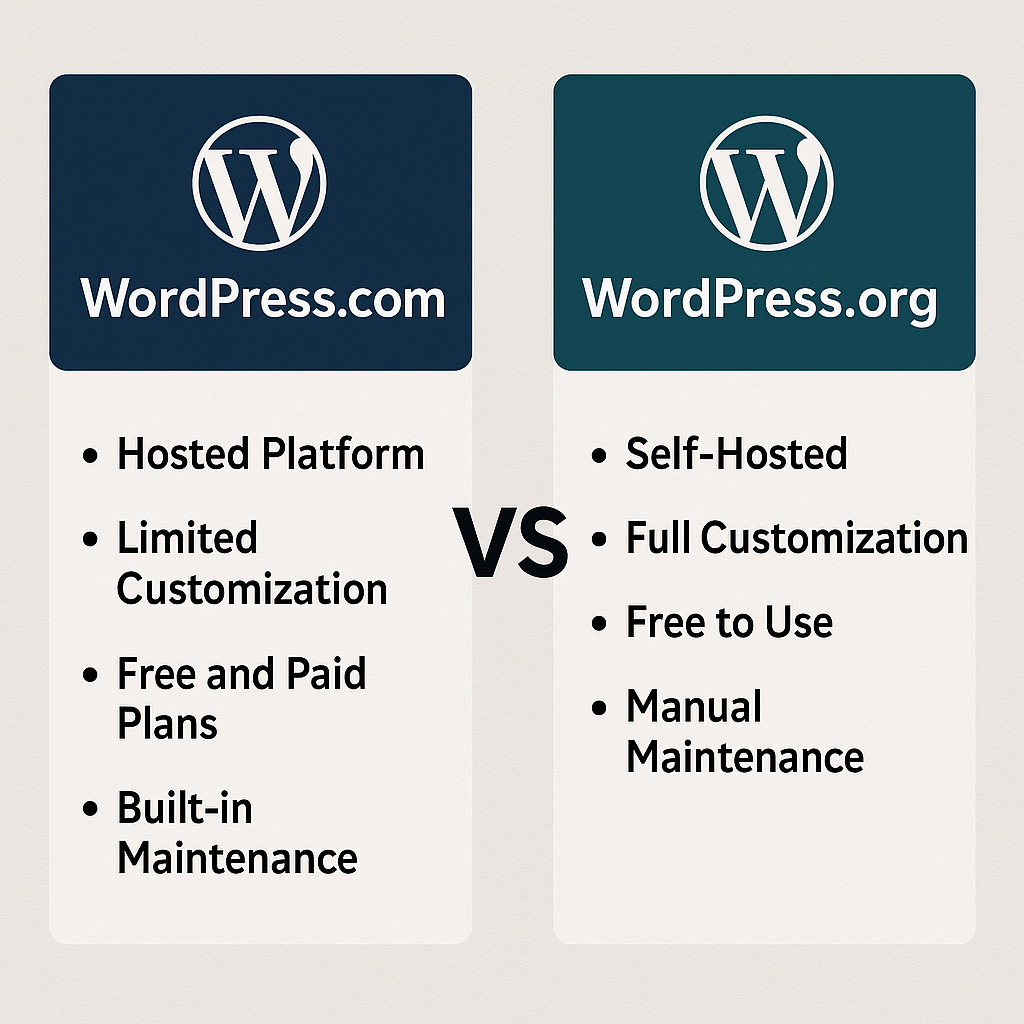
WordPress.com is a fully hosted platform — the provider handles installation, hosting, backups, and many maintenance tasks for you. It’s a streamlined way to get a site online without managing servers.
Core Features of WordPress.com
- Hosting included out of the box
- Automatic updates and security management
- Range of free and premium themes
- Plugin access limited to higher-tier plans
- Email and live support depending on plan
- User-friendly editor for beginners
WordPress.com is a great fit if you value simplicity and want to launch quickly without technical overhead.
What Is WordPress.org?
WordPress.org is the self-hosted version of WordPress. The software itself is free, but you install it on a hosting service you choose (for example, Bluehost, SiteGround, or Hostinger) and manage updates and backups yourself.
Core Features of WordPress.org
- Access to all themes and plugins
- Complete control over design and functionality
- Ability to edit code and custom files
- Unlimited integrations with third-party tools
- Full ownership of your site and data
This is often the right choice for growth-focused sites if you need maximum flexibility and room to scale or customize.
WordPress.com vs WordPress.org: Feature Comparison
You’re probably asking: Which platform delivers the features I actually need? Here’s a clear platform comparison for business owners .
Ease of Use Compared
- WordPress.com: Create an account → pick a theme → start publishing.
- WordPress.org: Choose a host → install WordPress → configure plugins, themes, and backups.
Design & Customization Options
- WordPress.com: Basic customization tools unless you move to an upgraded plan.
- WordPress.org: Near-unlimited customization through themes, plugins, and page builders like Elementor or Divi.
Plugins, Extensions & Integrations
- WordPress.com: Plugin access is restricted on lower plans and opens up on Business and above.
- WordPress.org: Full access to thousands of free plugins plus any premium options you choose.
Pricing Differences Explained
| Feature | WordPress.com | WordPress.org |
|---|---|---|
| Hosting | Included with your plan | Requires a separate hosting purchase |
| Plugins | Limited to lower plans | Unlimited access |
| Customization | Restricted unless upgraded | Full control over every detail |
| Cost | Free to premium subscription tiers | Varies by hosting, theme, and plugin choices |
Pros & Cons of WordPress.com
Pros of WordPress.com
- No server maintenance required
- Security and updates handled for you
- Simple, beginner-friendly setup
- Built-in blogging tools and editor
Cons of WordPress.com
- Less freedom to customize on lower plans
- Plugins not available on free accounts
- Monetization options are more limited
- Free plan includes platform branding
Pros & Cons of WordPress.org
Pros of WordPress.org
- Total control over your site
- Unrestricted plugin and theme use
- Strong monetization and eCommerce options
- Better tools for WordPress SEO and long-term growth
Cons of WordPress.org
- You’re responsible for hosting setup
- Need to manage backups and updates
- Some technical learning is required
Which Platform Is Best for You?
Best for Beginners
If you want the simplest, fastest route to publish content with minimal setup, WordPress.com is the easier choice.
Best for Businesses
For organizations, online stores, or sites that need custom functionality and scalability, WordPress.org gives the flexibility businesses rely on. If you want implementation support, a WordPress expert partner can help with setup, performance, and security.
Best for Developers
Developers and designers who need full control over code and integrations will prefer WordPress.org .
FAQs About WordPress.com vs WordPress.org
Conclusion
Choosing between WordPress.com and WordPress.org comes down to trade-offs. Pick WordPress.com for simplicity and minimal maintenance; choose WordPress.org for long-term growth , customization, and full monetization control.
For more detailed technical docs and downloads, visit the official WordPress site (https://wordpress.org).
References
- WordPress.com. (n.d.). About WordPress.com. Retrieved from https://wordpress.com/about/
- WordPress.org. (n.d.). About WordPress. Retrieved from https://wordpress.org/about/
About the Author

Brian Keary
Founder & Lead Developer
Brian is the founder of BKThemes with over 20 years of experience in web development. He specializes in WordPress, Shopify, and SEO optimization. A proud alumnus of the University of Wisconsin-Green Bay, Brian has been creating exceptional digital solutions since 2003.
Expertise
Writing since 2003