What Are the Primary Causes of Low WordPress Conversion Rates?
You’ve invested time, money, and creativity into building your WordPress website. It looks good, loads decently, and even gets traffic — but for some reason, it’s just not converting visitors into customers. Sound familiar?
This issue is far more common than most site owners realize. In fact, studies show that the average website conversion rate is around 2.35% , and many WordPress sites fall well below that mark.
Before you start overhauling your entire site, it’s crucial to identify what’s really stopping users from taking action — whether that’s signing up, purchasing, or booking a service.
Let’s explore the top reasons your WordPress is not converting, and the best ways to fix them. Let's start by defining a conversion.
What Is The Definition Of A Conversion?
A conversion occurs when a website visitor takes a specific, desired action that aligns with your business goals.
Instead of just browsing your site, the user transitions from a passive listener into an active participant.
Conversions generally fall into two categories:
- Macro Conversions: The primary, bottom-line goals of your website. Examples include buying a product, subscribing to a paid service, or filling out a high-value lead form.
- Micro Conversions: Smaller, introductory actions that show a visitor is moving down your sales funnel. Examples include signing up for a free newsletter, downloading a PDF guide, or adding an item to a shopping cart.
How Do You Measure WordPress Conversion Rates Effectively?
To measure WordPress conversion rates effectively, you must define clear goals, set up proper analytics tracking, and calculate the percentage of visitors who complete your desired actions.
Define Conversion Goals
-
Identify macro conversions like product purchases or service requests.
-
Track micro conversions such as newsletter sign-ups, PDF downloads, or form submissions.
-
Assign a specific value or tracking event to each goal on your site.
Install Tracking Tools
-
Connect analytics platforms like Google Analytics 4 (GA4) or privacy-friendly alternatives like Matomo Analytics to monitor site traffic.
-
Use WordPress integration plugins like Conversion Bridge or Burst Statistics to map form fills, user logins, and e-commerce orders directly into your analytics dashboard.
-
Implement UTM parameters in your marketing links to see which specific traffic sources drive conversions.
Calculate Your Conversion Rate
-
Use the standard formula: divide the total number of goal completions by the total number of unique visitors, then multiply by 100.
-
Segment your data by device type, traffic source, or landing page to find hidden performance drops.
Run A/B Tests
-
Test variations of headlines, page layouts, and call-to-action buttons using optimization plugins.
-
Allow tests to run long enough to gather statistically significant data before making design changes.
What Are The Top 10 Reasons Why Your WordPress Website Is Not Converting?
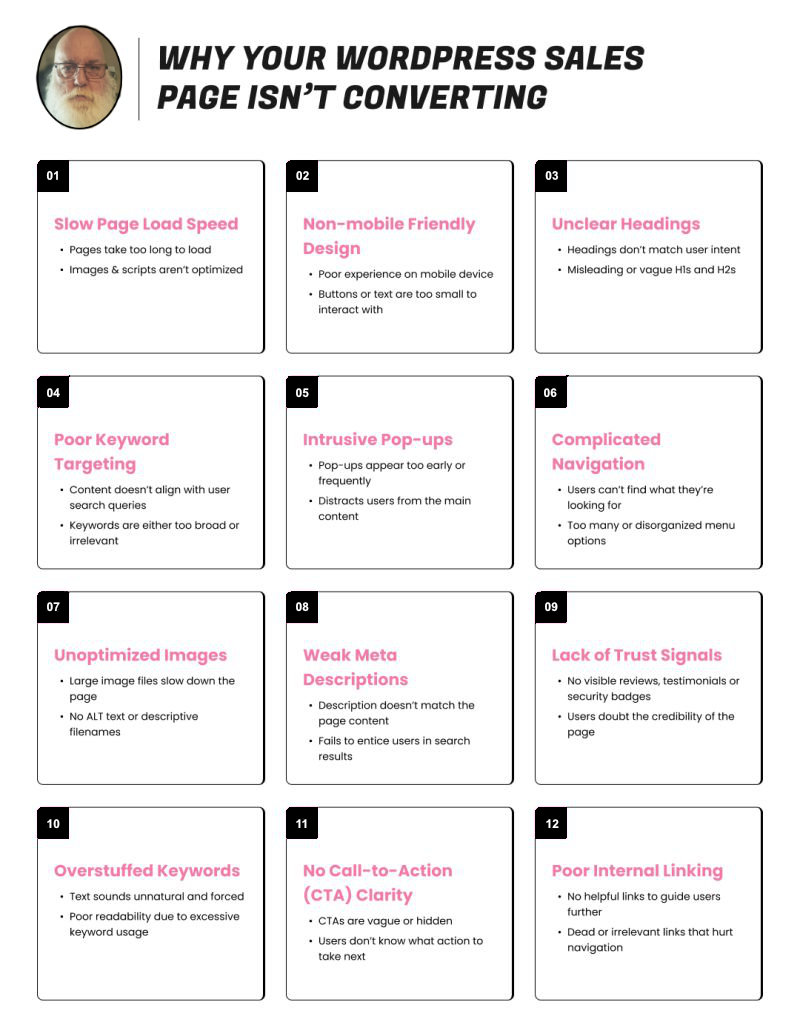
The are many reasons why WordPress might now be converting, including:
- Poor Website Speed and Performance
- Weak or Confusing Call-to-Actions (CTAs)
- Outdated or Non-Responsive Web Design
- Ineffective Copywriting and Content Strategy
- Lack of Social Proof and Trust Signals
- Poorly Optimized Checkout or Contact Forms
- Ignoring SEO and Organic Traffic Sources
- Overwhelming Pop-ups and Ads
- Not Tracking Analytics or Heatmaps
- Ignoring Mobile User Experience
How to Fix Conversion Issues on Your WordPress Site
Perform a conversion audit using tools like Google PageSpeed Insights or GTmetrix. Implement A/B testing to compare different layouts or CTAs. Collect real user feedback via surveys or chatbots to identify friction points.
Bonus Tips: Proven Strategies to Increase WordPress Conversions
Here are some bonus tips you can use to help increase your conversions:
- Leverage email automation with tools like MailerLite or ConvertKit
- Create lead magnets that solve real problems
- Simplify your navigation menus
- Build dedicated landing pages for campaigns
Real-Life Case Study: From 0.3% to 4.8% Conversion in 30 Days
A digital marketing agency revamped a WordPress eCommerce site by:
- Reducing homepage clutter
- Simplifying checkout
- Adding clear CTAs and testimonials The result? Conversions skyrocketed from 0.3% to 4.8% in just one month.
Are You Ready To Fix Your Conversion Issues?
We offer a website optimization service that will fix your conversion issues and improve your CRO to achieve results like above. What are you waiting for?
FAQs About “Why My WordPress Website is Not Converting”
Conclusion: Turn Your WordPress Site Into a Conversion Machine
Your WordPress site has enormous potential — but without the right optimization, it’ll never reach its full power. By understanding why your WordPress website is not converting, you can fix bottlenecks, engage visitors more effectively, and finally start turning traffic into tangible results.
Start small, test often, and remember: conversion optimization isn’t a one-time task — it’s an ongoing journey toward perfection.
External Source: For deeper insights, check out WordPress Conversion Optimization Guide by HubSpot.
About the Author

Brian Keary
Founder & Lead Developer
Brian is the founder of BKThemes with over 20 years of experience in web development. He specializes in WordPress, Shopify, and SEO optimization. A proud alumnus of the University of Wisconsin-Green Bay, Brian has been creating exceptional digital solutions since 2003.
Expertise
Writing since 2003