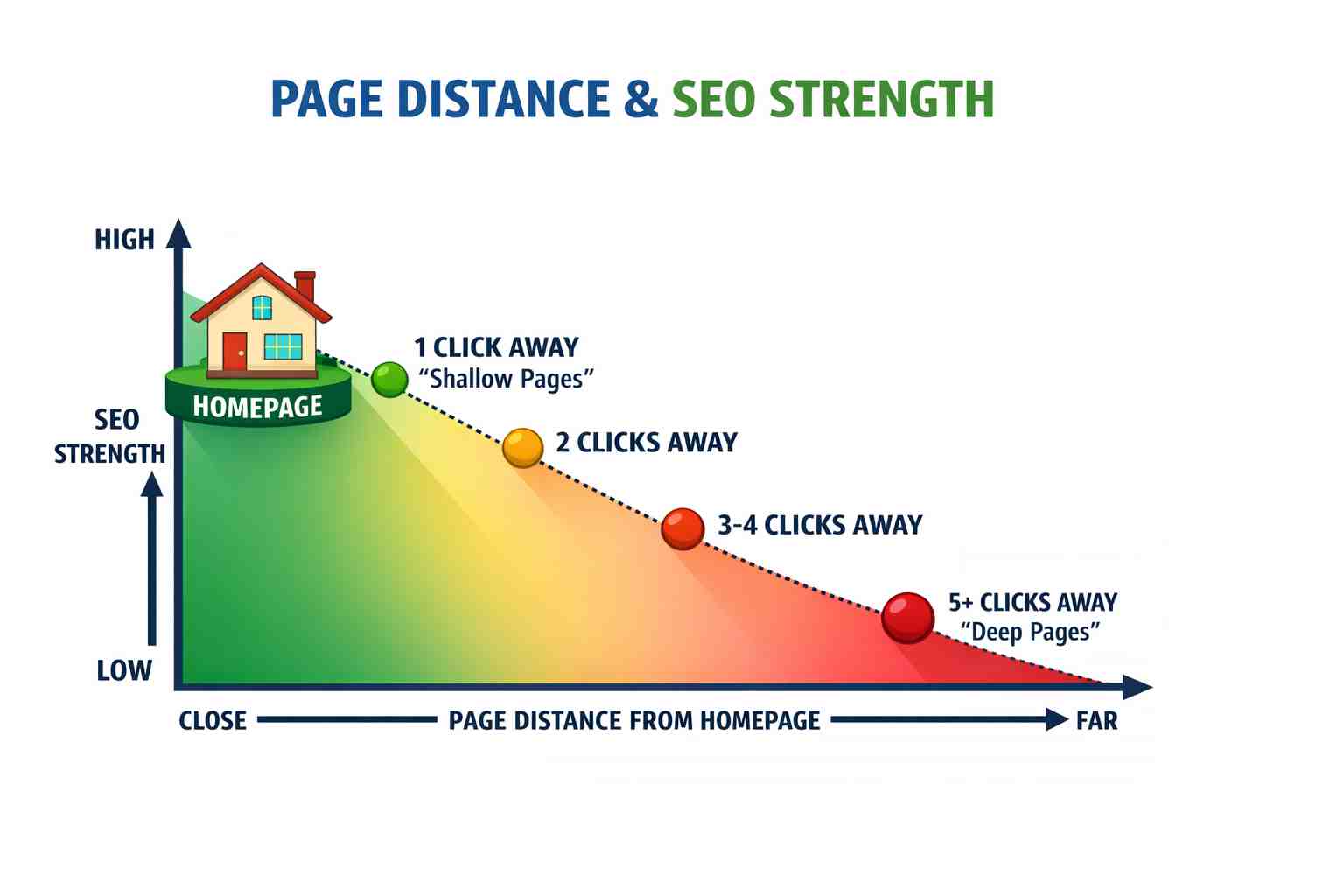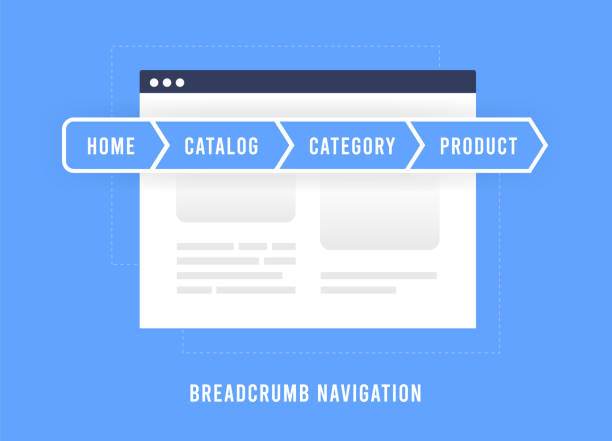
Website breadcrumbs are secondary navigation trails that display a visitor's exact position within a site's hierarchical structure. Placed near the top of a page, they provide clear horizontal orientation, distribute internal link equity, and generate rich snippet paths in Google search results.
What are the key technical pillars of breadcrumbs?
The key technical pillars of website breadcrumbs are structured hierarchy, semantic markup configuration, internal link equity distribution, and accessible user interface implementation.
- UX & Conversion Benefits: Orients users on content-heavy or e-commerce sites, provides single-click backtracking, reduces navigational frustration, and decreases bounce rates.
- SEO Advantages: Enhances Google snippet appearance in search results, distributes internal link authority, and optimizes how search engine bots crawl structural depth.
- Implementation Rules: Keep trails simple (ideally 3–4 levels deep), make all previous levels clickable while keeping the current page label text-only, ensure touch-friendly responsive design for mobile, and embed JSON-LD BreadcrumbList structured data for search engine tracking.
What are the three main types of breadcrumbs?
There are three main types of breadcrumbs:
- Hierarchical Breadcrumbs: Show the site's structure and where the current page sits in the hierarchy
- Attribute Breadcrumbs: Common in e-commerce, showing product attributes (Color > Size > Style)
- History Breadcrumbs: Show the path a user has taken to reach the current page (less common)
How do breadcrumbs improve website performance?
Breadcrumbs improve overall website performance across three primary domains: technical efficiency (speed and code footprint), Core Web Vitals (UX metrics), and programmatic SEO crawlability.
How do breadcrumbs enhance user experience?
Breadcrumbs play a crucial role in improving user experience for several reasons:
- Visibility of Location: Users can quickly identify where they are within the site, making navigation intuitive
- Ease of Navigation: They provide an alternative to backtracking, allowing users to jump between various content levels with a single click
- Reduced Frustration: By offering clear pathways, breadcrumbs minimize the chances of users becoming overwhelmed or lost, leading to reduced bounce rates
What are the SEO benefits of using breadcrumbs?
Using breadcrumbs improves both user experience and search engine performance, making it a highly recommended practice for search engine optimization (SEO).
- Lower Bounce Rates:: Users can quickly navigate to higher-level categories if a landing page doesn't match their exact intent, keeping them on your site longer.
- Enhanced Snippets: Google can display breadcrumbs directly in search results, replacing standard URLs with clean, readable paths that improve click-through rates (CTR).
- Internal Linking: They naturally distribute internal link equity (PageRank) across your site, reinforcing the contextual relevance of parent pages.
- Crawlability: Search engine bots use breadcrumbs to better understand your site's hierarchy, find deep-lying pages, and crawl your site more efficiently. For more details, refer to Google's documentation on breadcrumb structured data.
- Enhanced UX (User Experience): A clear visual trail reduces user friction, which indirectly signals positive engagement metrics to search engines.
Which Types of Websites Need Breadcrumb Navigation?
Breadcrumb navigation is essential for websites with deep structural hierarchies, but it can actually clutter sites with flat setups.
The types of websites that benefit most from breadcrumb navigation include:
High-Necessity Websites
- E-commerce Stores: Online retail websites (like Amazon or Target) have massive, multi-layered catalogs. Breadcrumbs are critical here to let users seamlessly jump from a specific product page back to a broad category (e.g., Home > Electronics > Audio > Headphones).
- Documentation Portals and Knowledge Bases: Technical help centers, software documentation, and API references (like MDN Web Docs or developer guides) house thousands of highly specific pages. Breadcrumbs act as a vital roadmap for developers to navigate complex hierarchies.
- Large Content Publishers and Media Sites: Large-scale news networks, magazines, and educational sites (like Wikipedia or BBC) group vast archives of articles into sections, subsections, and topics.
- Government and Institutional Portals: State, federal, or university sites contain dense networks of directories, services, departments, and public forms that inherently require a strict top-down structure.
Contextual and Situational Uses
- Blogs with Multiple Categories: If a blog covers distinct, nested topics (e.g., Home > Recipes > Baking > Desserts), breadcrumbs help readers explore similar content.
- Multi-Step Application and Checkout Funnels: While not traditional structural breadcrumbs, history-based or progress-based breadcrumbs are highly effective here to show users exactly where they stand in a sequential process (e.g., Shipping > Delivery > Payment > Review).
Websites That Do NOT Need Breadcrumbs
- Single-Page Websites (Landing Pages): Sites that rely on scrolling or anchor links have zero depth, making breadcrumbs useless.
- Flat-Structure Websites: Small business websites with only a few top-level pages (e.g., Home, About, Services, Contact) do not need them, as the primary navigation bar is always sufficient and accessible.
How do Breadcrumbs Complement Other Navigation Elements?
Website breadcrumbs complement primary navigation tools by acting as an orientation safety net that handles secondary, upward movement without cluttering the main layout. While main menus focus on where a user can go, breadcrumbs show exactly where they are and how to get back.
1. Primary Navigation Menus (Top Headers)
- The Division of Labor: Top menus provide broad, global access to main categories, while breadcrumbs handle the deep, granular layers of specific subcategories.
- Context Preservation: When a user journeys three levels deep in your hierarchy, the primary menu often stops showing active states. Breadcrumbs pick up the slack by maintaining the structural trail.
- Visual Relief: Because breadcrumbs handle deep sub-pages, top menus can stay clean, minimal, and focused only on high-level destinations.
2. Sidebar Filters and Facets
- Structural vs. Temporary: Breadcrumbs track a page's permanent location in the site hierarchy, while sidebars track temporary filters (like color, size, or price).
- Multi-Dimensional Navigation: On e-commerce sites, attribute-based breadcrumbs allow users to remove broad category layers, while sidebars let them toggle specific product traits simultaneously.
3. Search Bars
- The "Landing Page" Safety Net: When users find a deeply buried page directly through a search bar (or Google), they bypass the homepage entirely.
- Instant Orientation: Breadcrumbs instantly tell these search-referred visitors exactly what section of the site they dropped into, providing immediate context.
4. Footer Links
- Start vs. Finish: Footers act as a safety net at the absolute bottom of a long scroll (often containing utility links like Privacy or Support).
- Persistent Utility: Breadcrumbs sit at the top of the content area, giving users an immediate escape route back up the hierarchy before they ever need to scroll to the footer.
Best Practices for Implementing Breadcrumbs
Implementing breadcrumbs correctly improves both user experience and search engine rankings by creating a clear, predictable path through your website.
1. Structural Best Practices
- Keep them horizontal: Always place breadcrumbs horizontally near the top of the page, typically directly below the main navigation header and above the page's primary <h1> title.
- Reflect the actual hierarchy: Base your trail on the logical site structure (e.g., Home > Blog > Marketing > SEO Tips), not the user's random history, to prevent confusing, loops.
- Start with the Homepage: Always make the first link in your trail the homepage to establish a clear anchor point for the entire website.
- Style the current page uniquely: The final item in the breadcrumb trail must represent the current page. Keep it unclickable and styled slightly differently (e.g., regular text or bolded text) so users know exactly where they are.
- Use clean separators: Separate links with familiar visual anchors like the greater-than sign (>), forward slashes (), or small arrows (→).
2. User Experience & Design Best Practices
- Don't replace primary navigation: Breadcrumbs are a secondary helper tool. They should never replace top headers, sticky menus, or mobile burger menus.
- Keep them low-contrast: Design breadcrumbs to be small and clean. They should be visible when looked for but subtle enough that they do not compete with the main content of the page.
- Give them breathing room: Ensure target links have adequate spacing so mobile visitors can easily tap them without accidentally hitting the wrong category.
- Don't use them on flat structures: If your site only has a homepage and a few secondary pages, skip breadcrumbs entirely. They only provide value on sites with three or more nested structural layers.
3. SEO & Technical Best Practices
- Implement Schema markup: Always wrap your breadcrumbs in structural data using the Schema.org BreadcrumbList specification.
- Earn rich results: Providing search engines with proper schema allows platforms like Google to read your hierarchy and show clean, beautiful trail links directly in search engine results pages (SERPs).
- Align text with page titles: Ensure the anchor text used in the breadcrumb matching the destination page's actual title or target keyword to maintain consistency and clarity.
What Does an Ideal Breadcrumb Layout Look Like?
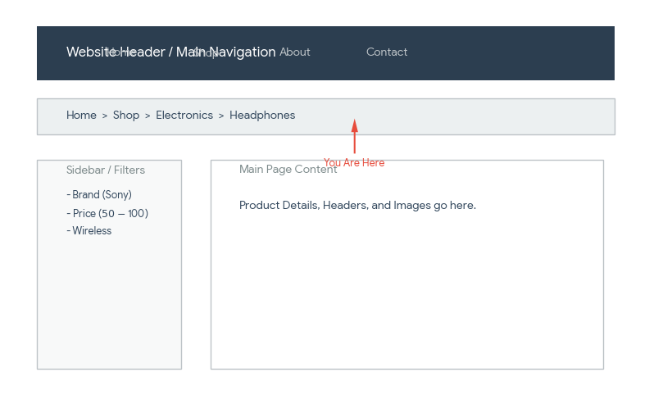
An ideal breadcrumb layout is a clean, secondary navigation trail that shows a site's structure and helps users track their location without cluttering the page.
According to guidelines from the Nielsen Norman Group and Smashing Magazine, an ideal breadcrumb layout features:
Anatomy and Structure
- Start at the Homepage: The trail always begins with the main home page (often using a home icon or the word "Home").
- Show Site Hierarchy: Display the actual structural path (e.g., Home > Category > Subcategory > Current Page) rather than dynamic user session history.
- Current Page State: Display the final item as plain, unlinked text since the user is already on that page.
- Clear Separators: Use simple, standard directional symbols between items like a greater-than sign (>), a forward slash (/), or right-pointing chevrons (→).
Visual and Placement Best Practices
- Placement: Position the trail near the top of the page—typically right below the global navigation bar or just above the main page title.
- Subtle Sizing: Keep the font size and visual weight smaller than the primary navigation so it acts as an orientation aid rather than a distraction.
- Clickable Links: Make every parent step in the trail interactive so users can easily jump back up a level.
- Handling Long Paths: For deep hierarchies with four or more items, consider collapsing the middle levels with an ellipsis (…) or truncating long titles cleanly.
- Mobile Adaptability: On mobile screens, avoid multi-line text wrapping or tiny tap targets by shortening the trail to recent parent levels or using a scrollable/dropdown pattern.
An example of a breadcrumb layout in a web page:
[       PRIMARY HEADER MENU       ]

-----------------------------------

Home > Marketing > SEO > Analytics  <-- Small, low-contrast secondary links

<h1>How to Track SEO Analytics</h1> <-- Bold, high-contrast primary heading
What is the Technical Implementation for Breadcrumbs?
Technical breadcrumb implementation requires semantic HTML markup with ordered lists wrapped in navigation elements, paired with Schema.org JSON-LD BreadcrumbList structured data.
HTML Structure Example
<nav aria-label="Breadcrumb">
  <ol class="breadcrumb">
    <li>[Home]()</li>
    <li>[Category](/category)</li>
    <li>[Subcategory](/category/subcategory)</li>
    <li aria-current="page">Current Page</li>
  </ol>
</nav>
Schema Markup
Implement JSON-LD structured data for breadcrumbs:
{
  "@context": "https://schema.org",
  "@type": "BreadcrumbList",
  "itemListElement": [{
    "@type": "ListItem",
    "position": 1,
    "name": "Home",
    "item": "https://example.com"
  }]
}
What are Some Common Mistakes to Avoid?
The most frequent breadcrumb mistakes include creating excessively deep chains, omitting Schema markup, using inconsistent hierarchy labels, and replacing primary navigation menus.
- Too Many Levels: Avoid creating overly deep breadcrumb trails
- Inconsistent Labeling: Ensure breadcrumb labels match page titles and navigation
- Poor Mobile Experience: Don't neglect mobile optimization
- Missing Schema Markup: Always include structured data for SEO benefits
- Replacing Primary Navigation: Breadcrumbs should supplement, not replace main navigation
How Do You Measure Breadcrumb Performance and Impact?
You can measure the performance and impact of breadcrumbs by tracking how often users interact with them and how they affect overall site navigation and conversion health. Because breadcrumbs are an orientation aid, a successful layout usually correlates with a smoother user journey, lower friction, and better search visibility.
To measure their exact impact, evaluate the following key metrics and testing methodologies:
Key Metrics to Track
- Interaction and Click-Through Rate (CTR): Track click events on the breadcrumb trail using event tracking in analytics tools like Google Analytics 4 (GA4). A healthy CTR—especially on complex sites like e-commerce or documentation portals—indicates that users find them valuable for backtracking.
- Bounce Rate and Exit Rate: Monitor whether pages with breadcrumbs experience a drop in immediate exits. When users land deep into a site via a search engine, breadcrumbs give them an immediate path to explore higher-level categories instead of hitting the "Back" button to leave the site entirely.
- Session Depth and Pageviews per Session: Analyze whether the presence of breadcrumbs increases the total number of pages a user visits per session. Effective breadcrumb trails encourage lateral and upward exploration.
- Form Completion and Conversion Rates: For multi-step forms or checkout funnels, track completion rates. Breadcrumbs that double as progress indicators help reduce abandonment by setting clear user expectations.
SEO and Search Impact
- Search Engine CTR and Impressions: Implement Breadcrumb Schema Markup (Schema.org). Search engines use this structured data to display rich snippets in search results instead of a raw URL. Monitor your Google Search Console to see if these clean, readable search results improve your organic click-through rates.
- Crawl Efficiency: Search engine bots use breadcrumbs to discover and crawl internal paths efficiently. Watch for improvements in how deeply and quickly your subcategories are indexed.
Behavioral and Qualitative Testing
- A/B Testing: Run a split test comparing a version of your site with breadcrumbs against a version without them (or test different placements and visual styles). Measure the variance in conversion rates, time-on-site, and task completion.
- Heatmaps and Session Recordings: Use tools like Hotjar or Microsoft Clarity to visually observe user behavior. Look at click heatmaps to see if users rely heavily on the breadcrumbs versus the main navigation, and watch session recordings to ensure the tap targets are large enough (especially on mobile).
- Usability Testing: Conduct unmoderated or moderated user testing. Give participants a task that requires backtracking or finding a related product, and observe whether they naturally utilize the breadcrumb trail or struggle to find their way.
Frequently Asked Questions (FAQ)
What are website breadcrumbs and why are they important?
Breadcrumbs are secondary horizontal navigation menus placed at the top of a page. They show a user's exact position within a website's hierarchy, making site navigation easier for visitors while helping search engine crawlers understand structural layout.
What are the three main types of breadcrumbs?
The three main types are Hierarchical (showing standard structural levels like Home > Category > Subcategory), Attribute (showing applied filters like Color > Size), and History (tracking the specific sequence of pages a user visited).
How do breadcrumbs benefit technical SEO?
Breadcrumbs enhance search snippet appearance in Google results, distribute internal link equity across deeper pages, and streamline how search engine bots crawl your site's structural depth.
Where should breadcrumbs be placed on a web page?
Breadcrumbs should be placed horizontally near the top of the page, directly below the primary navigation header and above the main <h1> page heading.
Should every website use breadcrumbs?
No. Breadcrumbs are most effective on content-heavy or multi-tiered sites (like e-commerce stores, blogs, or documentation portals) with 3 or more nested structural layers. Flat websites with only a homepage and a few top-level pages do not need them.
How do you test if breadcrumb structured data is working?
To test if your breadcrumb structured data is correctly implemented, you can use Google's Rich Results Test or the Schema Markup Validator. Simply enter the URL of the page containing breadcrumbs or paste the HTML code, and the tool will analyze whether the structured data is recognized and valid.
Conclusion
In conclusion, website breadcrumbs are a powerful tool for enhancing navigation, improving user experience, and optimizing SEO. By offering a clear and intuitive way for users to orient themselves within a website's content, breadcrumbs empower visitors to explore more deeply without feeling disoriented.
To harness their full potential, it is essential to follow best practices during implementation: keep the structure simple, ensure clickability, use semantic HTML with proper schema markup, design for mobile responsiveness, and continuously test for usability.
As online content continues to grow, effective navigation tools like breadcrumbs will remain crucial in maintaining user engagement and satisfaction. When implemented correctly, breadcrumbs become an invaluable asset that benefits both users and search engines, creating a win-win scenario for website owners seeking to improve their site's performance and user experience.
About the Author

Brian Keary
Founder & Lead Developer
Brian is the founder of BKThemes with over 20 years of experience in web development. He specializes in WordPress, Shopify, and SEO optimization. A proud alumnus of the University of Wisconsin-Green Bay, Brian has been creating exceptional digital solutions since 2003.
Expertise
Writing since 2003