
Core Web Vitals are a set of three specific metrics—Largest Contentful Paint (LCP), interaction to next paint (INP), and Cumulative Layout Shift (CLS)—that measure a website's loading performance, interactivity, and visual stability. These metrics are official Google ranking factors used to evaluate the quality of a user's page experience
If you want hands-on implementation help while improving these metrics, our Speed Me Up service is built for that.
In today's hyper-competitive digital landscape, merely ranking isn't enough. You need to provide an exceptional user experience to retain visitors, reduce bounce rates, and ultimately, convert. Ignoring Core Web Vitals is akin to building a beautiful house on a shaky foundation – it simply won't stand the test of time or Google's scrutiny. Let's dive deep into understanding and mastering these crucial signals to propel your website to the top. To understand the foundational elements, learn more about Core Web Vitals' core components.
Core Web Vitals cover the performance portion of UX. For the complete experience framework, including navigation, accessibility, content presentation, and testing, see our user experience design guide.
Key Takeaways: Mastering Core Web Vitals
TL/DR; Core Web Vitals (CWV) are critical user experience metrics that Google uses as direct ranking signals. Optimizing these three pillars improves site speed, interactivity, and visual stability, directly reducing bounce rates and boosting search visibility.
- Largest Contentful Paint (LCP) [Perceived Load Speed]: Measures how long it takes for the main content to render.
- Target: < 2.5 seconds.
- Quick Fixes: Use modern image formats (WebP/AVIF), set fetchpriority="high" on above-the-fold media, and eliminate lazy-loading for the LCP element.
- Interaction to Next Paint (INP) [Interactivity & Responsiveness]: Measures the time it takes for the browser to respond to a user's interactions throughout the page's lifecycle.
- Target: < 200 milliseconds.
- Quick Fixes: Break up long JavaScript tasks (>50ms), defer non-essential scripts, and utilize Web Workers to offload heavy computations.
- Cumulative Layout Shift (CLS) [Visual Stability]: Measures unexpected layout shifts during the page's lifecycle to prevent accidental clicks.
- Target: < 0.1.
- Quick Fixes: Always specify explicit width and height dimensions for images, videos, and ad containers; avoid injecting dynamic content above existing elements.
- Core Measurement Tools: Monitor performance using Google PageSpeed Insights and Chrome DevTools for real-time testing, alongside Google Search Console to track aggregate, real-world user data (field data) at scale.
What Are Core Web Vitals and Why Do They Matter?
Core Web Vitals are a set of three specific metrics that Google considers essential for a holistic understanding of a page's user experience. They became a ranking factor as part of the Page Experience update, signaling Google's commitment to prioritizing websites that offer a smooth, fast, and stable browsing environment. Think of them as Google's way of ensuring the web remains a pleasant place to navigate for everyone.
These three foundational pillars are:
Largest Contentful Paint (LCP): This metric measures perceived load speed by tracking how long it takes for the largest image or text block in the viewport to render. A good score is 2.5 seconds or less.
Interaction to Next Paint (INP): This measures interactivity and responsiveness by timing the delay between a user's interactions and the browser's response throughout the page's lifecycle. A good score is 200 milliseconds or less.
Cumulative Layout Shift (CLS): This ensures visual stability by measuring the total of all unexpected layout shifts that occur during the page's lifespan. A good score is 0.1 or less.
Google aims for a website to achieve "Good" status across all three metrics to be considered user-friendly. Anything less could potentially impact your search visibility, especially when competing with sites that excel in these areas. For a deeper technical dive, Google's own Core Web Vitals documentation is an invaluable resource.
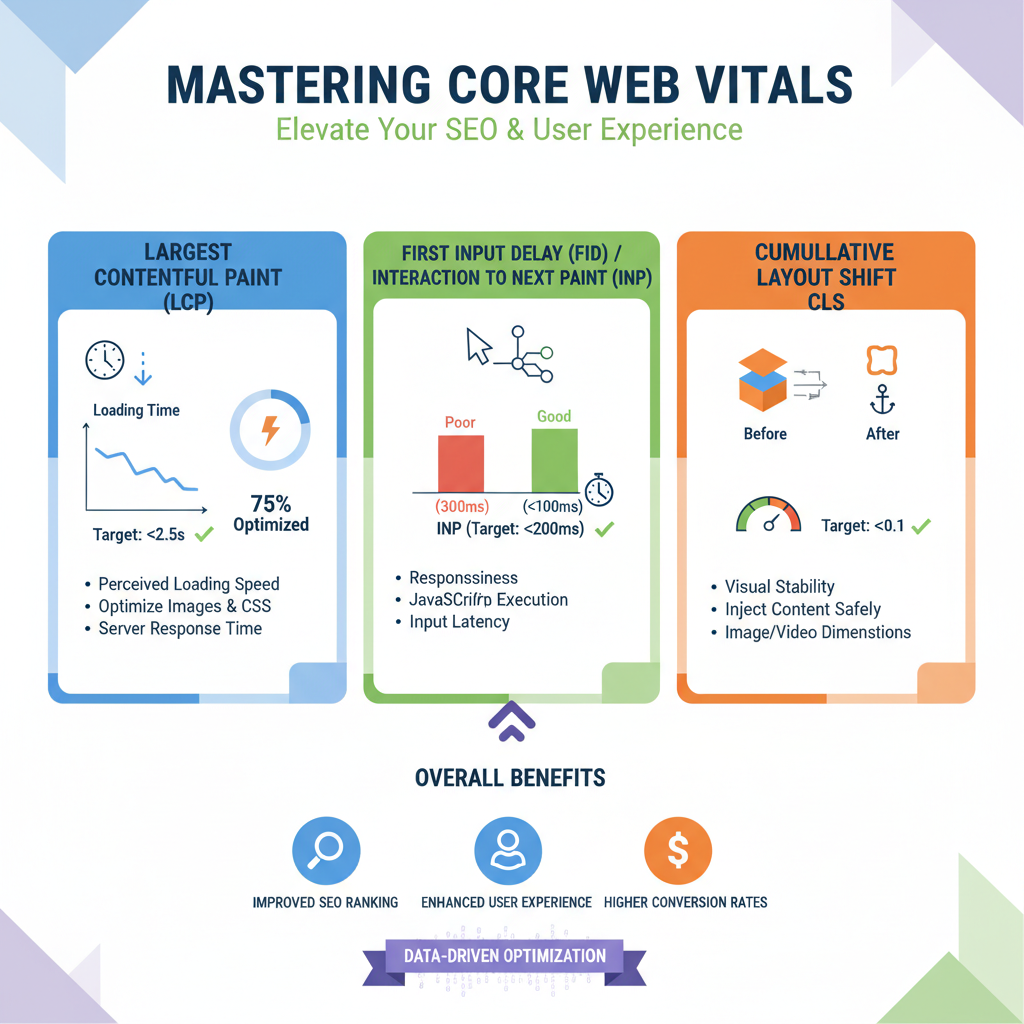
What are the three Core Web Vitals metrics?
The three core web vital metrics Google uses are:
Largest Contentful Paint (LCP): Perceived Load Speed
LCP is the time it takes for the largest image or text block visible within the viewport to render. It's a critical metric because it closely aligns with how users perceive your site's loading performance. A good LCP score is typically 2.5 seconds or less. Beyond this, users start to get impatient.
Optimization Strategies for LCP
1. Optimize Images and Media
Since the LCP element is often a large image or video, media optimization is usually the most impactful area.
- Use Modern Formats: Convert images to WebP or AVIF, which offer significantly better compression than JPEG or PNG.
- Implement Responsive Images: Use the
srcsetattribute to serve smaller images to mobile users instead of desktop-sized files. - Prioritize Loading: Add
fetchpriority="high"to your LCP image to tell the browser to download it immediately. - Avoid Lazy Loading for LCP: Ensure your "above-the-fold" LCP element does not have
loading="lazy", as this will delay its appearance.
2. Improve Server Response Time
If the browser takes too long to receive the first byte of data (TTFB), every other loading step is delayed.
- Utilize a CDN: A Content Delivery Network stores your site’s assets on servers closer to your users, reducing physical data travel time.
- Enable Page Caching: Use server-side or plugin-based caching so that pages don't need to be regenerated from scratch for every visitor.
3. Minimize Resource Blocking
Browsers often pause rendering to download and process CSS or JavaScript, which can "block" your LCP element from showing up.
- Defer Non-Critical JS/CSS: Move scripts that aren't needed for the initial view to the bottom of the page or load them asynchronously using the
deferorasyncattributes. - Inline Critical CSS: Include the CSS needed for the top of your page directly in the HTML to avoid waiting for an external stylesheet.
4. Enhance Discovery
The faster the browser "finds" the LCP element, the sooner it can start downloading it.
- Preload Key Assets: Use
<link rel="preload">in your HTML header for critical resources like the LCP image or important web fonts. - Avoid Client-Side Rendering for LCP: If possible, use Server-Side Rendering (SSR) so the LCP element is present in the initial HTML rather than waiting for a JavaScript framework to build it.
INP (Interaction to Next Paint): Measuring Interactivity
INP measures the time from when a user interacts with a page (e.g., clicking a link, tapping a button, using a custom-JavaScript-powered control) to the time when the browser is actually able to respond to that interaction. It focuses on the responsiveness of your site throughout the page's lifecycle. A good INP score is 200 milliseconds or less.
Note: INP is a field metric, meaning it relies on real user data (RUM). In lab testing, Total Blocking Time (TBT) serves as an excellent proxy for identifying responsiveness issues.
Optimization Strategies for INP
1. Break Up Long Tasks
Any JavaScript task that keeps the main thread busy for more than 50 milliseconds is considered a "long task". During these tasks, the browser cannot respond to user inputs.
- Yield to the Main Thread: Use
setTimeout()or the newerscheduler.yield()API to break large scripts into smaller, asynchronous chunks. - Code Splitting: Split large JavaScript bundles into smaller pieces that are only loaded when needed, rather than all at once during startup.
2. Reduce JavaScript Execution Time
The less JavaScript the browser has to parse and execute, the more quickly it becomes responsive.
- Remove Unused Code: Use tools like Chrome DevTools' Coverage tab to find and delete unused JavaScript or CSS.
- Minify and Compress: Minify your code to remove whitespace and use compression (like Gzip or Brotli) to speed up file delivery.
- Limit Polyfills: Only deliver polyfills to older browsers that actually need them to avoid wasting resources on modern browsers.
3. Minimize Third-Party Script Impact
Third-party scripts (like ads, analytics, or social widgets) often run heavy tasks that block the main thread.
- Audit Regularly: Identify which third-party scripts are slowing down your site and remove any that aren't providing significant value.
- Load Asynchronously: Use
asyncordeferattributes to ensure third-party scripts don't block the initial page load and user interaction.
4. Utilize Web Workers
Web workers allow you to run complex logic or heavy computations on a background thread, completely separate from the main thread. This keeps the main thread free to handle user interactions immediately.
Note: Total Blocking Time (TBT) is often used as a "lab" proxy for INP. If you improve your TBT in testing tools like Lighthouse, your real-world INP scores will typically improve as well.

Image: Fast interactivity is key to a positive user experience, reducing frustration.
Cumulative Layout Shift (CLS): Visual Stability Assurance
CLS measures the sum of all individual layout shift scores for every unexpected layout shift that occurs during the entire lifespan of the page. An unexpected layout shift is when a visible element changes its starting position from one rendered frame to the next. Think of how annoying it is when a button moves just as you're about to click it! A good CLS score is 0.1 or less.
Optimization Strategies for CLS
- Specify Explicit Dimensions: Always include
widthandheightattributes for images, videos, and iframes so the browser can reserve the correct amount of space while the asset downloads. - Reserve Space for Ads and Embeds: Style the container elements for advertisements or third-party embeds with specific dimensions to prevent them from "popping in" and shifting your text.
- Avoid Inserting Content Above Existing Elements: Do not dynamically inject banners, newsletters, or notifications at the top of the page after the initial render, as this pushes all underlying content down.
- Optimize Web Fonts: Use
font-display: swapor preload critical fonts to prevent a "Flash of Unstyled Text" (FOUT), which can cause layout shifts when the fallback font is replaced by the custom font.
Essential Tools for Measuring Core Web Vitals
You can't optimize what you don't measure. As a seasoned SEO, I rely on these indispensable tools to diagnose and track Core Web Vitals performance:
1. Google PageSpeed Insights (PSI)
This is often the best starting point for a quick, comprehensive report.
- Dual Data: It combines field data from the Chrome User Experience Report (CrUX) with lab data from Lighthouse.
- Actionable Advice: It provides specific, prioritized recommendations to improve your scores for a single URL.
2. Google Search Console (GSC)
GSC is essential for monitoring your entire site's performance over time.
- Site-Wide Snapshot: The Core Web Vitals report groups your pages into "Poor," "Needs Improvement," or "Good" based on real-world user data.
- Issue Tracking: It helps you identify collections of pages with similar issues, making it easier to fix problems at scale.
3. Chrome DevTools
Built directly into the Google Chrome browser, these tools are perfect for real-time debugging.
- Performance Panel: You can see live metrics as you interact with a page, which is particularly helpful for catching layout shifts or interaction delays as they happen.
- Lighthouse Tab: Run automated audits locally to test the impact of code changes before you even publish them.
4. WebPageTest
For advanced users, WebPageTest offers deep technical insights.
- Detailed Diagnostics: It provides filmstrip views, waterfall charts, and "connection throttling" to simulate how your site performs on slow mobile networks or in different geographic regions.
5. Web Vitals Chrome Extension
This extension provides instant feedback as you browse.
- Real-Time HUD: It displays a small "Heads Up Display" on any page you visit, showing your current LCP, CLS, and INP (or FID) scores immediately.
Tip: Lab vs. Field Data: Always remember that "lab" tools (like Lighthouse) use simulated environments, while "field" tools (like Search Console) use data from real users. Google uses field data for ranking, so it should be your primary focus.
Key Core Web Vitals Metrics & Their Impact on UX and SEO
| Largest Contentful Paint (LCP) | Perceived load speed of the main content (largest visible element). | ≤ 2.5 seconds | Crucial for initial engagement. Faster perceived loading reduces bounce rates, improves user satisfaction, and directly influences the "loading" aspect of Google's Page Experience. | Interaction to Next Paint (INP) | Responsiveness to user interaction during page load. | ≤ 100 milliseconds | A site that responds quickly feels snappy and professional. Enhances user trust and satisfaction, directly influencing the "interactivity" aspect of Page Experience. | Cumulative Layout Shift (CLS) | Visual stability of the page during its entire lifecycle. | ≤ 0.1 | Prevents frustrating and disorienting content shifts. Improves readability, prevents accidental clicks, and directly impacts the "visual stability" aspect of Page Experience. |
|---|
How can you optimize your website for Core Web Vitals?
Achieving "Good" Core Web Vitals scores across your entire site requires a systematic and often multi-faceted approach. Here's a checklist of strategic actions that have consistently yielded results in my experience:
- Implement Robust Caching: Leverage browser caching (for static assets), server caching (for dynamic content), and CDN caching. This drastically reduces load times for returning visitors and distributed users.
- Comprehensive Image Optimization: This cannot be overstated. Use responsive images, compress them ruthlessly without compromising quality, adopt modern formats (WebP, AVIF), and lazy-load all images outside the initial viewport.
- Minify & Compress Code: Reduce the size of your HTML, CSS, and JavaScript files by removing unnecessary characters. Employ server-side compression (Gzip or Brotli) to further shrink file sizes before delivery.
- Eliminate Render-Blocking Resources: Move critical CSS inline directly into the HTML for immediate rendering, and defer or asynchronously load all other CSS and JavaScript files using attributes like
asyncordefer. - Reduce Server Response Time (TTFB): Work closely with your hosting provider to ensure optimal server performance. Optimize database queries, reduce complex server-side processing, and consider preloading key requests using
<link rel="preconnect">or<link rel="dns-prefetch">. - Optimize Web Fonts: Self-host fonts if licensing allows, use
font-display: swapto prevent invisible text during font loading, and preload critical fonts necessary for above-the-fold content. - Audit and Streamline Third-Party Scripts: Every script from an external source (analytics, ads, social sharing buttons, chat widgets) adds overhead. Ruthlessly audit and remove unnecessary ones, or load them efficiently with
async/defer. - Prioritize Above-the-Fold Content: Ensure the content users see immediately upon landing loads as fast as humanly possible. This includes critical images, text, and interactive elements.
- Maintain Visual Stability with Explicit Dimensions: Always specify the
widthandheightattributes for images, videos, iframes, and ads. This allows the browser to reserve space and prevent layout shifts.
"Google is in the business of information retrieval, and if your information isn't retrieved quickly and pleasantly, you're not playing by the new rules. Core Web Vitals are those rules in action."
– A 30-year veteran SEO (that's me, Brian Keary!)
FAQs About Core Web Vitals
The Future of Page Experience: Beyond Core Web Vitals
While Core Web Vitals are foundational and represent Google's current focus, the emphasis on user experience is a continuous evolution. Google is constantly exploring new metrics and signals that contribute to a holistic "page experience." The current CWV are the core, but a truly future-proof SEO strategy involves looking beyond them:
My advice, forged over 30 years in this ever-changing industry, remains consistent: Don't chase algorithms. Chase the user. Build a website that truly delights your visitors, offers genuine value, and provides a seamless experience, and Google will reward you for it with visibility and trust.
Conclusion: Your Path to Superior Performance
Mastering Core Web Vitals isn't just a technical task; it's a strategic imperative for modern SEO. It’s about delivering a faster, more responsive, and visually stable website that delights users and earns Google's favor. By diligently optimizing for Largest Contentful Paint (LCP), Interaction to Next Paint (INP), and Cumulative Layout Shift (CLS), you’re not merely improving your rankings; you're building a more resilient, user-centric online presence that stands the test of time and algorithm updates.
The journey to excellent Core Web Vitals is ongoing. It requires continuous monitoring, testing, and refinement as your site evolves and user expectations shift. But the rewards – improved search visibility, lower bounce rates, higher conversions, and ultimately, a thriving digital business – are well worth the effort. Start your deep dive into Core Web Vitals optimization today, and watch your website reach new heights in performance and user satisfaction.
If you need help in implementing these SEO tracking tools on your website check out our SEO plans.
About the Author

Brian Keary
Founder & Lead Developer
Brian is the founder of BKThemes with over 20 years of experience in web development. He specializes in WordPress, Shopify, and SEO optimization. A proud alumnus of the University of Wisconsin-Green Bay, Brian has been creating exceptional digital solutions since 2003.
Expertise
Writing since 2003