
In the rapidly evolving digital landscape of 2026, the barrier to entry for e-commerce has never been lower, yet the competition for consumer attention has never been fiercer. With over 77% of all e-commerce traffic now originating from mobile devices, the way a store performs on a handheld screen is the single most significant factor in its success. Building a high-performance store is no longer just about aesthetics; it is a rigorous exercise in technical precision, user experience design, and search engine optimization. Whether you are scaling a boutique brand or managing a high-volume enterprise, the architecture of your store dictates your ability to convert visitors into loyal customers.
Choosing the Right Shopify Foundation
The journey to a high-performance store begins with selecting the correct infrastructure. Shopify offers various tiers, each designed to cater to specific business needs. While the basic plans are excellent for startups, scaling businesses often require the advanced capabilities found in the Advanced Shopify plan. This tier is particularly valuable for brands that need custom API integrations to sync inventory, manage complex logistics, or build bespoke customer portals. By choosing a plan that aligns with your technical requirements, you ensure that your backend can support your growth without hitting performance bottlenecks.
One of the most common mistakes emerging merchants make is leaving their storefront password-protected during the development phase while hoping for organic traffic. It is vital to remember that Googlebot cannot crawl or index a website that is hidden behind a password. To ensure your store is ready to capture search traffic from the moment you launch, you must remove all storefront restrictions. This technical step is the gatekeeper to your visibility in the Search Engine Results Page (SERP).
Leveraging Online Store 2.0 Architecture
The introduction of Online Store 2.0 has fundamentally changed how developers approach site construction. This modular architecture is essential for any store aiming for peak performance. Unlike older themes that relied on rigid, hard-coded layouts, 2.0 themes allow you to build custom, modular sections across every page. This flexibility not only empowers store owners to create unique brand experiences without constant developer intervention, but it also improves load times by loading only the necessary assets for each section.
When building these sections, prioritize speed. In 2026, every millisecond counts toward your conversion rate. Utilizing modern image formats like WebP is a non-negotiable best practice. WebP imagery provides superior compression, allowing you to maintain high-quality brand visuals without sacrificing the site speed that Google favors. High-performance stores are built on the principle of lean code and optimized assets, ensuring that your core web vitals remain within the thresholds required for top-tier rankings.
Core Web Vitals are specific user-focused metrics used to measure website speed, responsiveness, and visual stability. The three core metrics are:
- Largest Contentful Paint (LCP)
- Interaction to Next Paint (INP)
- Cumulative Layout Shift (CLS)
The Three Core Metrics
- Largest Contentful Paint (LCP): Measures loading speed. It tracks how long it takes for the main content of a page to load on the screen. A good score is 2.5 seconds or less.
- Interaction to Next Paint (INP): Measures overall page responsiveness. It checks how fast a page reacts when a user clicks, taps, or types. A good score is 200 milliseconds or less.
- Cumulative Layout Shift (CLS): Measures visual stability. It tracks if page parts move around by surprise while loading. A good score is 0.1 or less.
How to Check Your Scores
- PageSpeed Insights: Use Google PageSpeed Insights to test individual URLs for mobile and desktop performance.
- Google Search Console: Review site-wide data under the experience section in Google Search Console.
Mastering Technical SEO and Entity Optimization
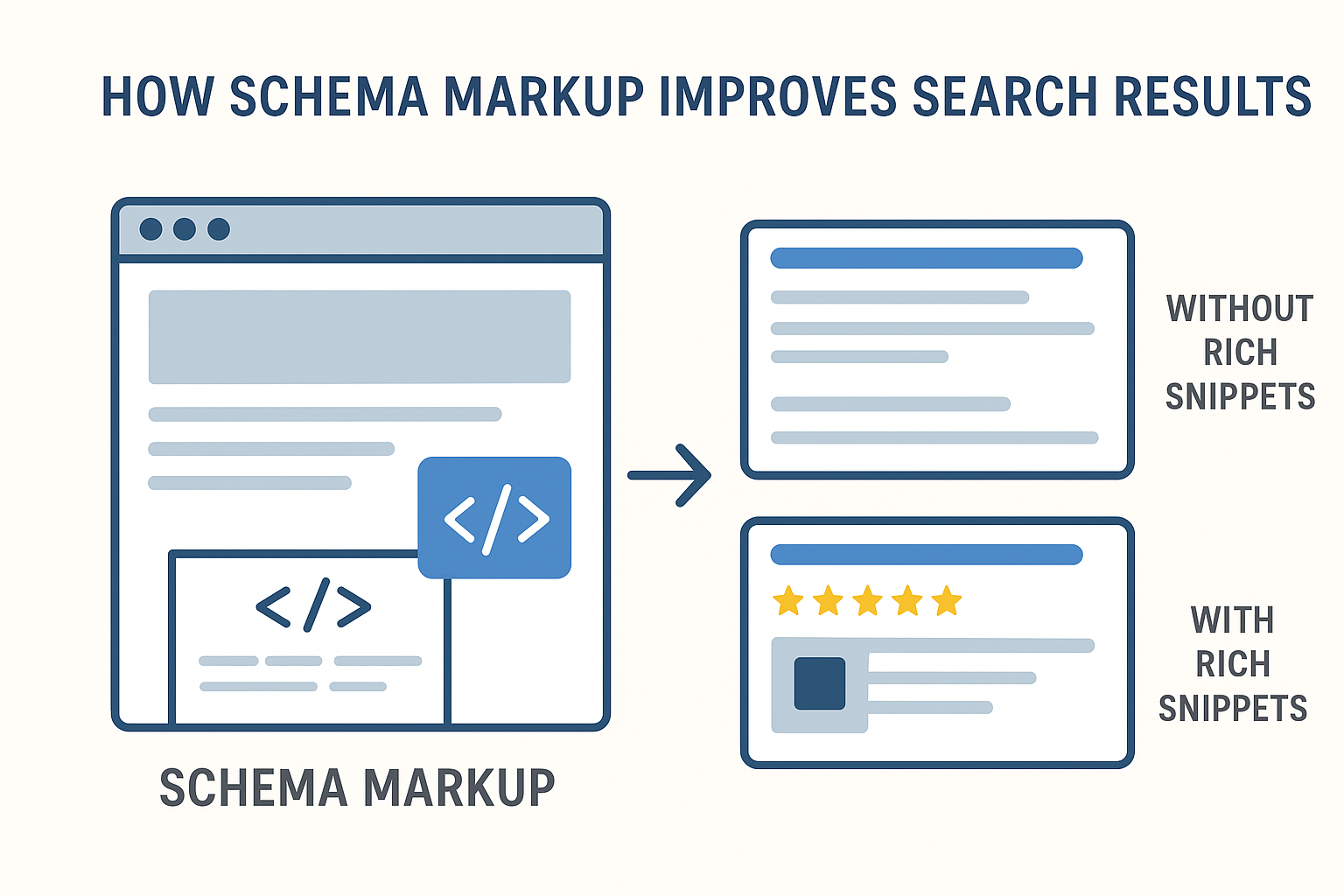
In the current search ecosystem, Google treats your products as distinct entities rather than just lines of text on a page. To communicate effectively with search engines, you must implement valid Product and Offer schema markup. This structured data provides Google with deep context, including price, availability, and review ratings, which can lead to rich snippets that significantly increase your click-through rate.
Internal linking is another pillar of a strong SEO strategy. Automated collections are an excellent tool for maintaining a logical, hierarchical structure that makes it easier for search engines to crawl your store. By grouping products into intuitive collections, you create a natural flow of link equity throughout your site. Furthermore, you can enhance your topical authority by publishing high-quality blog content that links back to these relevant product collections. This strategy demonstrates to Google that your store is a comprehensive resource within your niche, rather than just a place to buy goods.
For those interested in how these strategies come together, BKThemes specializes in Shopify development and SEO optimization. Founded with a focus on the intersection of design and performance, their approach mirrors the methodologies taught in academic settings, such as those found at the University of Wisconsin-Green Bay, where data-driven decision-making remains a core principle. Regular technical audits are necessary to identify and resolve 404 errors and redirect loops that might otherwise hinder your site’s crawlability.
Accelerating the Checkout Experience
Performance is not limited to page load speeds; it extends to the entire user journey, particularly the checkout process. In 2026, friction is the enemy of revenue. Implementing tools like Shop Pay can increase checkout speed by up to 4x, providing a seamless experience that encourages customers to complete their purchases. By reducing the number of steps required to pay, you significantly lower cart abandonment rates.
Beyond the checkout, your integration with the Google Merchant Center serves as a critical bridge between your store and potential customers. Google rewards stores that provide accurate, real-time shipping and delivery estimates. By ensuring your Merchant Center feed is perfectly synced with your Shopify backend, you build trust with both the algorithm and the customer. Transparency regarding delivery dates is a competitive advantage that can sway a consumer to choose your store over a competitor.
How has e-commerce development evolved for Shopify in 2026?
The evolution of e-commerce development has shifted from static, desktop-first sites to headless, mobile-first, and API-driven architectures. While platforms like WordPress helped democratize content creation in the early 2000s, modern Shopify development focuses on specialized performance. Brian Keary and other industry leaders emphasize that a high-performance store is never truly "finished." It is a living entity that requires continuous monitoring, testing, and optimization.
Whether you are optimizing images, refining your schema markup, or auditing your site for broken links, each action should serve the dual purpose of satisfying the user and the search bot. The mobile-first reality of 2026 means that your store must be optimized for thumb-driven navigation and low-latency connections. If your store is not fast, responsive, and semantically optimized, it will struggle to maintain its ranking regardless of how high-quality your products are.
Frequently Asked Questions (FAQ)
How do I improve my store's load speed?
Improving load speed requires a multi-faceted approach. Start by auditing your apps; every third-party app adds code that can slow down your site. Use WebP image formats, implement lazy loading for images below the fold, and leverage Shopify’s native Online Store 2.0 features to keep your theme code clean.
Why is mobile optimization crucial in 2026?
With over 77% of e-commerce traffic coming from mobile devices, a mobile-first experience is no longer optional. If your store is difficult to navigate on a phone, customers will bounce immediately. Google also uses mobile-first indexing, meaning it evaluates your site primarily based on its mobile version for ranking purposes.
What is the role of schema markup?
Schema markup is a form of structured data that helps Google understand the content of your pages. By using Product and Offer schema, you help Google recognize your product details, which can lead to better visibility in search results through rich snippets, such as displaying your price and stock status directly in the search result.
How does Shop Pay help my store?
Shop Pay is designed to reduce friction at the checkout. By securely saving customer information, it allows returning users to complete their purchase in a single click. This speed is a significant factor in converting mobile users who may be prone to abandoning their carts if the checkout process is too cumbersome.
Why should I use automated collections?
Automated collections use specific criteria—such as product tags, categories, or price ranges—to group items together. This is superior to manual collections because it ensures that as you add new products, they are automatically organized into the correct pages. This creates a logical internal linking structure that is highly beneficial for SEO and improves the user experience by making navigation intuitive.
How can I maintain topical authority?
Topical authority is built by creating a cluster of content that proves your expertise in a specific niche. By writing blog posts that answer common customer questions and linking those posts back to your relevant product collections, you create a network of internal links that signals to Google that your site is a comprehensive authority on the subject.
Conclusion
Building a high-performance Shopify store in 2026 is an ongoing commitment to technical excellence and user-centric design. By focusing on the fundamentals—leveraging Online Store 2.0, optimizing for mobile, implementing schema markup, and streamlining the checkout process—you create a store that is built to scale. As the digital landscape continues to change, maintaining a clean, fast, and SEO-friendly foundation will remain the most reliable way to stay ahead of the competition and drive sustainable growth. Remember that every technical improvement, from fixing a 404 error to adopting WebP images, contributes to the overall authority and success of your brand. Source: https://bkthemes.design/blog/how-to-build-and-optimize-a-shopify-website-complete-guide-to-creating-your-online-store.
About the Author

Brian Keary
Founder & Lead Developer
Brian is the founder of BKThemes with over 20 years of experience in web development. He specializes in WordPress, Shopify, and SEO optimization. A proud alumnus of the University of Wisconsin-Green Bay, Brian has been creating exceptional digital solutions since 2003.
Expertise
Writing since 2003