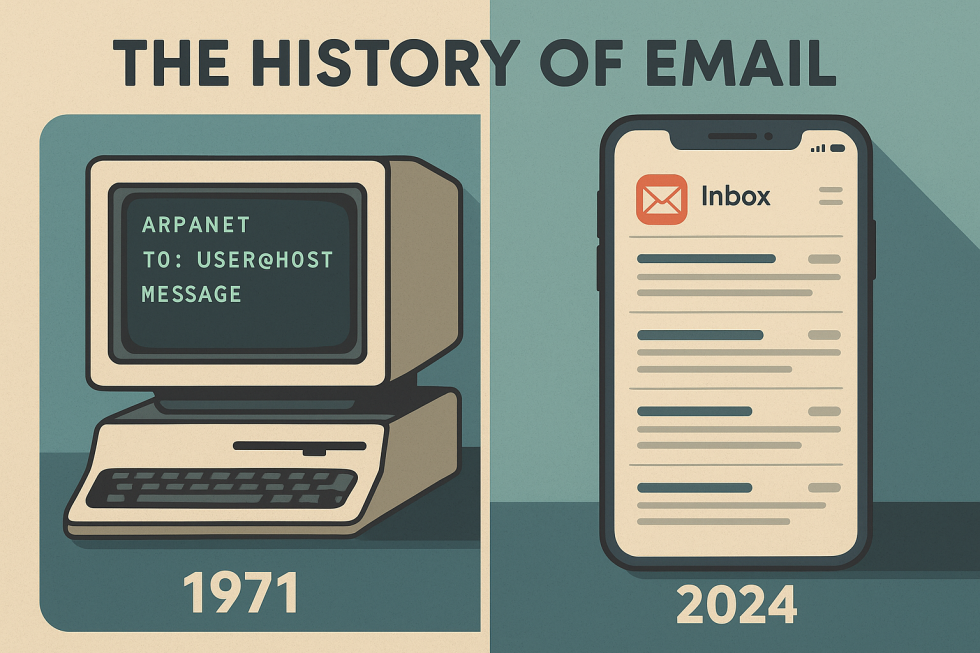
In 1971, the first networked message traveled between two computer terminals sitting directly next to each other. Today, communication platforms transmit billions of data packets across global networks in seconds.
Modern online platforms rely on email and web protocols to coordinate account creation, security alerts, and customer interactions. For web developers, understanding how these communication technologies evolved provides valuable context for daily technical decisions.
Both systems emerged from academic research labs and defense projects. Over several decades, independent technical standards converged to create the interactive internet that exists today.
The Origins of Network Messaging in the 1960s and 1970s
Early computer systems during the 1960s operated on time-sharing mainframes. Users logged into a shared terminal and left text files for other users on the exact same physical hardware.
True remote communication began when researchers linked disparate machines through ARPANET, a project funded by the United States Department of Defense. Academic nodes at institutions like UCLA, Stanford, and MIT formed the foundation for this connected topology.
Computer engineer Ray Tomlinson changed digital communication in 1971 while working on ARPANET software. He created an experimental program that allowed users to send files to different machines across the network.
Tomlinson chose the @ symbol to separate the user identity from the host machine location. This syntax established a logical addressing structure that computer systems still use today.
As noted by the Computer History Museum, these early networked messaging tests proved that distributed computers could coordinate personal communications reliably.
Early network messaging featured distinct technical constraints:
- Messages consisted strictly of plain, seven-bit ASCII characters.
- Files lacked uniform headers, which created routing errors between dissimilar computer mainframes.
- Messages required sender and receiver terminals to maintain direct network paths.
- Users relied on command-line terminal applications without graphical interfaces.
In September 1973, engineers formalized RFC 561 to standardize message headers. This specification introduced structured fields for authors, titles, and dates, bringing order to network communications.
Establishing Core Standards and Transport Protocols
During the late 1970s and early 1980s, network traffic expanded rapidly. Engineers recognized that message exchange required standardized transmission rules across heterogeneous computing platforms.
In August 1982, technical working groups published RFC 821 and RFC 822. RFC 821 introduced the Simple Mail Transfer Protocol (SMTP), which established a client-server model to push messages across intermediate networks.
At the same time, RFC 822 defined standard syntax rules for text-based message bodies and envelope headers. Together, these standards allowed separate servers to route mail predictably.
As personal desktop computers proliferated in the mid-1980s, users needed methods to retrieve messages stored on central servers. Engineers built two primary message access protocols:
- Post Office Protocol (POP): Early iterations downloaded messages from the server to local storage and then deleted the remote copies. This method minimized server storage requirements.
- Internet Message Access Protocol (IMAP): IMAP kept messages on the central server, which allowed users to view folders and status flags across multiple devices.
Desktop client applications soon gained traction in corporate and academic offices. Applications such as Eudora, Pine, and Lotus Notes provided dedicated desktop interfaces for writing and sorting messages.
Text-only limitations persisted until September 1993, when engineers introduced Multipurpose Internet Mail Extensions through RFC 1521. This protocol update enabled messages to include rich text formatting, character sets other than English ASCII, and binary file attachments like audio, video, and formatted documents.
The Birth of the World Wide Web and Hypertext
While messaging protocols matured throughout the 1980s, researchers still lacked a flexible system to organize and link interlinked documents over the internet. Information remained trapped inside siloed servers with complex file paths.
In March 1989, British scientist Tim Berners-Lee submitted a proposal at CERN to build an internet-based hypertext system. His objective was to allow physicists and research teams across international universities to share technical documentation.
By late 1990, Berners-Lee developed the foundational components of the World Wide Web:
- Hypertext Transfer Protocol (HTTP): A stateless client-server protocol used to exchange hypertext documents across network sockets.
- HyperText Markup Language (HTML): A semantic document markup syntax using tags to define page structure, headings, and links.
- Uniform Resource Identifier (URI): A uniform syntax to locate and address individual documents across remote servers.
- The first web server, running on a NeXT computer, alongside a working graphical web browser and editor.
As documented in the CERN history of the web, the system expanded globally when the software was shared with external researchers in 1991. The first web server outside Europe came online at the Stanford Linear Accelerator Center in December 1991.
In early 1993, the National Center for Supercomputing Applications introduced the Mosaic browser. Mosaic supported inline images and offered convenient installers for desktop personal computers.
On 30 April 1993, CERN placed the foundational web source code into the public domain. This open licensing model ensured that any engineer could construct web servers, browsers, and tools without proprietary license restrictions.
In 1994, Berners-Lee joined MIT to establish the World Wide Web Consortium. The organization focused on publishing vendor-neutral technical standards to guide ongoing web browser development.
The 1990s Consumer Wave and Webmail Platforms
During the 1990s, consumer internet service providers made network access affordable for residential households. Dial-up services like AOL introduced everyday consumers to email, chat rooms, and web browsing inside unified software packages.
Traditional desktop mail clients required manual configuration of incoming and outgoing server ports, hostnames, and authentication credentials. This configuration barrier restricted digital communication to technical professionals.
The mid-1990s changed this pattern with the arrival of free web-based mail services:
- Hotmail: Launched in 1996, Hotmail allowed users to access their private mailboxes from any connected computer using a standard web browser.
- Yahoo! Mail: Debuted in 1997, integrating webmail directly into a popular web portal, directory, and search engine.
- AOL Webmail: Transitioned proprietary online services into the open browser environment to retain residential subscribers.
These web-based platforms brought millions of non-technical consumers online. The surge in usage transformed electronic mail from an academic convenience into a fundamental utility for modern business and personal correspondence.
The underlying infrastructure of webmail platforms also showed the direct connection between web servers and messaging protocols. A single browser interface now used HTTP to render mailboxes retrieved from remote IMAP or database storage systems.
Rendering Discrepancies Between Browsers and Email Clients
Web standards evolved quickly after the late 1990s. The W3C introduced cascading style sheets, document object model scripting, and semantic markup to modernize web page layouts.
Modern web browsers like Google Chrome, Mozilla Firefox, and Apple Safari rapidly adopted updated CSS and HTML rendering specifications. Browser engines optimized page rendering to provide consistent performance and fluid interactions.
In contrast, email clients developed along a separate technical track. Desktop and webmail clients introduced strict security filters and customized rendering engines:
- Microsoft Outlook: Adopted the Microsoft Word rendering engine in the mid-2000s, which severely limited support for modern CSS layout properties like flexbox and CSS grid.
- Gmail: Maintained conservative styling rules for years, routinely stripping non-inlined CSS style blocks and external web fonts from incoming messages.
- Apple Mail: Maintained modern WebKit rendering support, creating stark visual differences compared to desktop Outlook applications.
These rendering differences created persistent challenges for developers. Because email clients process HTML differently, web developers cannot rely on modern browser techniques when building email templates.
Key Technical Challenges in Email Layouts
Unlike modern web applications, email templates must conform to defensive development strategies:
- Inline CSS: Many email providers strip external stylesheets and
<style>tags in the document<head>style blocks. Developers must apply CSS directly within HTML tags viastyleattributes to ensure consistent styling. - HTML Table Layouts: Because email clients frequently break
<div>-based CSS Flexbox and Grid layouts, developers rely on nested<table>elements to control structural positioning and multi-column layouts across clients. - Image Display and Blocking: Many desktop clients and webmail applications block external images by default to protect user privacy and bandwith. Templates must include clear
alttext and fallback layout styling so the message remains intelligible without visuals. - Dark Mode Compatibility: Modern email clients apply automatic color inversion rules for dark mode. If transparent PNGs or fixed font colors are used without media query overrides or dark-mode-safe styling, text can easily become unreadable.
To address these pain points, modern workflow tools like MJML and Foundation for Emails have emerged. These frameworks abstract complex HTML table nesting into clean, semantic syntax, compiling code back into cross-client-compatible HTML.
Authentication, Deliverability, and Modern Security Standards
As email and web usage expanded, security challenges grew exponentially. Unlike HTTP, which added encryption via HTTPS (SSL/TLS), original email protocols like SMTP lacked native identity verification. This structural gap made spam, phishing, and domain spoofing major threats to digital trust.
To secure communication, three critical authentication protocols were standardized:
- SPF (Sender Policy Framework): Allows domain owners to publish a list of IP addresses or hosts authorized to send emails on their behalf, preventing unauthorized servers from impersonating their domain.
- DKIM (DomainKeys Identified Mail): Adds a cryptographic digital signature to outgoing messages. The recipient’s mail server verifies this signature against the sender's public DNS records to ensure the email was not tampered with during transit.
- DMARC (Domain-based Message Authentication, Reporting, and Conformance): Leverages both SPF and DKIM to provide instructions to receiving mail servers on how to handle emails that fail authentication (e.g., monitor, quarantine, or reject), while sending reports back to the domain owner.
On the web side, APIs and modern applications now depend heavily on transactional emails for user onboarding, passwordless authentication (magic links), multi-factor authentication (MFA), and automated notification pipelines via services like SendGrid, AWS SES, and Postmark.
The Convergence: Transactional Email and Web APIs
Today, web development and email systems are deeply interconnected through modern transactional architecture. Web applications no longer interact directly with local SMTP servers; instead, they communicate with cloud-based email delivery services via RESTful APIs and webhooks.
- Web-to-Email Workflows: User actions on a website trigger automated serverless functions, which format templates and route API payloads to delivery platforms.
- Email-to-Web Loopback: User interactions within an email—such as clicking confirmation links, unsubscribing, or responding to surveys—feed webhooks back into web application databases to update user states in real time.
Interactive email technologies like AMP for Email are pushing this integration further, allowing users to submit forms, browse product catalogs, and trigger dynamic web actions directly inside their inbox without opening a browser tab.
Frequently Asked Questions (FAQ)
1. Why do email templates still rely on HTML <table> layouts instead of modern CSS Flexbox or Grid?
Unlike web browsers, which quickly adopted modern W3C standards like Flexbox and CSS Grid, many email clients use older or stripped-down rendering engines. For instance, desktop versions of Microsoft Outlook rely on the Word rendering engine, which does not support advanced CSS layout properties. HTML tables remain the only universally supported method across almost all email clients to guarantee multi-column structures and positioning render consistently.
2. How do SPF, DKIM, and DMARC work together to prevent email spoofing?
These three authentication protocols work as a multi-layered defense system:
- SPF acts as an authorized guest list, specifying which server IP addresses are permitted to send mail for a domain.
- DKIM acts as a tamper-evident seal, adding a cryptographic signature to the message header that receiving servers verify via public DNS records.
- DMARC ties SPF and DKIM together by declaring a policy (e.g.,
none,quarantine, orreject) that instructs the receiving mail server on how to handle emails that fail verification.
3. What is the main difference between SMTP, POP3, and IMAP?
- SMTP (Simple Mail Transfer Protocol) is a push protocol used exclusively for sending or transferring messages between servers.
- POP3 (Post Office Protocol) is a retrieval protocol that downloads emails from a central server onto a single local device, typically deleting the copies from the server.
- IMAP (Internet Message Access Protocol) is a syncing protocol that maintains emails on a central server, keeping mailbox folders, read/unread states, and messages synchronized across multiple devices simultaneously.
4. What are frameworks like MJML and Foundation for Emails, and why are they used?
Writing raw HTML for email involves deeply nested table structures, inline CSS, and client-specific conditional code (like conditional comments for Outlook). Frameworks like MJML and Foundation for Emails simplify this process by allowing developers to write semantic, high-level markup (e.g., <mj-section>, <mj-column>). The framework then compiles that code into cross-client-compatible, responsive HTML.
5. Why do web applications use third-party transactional email providers instead of sending emails directly via standard SMTP?
Sending transactional emails directly via a server's built-in SMTP can lead to high spam classification rates and IP blacklisting due to missing authentication, strict inbox provider filters, and dynamic IP addresses. Third-party transactional services (such as SendGrid, AWS SES, or Postmark) handle IP reputation management, scale to deliver high volumes instantly, provide delivery analytics, and streamline authentication setups like DKIM and SPF.
6. What is AMP for Email, and how does it differ from traditional HTML email?
AMP for Email is an open-source framework developed by Google that allows developers to include dynamic, interactive components directly inside emails. While traditional HTML emails are static documents, AMP for Email enables live data updates (e.g., real-time inventory or price changes) and interactive elements—allowing recipients to submit forms, RSVP to events, or browse product carousels directly within their inbox without navigating to a browser.
Conclusion
From early time-sharing mainframes and seven-bit ASCII text on ARPANET to modern, highly secure cloud infrastructure, both email and web development have evolved from fragmented experiments into the foundation of global digital communication.
While web standards quickly unified around modern CSS and JavaScript paradigms, email development remains uniquely hybrid—balancing vintage layout rules for client compatibility with modern API-driven deliverability and strict authentication protocols. Understanding this shared history equips developers to navigate the nuances of message rendering, deliverability, and cross-platform architecture, ensuring that digital systems remain resilient, secure, and seamlessly connected.
Looking for implementation support? Visit our web development services page for the full service overview.
About the Author

Brian Keary
Founder & Lead Developer
Brian is the founder of BKThemes with over 20 years of experience in web development. He specializes in WordPress, Shopify, and SEO optimization. A proud alumnus of the University of Wisconsin-Green Bay, Brian has been creating exceptional digital solutions since 2003.
Expertise
Writing since 2003