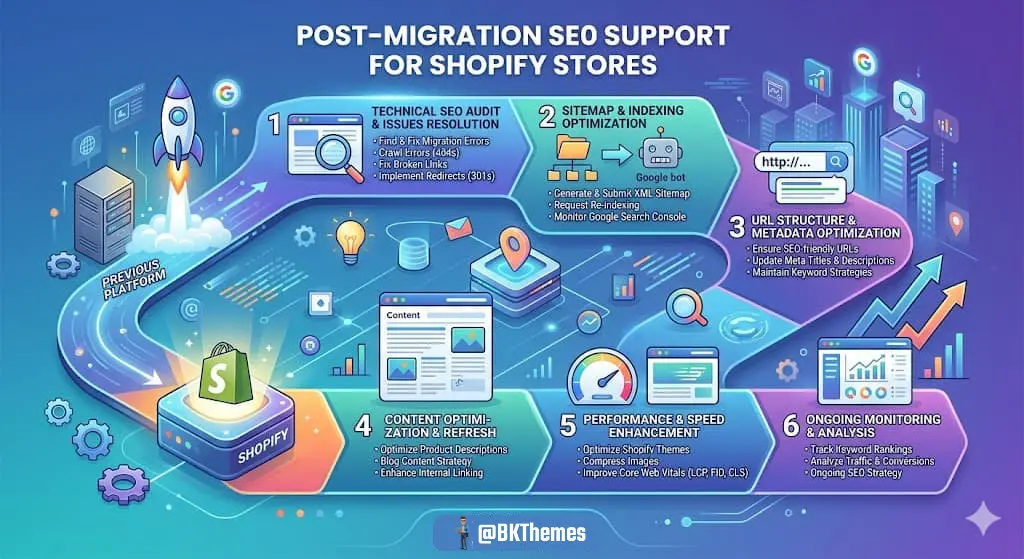

Your traffic graph is flatlining. You know a BigCommerce migration will fix the platform problems, but every time you open a project plan, one thought stops you cold: what happens to the rankings you spent years building? I've watched merchants delay a move for eighteen months out of pure fear. That delay cost them far more than a well-managed migration ever would have.
Here's the honest truth. A migration is not an SEO event you survive. It's a controlled handover between two systems, and you are the one holding the clipboard. Get the handover right and most sites recover within weeks. Get it wrong and you hand Google a jigsaw puzzle with missing pieces. This guide walks through the whole process, from the URL inventory you build before anything moves to the Search Console monitoring you run for ninety days after launch.
Key Takeaways
- Plan before you move. The URL inventory and redirect map are the migration. Everything else is execution.
- Preserve paths where possible. BigCommerce lets products and categories keep existing paths through the custom URL field.
- Redirect to the closest equivalent. Never funnel unrelated old URLs to the homepage.
- Check channel coverage. Storefront channels get automatic redirects. Non-storefront channels don't.
- Baseline everything. Without pre-launch data, you can't measure recovery.
- Give it ninety days. Judge the migration on a quarter, not a weekend.
What Does a BigCommerce Migration with SEO Support Actually Involve?

A BigCommerce migration with SEO support means moving your catalog, content, and URLs to BigCommerce while deliberately preserving the signals search engines use to rank you. It is part planning, part redirect engineering, and part post-launch monitoring. The SEO work starts weeks before launch and continues for months after.
Think of it like moving a restaurant to a bigger location. The kitchen equipment is your catalog. The signage is your metadata. But the regulars need to know where you went, and the map apps need updating. If you skip that step, the new place sits empty while the old address keeps getting reservations.
SEO support during a migration covers five workstreams:
- URL inventory and mapping: Every old URL gets a documented destination before launch.
- Redirect engineering: Changed paths get permanent, server-side redirects that point to the closest equivalent page.
- Metadata migration: Titles, meta descriptions, and heading structures carry over or get improved.
- Technical hygiene: Canonicals, sitemaps, robots.txt, and internal links all point to the new structure.
- Post-launch monitoring: Indexed URL counts, crawl errors, and traffic get checked against a baseline.
Each of these is unglamorous. Each one matters more than any single "SEO trick" you've read about.
Why Do Stores Lose Rankings During a Migration?
Most ranking losses during a migration come from broken redirects, missing content, and slow indexing of new URLs. The platform itself is rarely the culprit. BigCommerce can rank perfectly well. The damage usually happens in the gap between what the old site had and what the new site launched with.
I've audited migrations where 40% of product URLs returned 404s on launch day. I've seen category pages consolidated "for simplicity" and watched long-tail traffic evaporate. None of those were platform failures. They were planning failures.
The most common causes, in rough order of damage:
- Redirect chains and loops. Old URL redirects to another old URL, which redirects to the new one. Each hop dilutes the signal.
- Everything pointed at the homepage. Google's guidance on moving a site with URL changes explicitly warns against sending many unrelated old URLs to the homepage. It reads as a soft 404.
- Content dropped in the rebuild. A product description that ranked for a niche phrase quietly disappears because the new template pulls from a different field.
- Accidental noindex. A staging setting ships to production. Crawlers see nothing. Traffic falls off a cliff within days.
- Internal links left pointing at old paths. Every internal link becomes a redirect hop, slowing crawl efficiency.
Notice that four of those five are process problems, not platform problems. That's encouraging. Process problems have process solutions.
How Do You Build an SEO-Safe Migration Plan Before Launch?

You build an SEO-safe migration plan by inventorying every URL, mapping each one to a destination, and testing redirects in staging before DNS ever changes. The plan is a spreadsheet and a checklist, not a feeling. Build it early, because every later decision depends on it.
BigCommerce's own catalog data migration guidance notes that products and categories can keep their existing paths through the custom URL field, and that changed URLs need 301 redirects. That's your first lever: preserve paths wherever you can. Fewer changes mean fewer redirects mean less risk.
Step 1: Crawl the Old Site and Build the URL Inventory
Run a full crawl of your current store. Export every indexable URL, plus the ones in your XML sitemap. Add any URLs you know about from analytics that the crawler missed. Your inventory should include:
- Product URLs with current traffic and revenue data attached
- Category and collection URLs with their ranking keywords
- Blog and content URLs with backlink counts
- Landing pages built for campaigns or paid traffic
- Paginated URLs and filter parameters that generate indexable variants
Tag each URL with a priority tier. Tier one is any URL with steady organic search traffic or external links. Tier two is everything else that's indexed. Tier three is junk you're happy to retire.
Step 2: Map Every URL to a Destination
For each tier-one and tier-two URL, write down the new destination. Where a product keeps its path, the mapping is one-to-one and easy. Where a category gets restructured, map to the closest equivalent, not the homepage. Where content genuinely has no successor, consider whether you should keep it rather than lose it.
A simple mapping table keeps everyone honest:
| Old URL Type | Typical New Destination | Redirect Needed? | Risk Level |
|---|---|---|---|
| Product with same path | Same path via custom URL field | No | Low |
| Product with new path | Matching product page | Yes, 301 | Medium |
| Category consolidated | Closest parent category | Yes, 301 | High |
| Blog post retained | Same slug on new blog | Usually no | Low |
| Retired landing page | Closest relevant page | Yes, 301 | Medium |
| Filtered or paginated URL | Canonical version | Sometimes | Medium |
If you've migrated before and want a deeper checklist, the BigCommerce migration SEO guide on what to look for covers the vendor-side questions worth asking before you sign anything.
Step 3: Decide What You're Deliberately Retiring
Not every URL deserves to survive. Thin product variants, duplicate filter pages, and outdated campaign pages can go. But retire them on purpose. Write them down. Point them somewhere sensible. A deliberate retirement is a decision. A forgotten URL is an accident, and accidents are what tank traffic.
How Do Redirects Work in BigCommerce, and Where Do They Break?
BigCommerce creates 301 redirects automatically for storefront channels, but non-storefront channels do not get them. That distinction matters, and it's documented in the BigCommerce redirects API reference. If you use headless architecture or a separate content system, you own those redirects yourself.
Redirects break in predictable ways. Here's what I check on every project:
- Chains: A redirect that points to another redirect. Flatten these to a single hop.
- Loops: A redirects to B, B redirects to A. The browser gives up and shows an error.
- 302 instead of 301: Temporary redirects don't pass signals the same way. Use permanent redirects for permanent moves.
- Redirects to 404s: The destination doesn't exist. This happens when the mapping spreadsheet and the live catalog drift apart.
- Case and trailing slash mismatches:
/Product/Nameand/product/namemay be treated as different URLs.
The Wikipedia entry on URL redirection is a useful primer if you need to explain the concept to a stakeholder who doesn't live in this world. For the practical side, test every redirect in a staging environment with a crawler before launch. Then test again after launch. Then spot-check a week later, because someone will always publish a page with a typo in the slug.
If your migration also involves a platform change beyond BigCommerce, the guide to providers for migrating to Shopify with ongoing SEO support covers a parallel set of questions that apply to any platform move.
What Should You Do on Launch Day?

On launch day, your job is to make the new site fully discoverable and remove every obstacle the staging environment left behind. Launch day is not a party. It's a checklist day. Work through it in order and don't skip steps because the site looks fine.
- Remove staging blocks. Delete any noindex tags, password protection, or robots.txt disallow rules left over from development. BigCommerce's guide to how robots.txt affects crawling is worth reading before you touch that file, because a disallowed page can still get indexed if other sites link to it.
- Verify canonical tags. Every page should point to its own new URL, not the old domain and not a staging hostname.
- Check internal links. Navigation, breadcrumbs, and in-content links should all use the new structure directly, not route through redirects.
- Submit the new sitemap. BigCommerce's Catalyst sitemap documentation explains that the generated sitemap covers BigCommerce-managed URLs, and that pages served by third-party systems may need separate sitemaps. A sitemap helps discovery. It does not guarantee indexing.
- Set up Search Console properly. If the domain changed, use the Change of Address tool, which Google says applies to moves between domains or subdomains, not HTTPS swaps or www-to-non-www changes on the same domain. The Change of Address tool guidance spells out the boundaries.
- Run a smoke test. Fetch a sample of old URLs and confirm each one lands on the right destination with a single 301.
That last step catches more problems than any dashboard. Do it manually for your top fifty URLs by traffic. It takes twenty minutes and saves weeks.
How Do You Monitor SEO After the Migration?
You monitor SEO after a migration by comparing indexed URL counts, crawl errors, and organic traffic against a pre-launch baseline for at least ninety days. Set the baseline before you touch anything. Screenshot your Search Console performance report, export your top pages, and save your crawl data. Without a baseline, you can't tell recovery from decline.
What to watch, week by week:
- Indexed URL count: It should climb toward your inventory total. A flat line means discovery is blocked somewhere.
- Crawl errors: 404s and 5xx errors should trend down, not up.
- Redirect errors: Search Console reports these separately. Fix them fast.
- Organic sessions and revenue: Expect a dip. Judge it against the baseline, not against your feelings.
- Top-page rankings: Watch your tier-one URLs individually. Aggregate traffic hides page-level losses.
A real-world example helps here. Our BigCommerce SEO case study on improved rankings and visibility walks through how structured post-launch fixes moved the needle after a transition. The pattern is consistent: most recovery comes from fixing what the launch checklist missed, not from new tactics.
One more thing. Expect a wobble. Google's own community guidance on domain migrations frames recovery as a long-term reality rather than an overnight switch. If traffic dips for two weeks and then climbs, that's normal. If it's still down at week eight, start auditing.
Mistakes to Avoid

The biggest migration mistakes are the ones that feel like shortcuts at the time. Each of these has cost someone real revenue. I've made two of them myself, which is how I know.
- Redirecting everything to the homepage. It's the single most common error. It tells search engines the individual pages no longer exist.
- Launching without a redirect map. "We'll fix redirects after launch" means you'll fix them while watching traffic fall.
- Changing URL structure for aesthetics. Pretty URLs are nice. Preserving ranking equity is nicer.
- Forgetting paginated and filtered URLs. These often carry long-tail traffic nobody tracked.
- Skipping the staging crawl. A five-minute crawl catches broken templates before customers do.
- Dropping content because the new template doesn't have a field for it. Fight for the field.
- Declaring victory at week two. Recovery takes longer than launch excitement lasts.
Actionable Checklists
Pre-Launch Checklist
- Full crawl of the old site exported and deduplicated
- Every indexed URL mapped to a destination
- Priority tiers assigned by traffic and backlinks
- Redirects implemented and tested in staging
- Metadata migrated for all tier-one pages
- Canonical strategy documented
- Baseline Search Console data exported
- Sitemap generated and validated
- Robots.txt reviewed for staging leftovers
Launch Day Checklist
- Noindex tags and password protection removed
- Canonicals point to live URLs
- Internal links use new paths directly
- Sitemap submitted
- Change of Address filed if the domain changed
- Top fifty URLs spot-checked manually
- Analytics and Search Console verified as tracking
Post-Launch Checklist
- Weekly indexed URL count compared to inventory
- Crawl errors reviewed and fixed
- Redirect chains flattened
- Tier-one page rankings tracked individually
- Content gaps from the rebuild filled
- Ninety-day review scheduled
Conclusion
A BigCommerce migration with SEO support is a controlled handover, and you hold the clipboard. The platform will do its part. The redirects, the sitemap, the catalog structure — those tools exist and they work. What the platform can't do is decide that a retired category page deserves a proper destination, or notice that a staging noindex tag shipped to production.
That's your job. Build the inventory. Map every URL. Test the redirects twice. Watch the data for a quarter. None of it is glamorous, and all of it compounds. The merchants who come out the other side with traffic intact aren't luckier than the ones who don't. They just refused to skip steps.
Start with the crawl this week. Everything else follows from that spreadsheet.
Frequently Asked Questions
How long does it take for SEO to recover after a BigCommerce migration?
Most sites see clear recovery in organic traffic within four to eight weeks, with full stabilization closer to ninety days. Recovery speed depends on how clean your redirects are and how quickly new URLs get indexed. Sites with large catalogs and heavy backlink profiles sometimes take longer. Judge progress against your pre-launch baseline rather than against the week before launch.
Will I lose rankings if I change my URL structure during the migration?
You can change URL structure and keep rankings, but every changed URL needs a direct 301 redirect to its closest equivalent page. The risk rises with the number of changes. If a product currently ranks well on its existing path, preserving that path through the custom URL field is almost always the safer choice. Change structure where it earns something, not where it just looks tidier.
Does BigCommerce automatically create redirects for every URL?
No. BigCommerce creates 301 redirects for storefront channels, but non-storefront channels do not receive them automatically. If you run a headless architecture or serve content from a separate system, you are responsible for those redirects. Check coverage channel by channel before launch rather than assuming the platform handled it.
Do I need to use Google's Change of Address tool?
Only if the domain or subdomain changes. Google's tool applies to moves between domains or subdomains. It does not apply to HTTPS changes, www-to-non-www switches on the same domain, or moves within a single domain. Filing it when it doesn't apply won't help, and skipping it when it does apply slows down the transition.
What should I do if traffic drops sharply right after launch?
Check three things in order: accidental noindex tags, broken redirects on your top URLs, and robots.txt rules blocking crawlers. A sharp drop within days usually points to a discovery block rather than a ranking problem. Fix the block, request reindexing for key pages, and monitor for two weeks before making larger changes. Panic edits during the first week often make things worse.
Can I run the old and new sites at the same time?
Running both temporarily is possible but risky, because duplicate content competes with itself. If you must overlap, keep the old site accessible only for redirect purposes and make sure every old URL resolves to the new one with a single permanent redirect. Don't leave two full storefronts indexed and serving the same catalog for weeks. That confuses both customers and crawlers.
Looking for implementation support? Visit our web development services page for the full service overview.
About the Author

Brian Keary
Founder & Lead Developer
Brian is the founder of BKThemes with over 20 years of experience in web development. He specializes in WordPress, Shopify, and SEO optimization. A proud alumnus of the University of Wisconsin-Green Bay, Brian has been creating exceptional digital solutions since 2003.
Expertise
Writing since 2003