How to boost rankings and website speed using only the links you already control
Learn how to build an internal linking strategy that improves SEO ranking factors without enterprise resources. This guide covers auditing, implementation, and optimization for WordPress and Shopify sites.
TL;DR
- Internal linking is your most controllable SEO lever - Pages within 3 clicks of your homepage generate 9x more traffic than deeper pages, and you control every internal link on your site.
- Quality beats quantity - Aim for 2-5 internal links per 1,000 words. Pages with 45-50 total internal links perform well, but have a more diluted impact.
- Build pillar/cluster structures - Organize content around 3-5 main topics (pillars) with supporting pages (clusters) that interlink. This signals topical authority to search engines.
- Fix broken links and redirect chains - These waste crawl budget, leak link equity, and slow your site. Quarterly audits catch problems before they compound.
- Start small and maintain consistently - Optimize your three most important pages this week. Build the habit of including internal links in every new piece of content. Small improvements compound over time.
Guide Orientation: What You'll Learn About Internal Linking
This guide covers how to build an effective internal linking strategy when time, budget, and team bandwidth are limited. You'll learn the specific techniques that move the needle on SEO ranking factors without requiring enterprise-level resources.
This is for small business owners, marketing managers, and founders managing websites with fewer than 50 employees behind them. By the end, you'll understand exactly how internal links affect your rankings, how to audit your current structure, and how to implement changes that improve both website speed and search visibility.
We focus on WordPress and Shopify sites, though principles apply broadly. We exclude paid link-building tactics and technical server configurations. This is about maximizing what you control on your own site.
Why Does Internal Linking Matter?
Google's algorithm evaluates over 200 ranking signals, with content quality, backlinks, and search intent alignment at the top. Internal linking directly supports all three by distributing authority, clarifying content relationships, and guiding users to relevant information.
The math is compelling. Holding the #1 organic spot delivers 39.8% of total clicks. Moving from position 5 to position 1 can triple your traffic without spending a dollar on ads. Internal linking is one of the few SEO levers entirely within your control.
Small businesses often chase backlinks while ignoring the links they already own. This is backwards. Quality over quantity defines 2025's link landscape, and your internal links establish the foundation that makes external links more valuable.
The cost of neglecting internal linking compounds over time. Pages become orphaned. Link equity pools in the wrong places. Crawlers miss important content. Your competitors who invest in site architecture pull ahead while you wonder why good content isn't ranking.
Core Concepts: Understanding Internal Link Mechanics
How Does Link Equity Flow?
Link equity (sometimes called "link juice") is the ranking value passed from one page to another through hyperlinks. When your homepage links to a product page, some of that homepage authority transfers. Internal linking lets you direct this equity strategically.
Think of your website as a building with electricity. Your homepage is the main breaker. Internal links are the wiring that distributes power to every room. Poor wiring means some rooms stay dark while others overload.
Click Depth and Crawlability
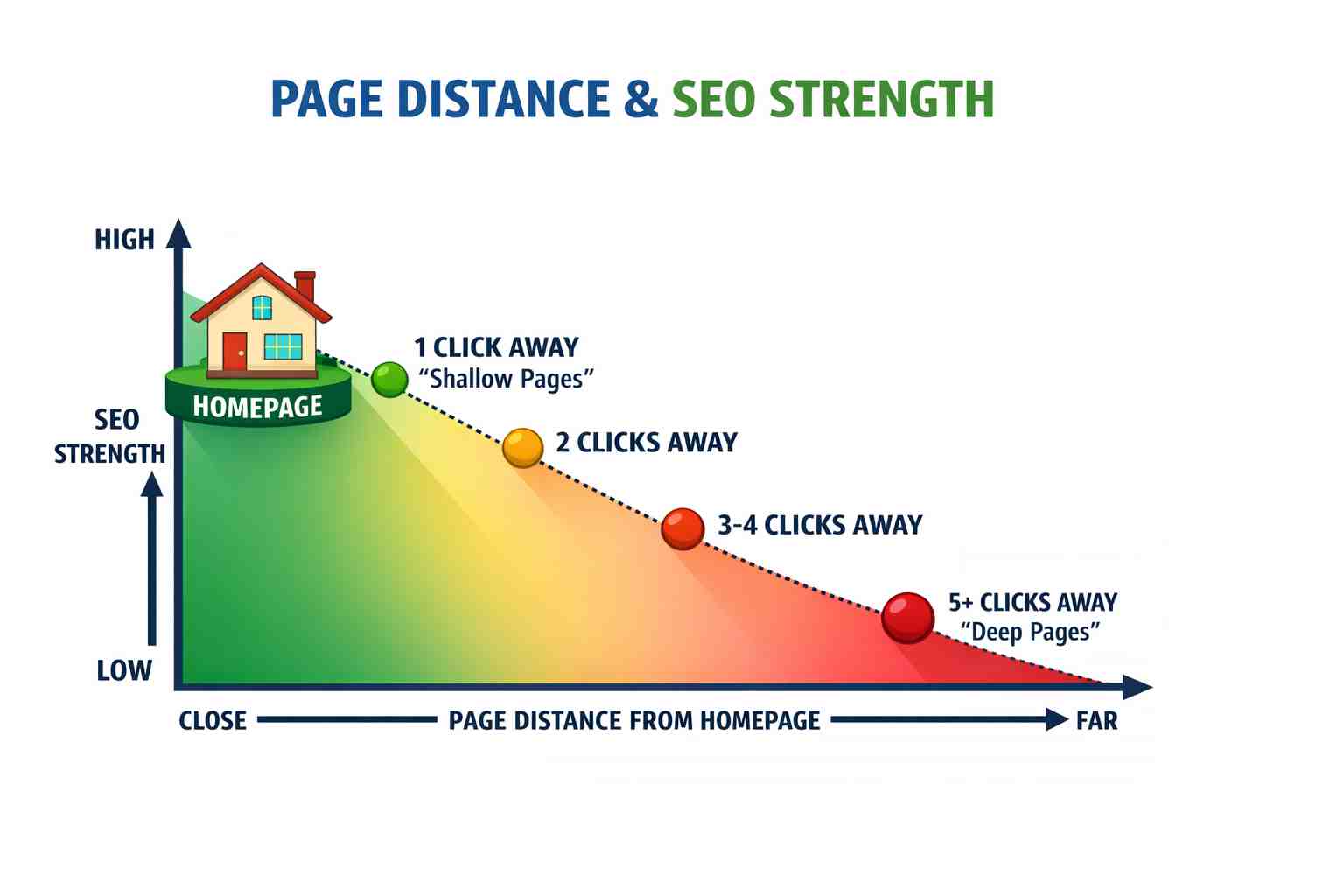
Click depth measures how many clicks separate a page from your homepage. Pages at depth 1 to 3 generate 9 times more SEO traffic than those at depth 4 or beyond. This isn't arbitrary. Search engines interpret distance from the homepage as a signal of importance.
A flatter site architecture ensures crawlers find and index your important pages. Deep pages often go undiscovered or receive minimal crawl attention.
Anchor Text and Context
Anchor text is the clickable text in a hyperlink. It tells both users and search engines what the destination page covers. "Click here" wastes this opportunity. "Internal linking strategy guide" provides clear context.
Descriptive anchor text supports keyword optimization without keyword stuffing. It also improves content readability by setting accurate expectations for readers.
The Resource-Efficient Internal Linking Framework
This framework operates in four phases: Audit, Prioritize, Implement, and Monitor. Each phase builds on the previous, creating a sustainable system rather than a one-time fix.
- Audit reveals your current state.
- Prioritize focuses limited resources on highest-impact opportunities.
- Implement executes changes systematically.
- Monitor catches problems early and measures progress.
The phases cycle continuously. As you publish new content, the audit phase identifies new internal linking opportunities. This prevents the common pattern of building a great structure once, then watching it degrade as the site grows.
Step-by-Step Internal Linking Implementation
Step 1: Audit Your Current Internal Link Structure
Objective: Create a complete map of your existing internal links and identify structural problems.
Start with free tools. Google Search Console's Links report shows your most-linked internal pages. Xenu Link Sleuth crawls your whole site and reveals orphan pages, broken links, and click depth issues.
Document three things: pages with zero internal links pointing to them (orphans), pages with excessive links diluting their focus, and your current average click depth. This baseline lets you measure improvement.
Export your findings to a spreadsheet. Note each page's current internal linking count, click depth from homepage, and primary keyword target. This becomes your working document for the next phases.
What to avoid: Skipping the audit and jumping to implementation. You'll waste time adding links where they're not needed while missing critical gaps. Also avoid paying for expensive tools before trying free alternatives.
Success indicators: You have a complete list of orphan pages. You know your site's maximum click depth. You've identified pages receiving disproportionate internal link attention.
Step 2: Identify Your Pillar Pages and Content Clusters
Objective: Establish a clear content hierarchy that guides your linking decisions.
Pillar pages are comprehensive resources on broad topics central to your business. Cluster pages address specific subtopics and link back to their pillar. This structure signals topical authority to search engines.
Review your audit spreadsheet. Which pages target your most valuable keywords? Which have the strongest existing authority (backlinks, traffic, engagement)? These are pillar candidates.
Map each pillar to 5-15 related cluster pages. A pillar on "WordPress Performance" might cluster with pages on caching, image optimization, hosting selection, and Core Web Vitals. Every cluster page should link to its pillar. Every pillar should link to its clusters.
How it works
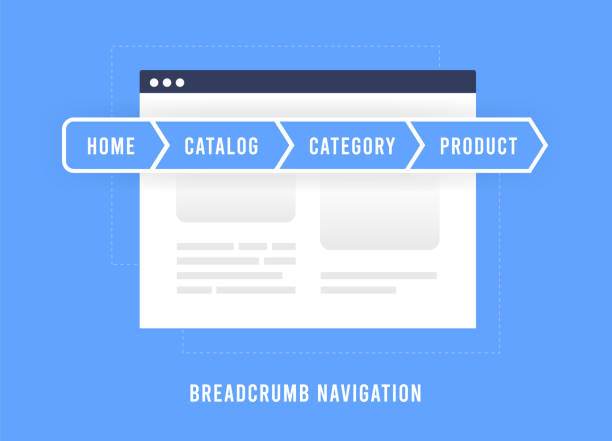
When a search-engine bot arrives on a cluster article, it evaluates the page. Initially, it finds the top-level breadcrumb navigation, which immediately clarifies the page’s exact location inside the website’s wider taxonomy and category structure.
Then it reads the post content, the bot will follow any internal linking placed within the body copy, uncovering specific semantic connections among nearby subtopics and distributing topical authority throughout the content cluster. As the Table of Contents is scanned, the page’s internal structure is indexed, allowing major headings to be mapped for possible rich-snippet visibility within search results.
When the bot gets to the bottom of the article, the "Related Posts" section keeps it exploring. Instead of hitting a dead end, it finds direct links to related articles and a main link leading back to the parent page. This helps search engines understand the site's main topics without wasting their crawling time.
What to avoid: Creating too many pillars. With limited resources, 3-5 strong pillars outperform 15 weak ones. Also avoid forcing content into clusters where it doesn't naturally fit.
Success indicators: Each pillar has a clear cluster of supporting content. You can explain in one sentence how any page relates to your overall content strategy.
Step 3: Optimize Link Quantity and Placement
Objective: Add the right number of links in the right locations for maximum impact.
Research shows pages with 45 to 50 internal links saw significant traffic boosts, but adding more diluted the impact. More isn't better. Aim for 2 to 5 internal links per 1,000 words of content.
Placement matters. Links in body content carry more weight than footer or sidebar links. Links early in content typically pass more equity than those buried at the bottom. Contextual relevance trumps both factors.
Prioritize internal linking from high-authority pages to pages you want to rank higher. Your homepage, popular blog posts, and pages with external backlinks are link equity sources. Direct that equity toward conversion pages and target keywords.
What to avoid: Stuffing links into content where they don't fit naturally. Users notice and bounce. Search engines notice and may discount forced links. Also avoid linking to the same page repeatedly from one article.
Success indicators: Your important pages receive links from your highest-authority pages. Link density falls within recommended ranges. Anchor text varies naturally while remaining descriptive.
Step 4: Implement Navigation and Structural Links
Objective: Ensure every page is reachable within three clicks from your homepage.
Navigation links (menus, breadcrumbs, footer links) form your site's backbone. They're less powerful than contextual links but essential for crawlability and user experience.
Audit your main navigation. Does it link to pillar pages? Can users reach any page in three clicks or fewer? If not, restructure. Add category pages that bridge homepage to deep content. Implement breadcrumb navigation for clear hierarchy signals.
For Shopify stores, collection pages serve as natural category hubs. For WordPress blogs, archive pages and custom landing pages fill this role. Both platforms support breadcrumbs through native features or simple plugins.
What to avoid: Mega-menus that link to everything. They dilute link equity and overwhelm users. Also avoid hiding important pages behind JavaScript that search engines can't easily render.
Success indicators: Maximum internal linking click depth is 3 or less for important pages. Breadcrumbs appear on all content pages. Navigation clearly reflects your pillar/cluster structure.
Step 5: Fix Broken Links and Redirect Chains
Objective: Eliminate link equity leaks and crawl waste.
Broken internal linking hurts SEO by wasting crawl budget and creating dead ends for link equity. Redirect chains (A links to B, B redirects to C, C redirects to D) slow page loads and lose equity at each hop.
Use your audit tool to identify 404 errors and redirect chains. Fix broken links by updating them to current URLs or removing them if the content no longer exists. Collapse redirect chains by updating links to point directly to final destinations.
This step directly impacts website speed. Each redirect adds latency. Core Web Vitals affect search rankings, and unnecessary redirects hurt your scores.
What to avoid: Deleting pages without implementing redirects. You'll lose any backlink equity those pages accumulated. Also avoid using temporary (302) redirects when permanent (301) redirects are appropriate.
Success indicators: Zero broken internal links. No redirect chains longer than one hop. Pages load without unnecessary redirect latency.
Step 6: Establish a Sustainable Maintenance Process
Objective: Prevent link rot and ensure new content integrates properly.
Create a simple checklist for publishing new content: identify 3-5 existing pages to link from, add 2-5 internal links within the new content, verify the page is reachable in 3 clicks or fewer, and confirm it belongs to a content cluster.
Schedule quarterly audits. Run your crawl tool, check for new orphan pages, and verify link counts haven't drifted outside recommended ranges. This takes 2-3 hours per quarter for most small business sites.
Get comprehensive website maintenance in place. We offer ongoing monitoring, regular audits, and automated link checks to ensure your internal linking structure remains healthy and effective.
Consider automated link monitoring if your site exceeds 100 pages. Manual audits become impractical at scale, and automation catches broken links before they impact rankings.
What to avoid: Treating internal linking as a one-time project. Sites evolve. Content gets deleted, URLs change, and new pages need integration. Without maintenance, your structure degrades.
Success indicators: New content follows the publishing checklist. Quarterly audits happen consistently. Orphan page count stays at zero.
Practical Application: Before and After
Scenario: E-commerce Store with 50 Products
Before: Products link only to related products (automatic). Blog posts don't link to products. Homepage links to 8 category pages but not bestsellers. Average click depth: 4.2.
After: Blog posts about product use cases link to relevant products. The homepage features the top 3 products directly. Category pages link to buying guides. Average click depth: 2.4. Result: 34% increase in organic product page traffic over 90 days.
Scenario: Service Business with 20 Blog Posts
Before: Blog posts exist in isolation. Service pages receive no internal linking except from navigation. No clear pillar/cluster structure. 6 orphan pages.
After: 3 pillar pages established (one per service category). Each blog post links to a relevant pillar and 2-3 related posts. Service pages receive contextual links from relevant blog content. Zero orphan pages. Result: Primary service page moves from position 8 to position 3 for the target keyword.
What are Some Common Internal Linking Mistakes and How to Avoid Them?
Internal linking mistakes can undermine your SEO efforts and frustrate users. Here are some common pitfalls to watch out for:
Over-optimizing anchor text: Using exact-match keywords for every link looks manipulative. Vary your anchor text naturally. "Internal linking strategy," "how to link pages internally," and "this guide on linking" all work.
Ignoring user intent: Links should help users, not just search engines. If a link doesn't genuinely help someone reading the content, reconsider including it.
Linking to low-quality pages: Internal links pass equity both ways. Linking extensively to thin or outdated content can dilute your site's overall quality signals. Update or remove weak pages before linking to them.
Forgetting mobile users: Links too close together frustrate mobile users. Ensure adequate spacing and tap targets. Mobile friendliness affects both rankings and conversions.
Chasing perfection over progress: A good internal linking structure implemented beats a perfect one planned indefinitely. Start with your highest-traffic pages and expand systematically.
What to Do Next
Start with one action: run a free crawl of your site using Xenu Link Sleuth or a similar tool. Identify your orphan pages. That list becomes your priority.
Don't try to fix everything at once. Pick your three most important pages and optimize their internal link profiles this week. Measure their ranking changes over 30 days. Use that data to guide your next moves.
Return to this guide as a reference when publishing new content or conducting quarterly audits. The framework stays consistent even as your site grows.
Internal linking rewards patience and consistency. Small improvements compound. A link added today continues working for years. Build the habit, maintain the structure, and let time multiply your efforts.
Frequently Asked Questions
Useful Links
- https://www.link-assistant.com/news/seo-statistics.html
- https://searchengineland.com/seo-priorities-win-organic-traffic-454482
- https://inblog.ai/blog/how-many-internal-links-per-page-seo
- https://bkthemes.design/blog/mastering-page-distance-a-core-seo-strategy-for-enhanced-visibility
- https://bkthemes.design/blog/website-breadcrumbs-what-are-they-best-practices
- https://bkthemes.design/blog/mastering-website-health-the-indispensable-power-of-utomated-link-building
- https://bkthemes.design/blog/top-10-seo-mistakes-web-designers-make-in-2025
About the Author

Brian Keary
Founder & Lead Developer
Brian is the founder of BKThemes with over 20 years of experience in web development. He specializes in WordPress, Shopify, and SEO optimization. A proud alumnus of the University of Wisconsin-Green Bay, Brian has been creating exceptional digital solutions since 2003.
Expertise
Writing since 2003