The search for backlinks can help you review which sites link to your domain and explore where competitors receive links. When you monitor these connections, you can inspect the pages and link text, spot links that may have changed, and identify sites to research further.
Finding who links to you is not rocket science, but it takes patience and careful review. Let us walk through how to check your own incoming backlink profile, inspect competitor links, and use the results to guide your research.
Who This Is For
This walkthrough is for independent website owners, small marketing teams, and content creators who want to review incoming links and identify outreach targets. If you run an online shop, write an industry blog, or manage a regional brand, knowing which sites link to your pages can help you understand your online presence.
You do not need an advanced backlink checker to inspect link records. You need access to basic web platforms and a practical plan for reviewing the information they provide.
If you want to understand how other sites refer to your content, learning this skill gives you a useful way to review your profile and research new link building opportunities .
Who This Is Not For
This guide is not for enterprise data engineers who build custom crawlers from scratch or link brokers who run private blog networks to manipulate rankings. If your goal involves creating links primarily to manipulate search results, this material will not help you.
Google defines link spam as creating links primarily to manipulate rankings. Its examples include buying links for ranking purposes, excessive link exchanges, and automated link creation. See Google’s spam policies.
Key Takeaways
Finding your incoming links means looking at Search Console data and, when researching competitors, other sources too. Here are the core facts to keep in mind:
- Google Search Console displays links Google found, but its Links report may omit links and is not a complete backlink census.
- Search Console lets you review top linking sites, top linked pages, and common link text.
- Backlink index checker tools can help with competitor research, but their coverage may differ from Google’s.
- Search operators can help you discover candidates using niche terms and phrases such as “guest post” or “write for us.”
- Review the linking page and the link itself rather than relying on a backlink count alone.
How do you Search for Backlinks to Your Own Website?
To search for backlinks pointing to your own website, you can use either completely free tools provided by Google or powerful backlink checker tools .
Method 1: Use Google Search Console (100% Free)
Google Search Console provides the most accurate and primary data directly from Google about which links they actually recognize.
- Log into your account: Go to Google Search Console and select your website property.
- Navigate to Links: Scroll down the left-hand menu and click on Links under the "Legacy tools and reports" or general section.
- Check external links: Under the Top linking sites column, click More to see a full list of every external domain linking to your website.
- View specific pages: Click on any referring domain to see exactly which pages on their site link to your specific URLs.
- Export the data: Click the Export button in the top right corner to download the full list as a CSV or Google Sheet.
Method 2: Use Third-Party Powerful Backlink Checkers
Third-party link checker tools give you deeper insights into link quality, domain authority, and "DoFollow" vs. "NoFollow" tags that Google's native tool hides.
- Use free/freemium tools: Open a tool like Ahrefs Free Backlink Checker, Semrush, or Moz Link Explorer.
- Enter your domain: Type your exact homepage URL into the search bar and select Domain (with all its subdomains) to catch every link.
- Analyze the backlink data:
- Referring Domains: The total number of unique websites linking to you (this matters more than total backlinks).
- Domain Rating (DR) / Authority (DA): The strength of the sites linking to you.
- Anchor Text: The exact words people click on to reach your site.
- Referral Traffic: The amount of traffic these sources generate.
Method 3: Use Advanced Google Page Search Operators
If you want a quick, on-the-fly check without logging into any software, you can search Google directly using specific search commands.
- Exclusion Search: Type link:yourdomain.com -site:yourdomain.com into the Google search bar.
- How it works: This tells Google to look for mentions of your URL across the web while actively filtering out links coming from your own website.
Using this method you can store all the links in a backlink database. Just make sure you date the backlink data before you save it, so you know what time and date this comes from.
How do you do a Backlink Profile Analysis to Search for Competitor Backlinks?
To do a competitor backlink analysis, you evaluate the websites linking to your search engine (SERP) competitors, so you can replicate their best link-building sources.
Step 1: Identify Your SEO Competitors
- Find target keywords: List the primary keywords you want to rank for.
- Search the SERP: Type your target keywords into Google (use an Incognito or private window).
- Pick top rivals: Select 3 to 5 websites that consistently outrank you for those terms. Do not just pick direct business competitors; pick whoever actually owns the search results.
Step 2: Use a Backlink Analysis Tool to Check Backlinks
- Choose a tool: Plug your competitors' URLs into SEO software like Ahrefs, Semrush, Moz Link Explorer, or a free backlink checker .
- Run a Backlink Report: Navigate to the backlinks or referring domains section for each competitor.
- Use the Domain Authority Checker: Make sure to use the website authority checker on each competitor and select those with higher authority and real traffic.
- Export the data: Download the backlink profiles into a spreadsheet (CSV or Excel) to organize and filter the data.
Step 3: Run a Link Gap Analysis
- Use automated intersection tools: Use Ahrefs' Link Intersect or Semrush's Backlink Gap tool.
- Compare domains: Input your domain alongside 2 to 4 of your top competitors.
- Spot the overlap: The tool will generate a list of websites that link to multiple rivals, highlighting domains that do not link to you yet.
Step 4: Evaluate Link Quality and Relevance
Filter and score the potential link sources before doing outreach:
- Domain Authority/Rating: Prioritize referring domains with strong authority scores or domain ratings (typically 25 and above, depending on your niche).
- Anchor text patterns: Look at what anchor text (clickable words) they use.
- Context type: Distinguish between high-value editorial mentions, guest posts, resource pages, or lower-quality directory links.
Step 5: Plan Your Outreach
- Sort by impact: Sort your exported list by the highest-authority referring domains first.
- Find contact info: Locate the right editor, writer, or site owner.
- Pitch your value: Reach out to pitch why your content is a better or fresher resource to link to than your competitor's page.
How do you find Link Building Candidates with Search Engine Operators?
You can find link building candidates manually by combining niche terms with search queries. Ahrefs’ link prospecting guide suggests using topical modifiers and phrases such as “guest post” or “write for us,” then recording likely targets for review.
For example, a search for a competitor’s brand name while excluding its own website can help surface other pages that mention it:
text "Competitor Brand" -site:competitor.com
This query may return pages that mention the brand. Review the results to see whether they are relevant to your research.
You can also try topical searches that combine a subject with a prospecting phrase:
text "home gardening" "guest post" "small business tips" "write for us"
Search operators offer a manual way to discover publishing targets. Inspect each page before deciding whether it is a suitable prospect.
Do Different Backlink SEO Tools Bring Different Results?
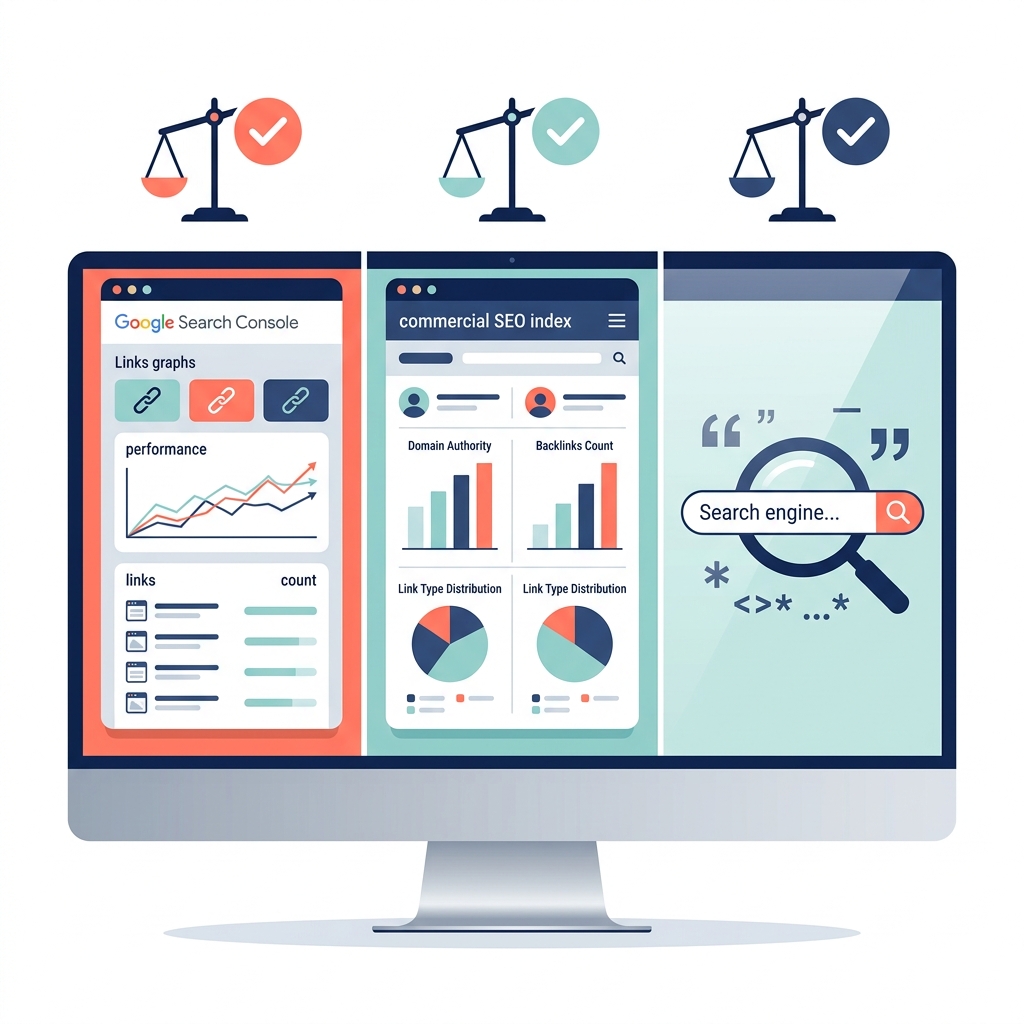
Different backlink search methods offer distinct advantages depending on your website and goals. Using more than one source can provide different perspectives, but keep in mind that the results may not match.
| Search Method | Primary Advantage | Main Limitation | Best Use Case | Typical Cost |
|---|---|---|---|---|
| Google Search Console | Shows links Google found for your site | May omit links; does not specify <code>nofollow</code> | Reviewing links to your own site | Free |
| Commercial Link Indexes | Can be used for competitor research | Coverage may differ from Google’s | Exploring competitor links | Varies by tool |
| Google Search Operators | Helps find candidate sites by query | Requires manual review | Prospect research | Free |
Use the method that fits your purpose. Search Console is for reviewing your own site’s data; a backlink index can help with competitor research; and search queries can help you find prospects to review.
How do you Evaluate the Quality of Inbound Links?
To evaluate the quality of inbound links, you must analyze relevance, authority, and safety to ensure the links help your search rankings rather than trigger a search penalty.
Step 1: Check Domain Relevance and Context
A link from a low-authority site in your exact industry is often worth more than a link from a massive site that is completely unrelated.
- Topical relevance: Ensure the linking website covers topics closely related to your niche.
- In-content placement: Verify that the link is placed naturally within the main body text of an informative article, rather than buried in a footer, sidebar, or author bio.
- Outbound link hygiene: Look at the other external links on that same page. If the site links out to spammy or low-quality sites, a link from them will carry less value.
Step 2: Analyze Authority Metrics
While not official Google metrics, third-party authority scores are excellent benchmarks for assessing a site's overall strength.
- Domain Strength: Use tools to check the website's authority rating (e.g., Domain Rating (DR) on Ahrefs, Authority Score (AS) on Semrush, or Domain Authority (DA) on Moz). Aim for domains with a score of 25 or higher.
- Page-level authority: Check the strength of the specific page hosting your link. A link from a page that already has its own high-quality inbound links passes significantly more "link juice."
- Organic traffic trends: Check if the linking website actually gets real human traffic from search engines. If a site has a high DA but zero organic search traffic, it may be part of a private blog network (PBN) or link farm.
Step 3: Inspect Link Attributes and Anchor Text
How the link is coded and labeled determines how search engines treat it.
- Link attributes: Prioritize Follow (DoFollow) links, as they pass ranking power. While NoFollow, Sponsored, and UGC (User Generated Content) tags are natural for a healthy link profile, they do not pass standard authority.
- Anchor text profile: Check the clickable text used for the link. It should look natural and descriptive (e.g., your brand name or a natural phrase). Beware of overly optimized anchor text that repeats exact commercial keywords too many times, as this looks manipulative to search algorithms.
Step 4: Screen for Red Flags and Spam
Steer clear of toxic links that violate webmaster guidelines and could result in an algorithm penalty.
- Spam Score: Use tools like Moz to check the domain's Spam Score percentage.
- Domain extensions: Be cautious of strange or cheap TLDs (Top-Level Domains) like .xyz, .top, or .biz if they lack a clear purpose.
- Foreign language mismatches: If your site is in English and you suddenly receive hundreds of links from sites entirely written in another language with no clear contextual connection, it is likely a negative SEO attack or comment spam.
Actionable Checklist for Your Monthly Backlink Audit
A regular backlink review can help you keep track of the information available in Search Console and identify pages or links that deserve closer inspection.
- Open the External links report: Review the top linking sites, top linked pages, nofollow backlinks, and common link text.
- Export data if needed: Search Console’s tables are limited to 1,000 rows, while exported link data can include up to 100,000 rows.
- Review linking pages and target URLs: Check the context of links and the pages they point to.
- Look for unexpected link text or patterns: Use the report’s common link text and linking-page information as a starting point for review.
- Remember that links can be stale: A link in the report may since have been removed or point to a page that no longer exists.
- Use other sources carefully: If you compare results with a backlink index, remember that its coverage may differ from Google’s.
What Mistakes Should you Avoid When Searching for Backlinks?
When searching for and building backlinks, avoiding critical mistakes is just as important as finding the right opportunities. Falling into common link-building traps can waste your time, burn your budget, or cause your site to get penalized by search engine algorithms.
1. Buying Cheap Toxic Backlinks or Using Link Farms
- The Trap: Purchasing packages of 50, 100, or 1,000 backlinks from sites like Fiverr, or subscribing to Private Blog Networks (PBNs).
- The Reality: Search engines easily detect these low-quality, toxic backlinks that have automated footprints. At best, Google will completely ignore these links, wasting your money. At worst, your site will face a manual action penalty, removing you from search results entirely.
2. Prioritizing Link Quantity Over Relevance
- The Trap: Chasing any site with a high third-party metric score (like Domain Rating or Domain Authority), regardless of what the site is about.
- The Reality: A link from a highly authoritative food blog means almost nothing if your website sells financial software. Search engines prioritize topical relevance. A few contextually relevant backlinks from smaller sites in your exact niche hold far more ranking power than a number of backlinks from unrelated links.
3. Over-Optimizing Anchor Text
- The Trap: Forcing every single backlink to use your exact target commercial keyword as the clickable anchor text (e.g., using "best car insurance" 100% of the time).
- The Reality: Real websites link to each other using a natural mix of brand names ("According to Geico..."), raw URLs (geico.com), and generic phrases ("click here" or "source"). An identical, exact-match anchor text profile looks highly manipulative to modern search filters.
4. Ignoring Traffic and Site Health
- The Trap: Trusting third-party authority metrics blindly without checking if the site actually gets real visitors.
- The Reality: Domain metrics can be easily manipulated by spam techniques. Always check the site's organic search traffic trend. If a site has a high DA score but gets virtually zero monthly traffic from search engines, it is highly likely that Google has already flagged or devalued that site.
5. Blasting Generic, Automated Outreach
- The Trap: Scraping thousands of other website email addresses and sending a generic, copy-and-paste pitch asking for a backlink opportunity.
- The Reality: Webmasters and editors delete dozens of these automated templates every single day. Spammy outreach damages your brand's reputation and can get your email domain blacklisted. Successful outreach requires hyper-personalized pitches that offer clear, unique value to the recipient's audience.
- Need real working outreach? Explore our guide on 7 proven templates to boost your website authority.
6. Neglecting Your Own Content Quality
- The Trap: Focusing 100% of your energy on hunting for links while hosting thin, outdated, or unhelpful content on your own pages.
- The Reality: High-quality websites will not link to low-quality resources. Before you search for external backlinks, ensure your site features linkable assets—such as original data studies, unique infographics, or comprehensive guides—that sites naturally want to reference.
How do you Turn Competitor Link Research into New Placements?
You can use a competitor backlink audit to identify valuable backlinks and pages that may be relevant to your own outreach. Finding a competitor’s link does not mean that the same placement will suit your site, so review the page and its context before treating it as a prospect.
Search prospecting can also help you find relevant publishers. Combine niche terms with phrases such as “guest post” or “write for us,” then record and review likely targets. The Ahrefs link prospecting guide describes this approach.
Use platforms like LinkedIn, Apollo, or any outreach tool to identify decision-makers, gather verified contact details, and execute personalized campaign sequences at scale. When you contact a publisher, make sure your suggestion is relevant to the page and its readers. Link research can help you identify possibilities, but the decision to link remains with the publisher.
How Does Backlink Research Support Long-Term Website Health?
Backlink research supports long-term website health by providing continuous visibility into how search engines and third-party sites perceive your site's authority, relevance, and safety.
Here is how ongoing backlink research protects and grows a website over time:
- Early Detection of Toxic Links & Spam: Regular monitoring allows you to spot sudden influxes of low-quality, automated, or negative SEO link attacks early—such as comment spam or foreign-language link farms—before search engine algorithms devalue your domain or issue a manual spam penalty.
- Understanding Brand Perception & Anchor Text Health: Analyzing anchor text patterns ensures your link profile remains natural. Over-optimized, exact-match keywords can trigger algorithmic filters, while a healthy distribution of brand names, raw URLs, and natural context signals authenticity.
- Identifying Lost or Broken Links (Link Recovery): Websites constantly undergo updates, redesigns, and URL changes. Backlink research reveals high-value incoming links pointing to broken 404 pages, so you can set up proper 301 redirects or reclaim valuable link authority.
- Revealing Content & Referral Opportunities: Reviewing top-performing linked pages highlights what content resonates most with publishers. This data informs future content strategy, showing you where to invest in linkable assets (like data studies, original tools, or comprehensive guides) that naturally attract sustainable traffic and organic placements over time.
- Informing Competitor Link Gap Strategy: Tracking competitor backlink profiles surfaces reputable publications, industry directories, and resource pages within your niche, giving you a steady pipeline of sustainable outreach targets rather than relying on short-term tactics.
Frequently Asked Questions (FAQ)
Can I Search for Backlinks Completely Free of Charge?

Yes. You can review links to your own verified site in Google Search Console without paying for a backlink index tool. You can also use search queries to look for link candidates manually. Search Console’s Links report is a sample, however, and may omit links.
Why Do Different Backlink Tools Show Different Numbers?
Different backlink tools can show different numbers because their coverage and data processing may differ. Google’s Links report may omit links and combines duplicates, while other tools may use different sources and coverage. Treat counts as tool-specific rather than as a single complete total.
How Often Should I Search for New Backlinks?
There is no single review schedule that fits every site. You can check the Links report when you need to review linking sites, target pages, or common link text. Remember that the report may include links Google found in the past that are no longer present.
Does Google Search Console Show if a Link Is Nofollow?
No. Google’s Links report does not specify whether a listed backlink is <code>nofollow</code>. It provides information such as the linking page, the target URL, and common link text, but not that attribute.
What Should I Do if I Find Low-Quality Spam Backlinks?
Review the linking page and link in context rather than drawing conclusions from a count alone. Google’s spam policies describe link spam as links created primarily to manipulate rankings, including buying links for ranking purposes, excessive exchanges, and automated link creation. If your research raises concerns, use Google’s guidance to understand the policy rather than assuming every unfamiliar link is evidence of a problem.
How to search for backlinks on Google?
You can search for backlinks on Google using native tools, direct search commands, or third-party indexers, depending on whether you are analyzing your own site, evaluating a competitor, or searching for new link prospects.
What is the best free backlink checker?
The "best" free backlink checker depends entirely on whether you are analyzing your own website or prospecting competitors.
1. Best for Your Own Website: Google Search Console (GSC)
If you own the website, Google Search Console is completely free with zero limits.
- Why it wins: It comes directly from Google's index, showing exact referring domains, top linked pages, and anchor text.
- Limitations: You can only view data for domains you verify ownership of, and it doesn't give third-party metric scores (like DR or DA).
2. Best for Industry Accuracy & Competitors: Ahrefs Free Backlink Checker
Ahrefs maintains one of the largest web-crawling databases available.
- Why it wins: Excellent for fast competitor research. It shows the top 100 backlinks, top 5 anchor texts, and overall Domain Rating (DR) per search.
- Limitations: Requires a free sign-up account to access full referring-domain metrics.
3. Best for Competitor Depth: Semrush Backlink Analytics
Semrush provides detailed insights into link toxicity, dofollow/nofollow distributions, and link velocity trends.
- Why it wins: Displays deep breakdowns of anchor text distributions and link context.
- Limitations: Free accounts are capped at ~10 requests per day.
4. Best No-Signup Quick Checkers
If you need a quick check without creating an account:
- SEO Review Tools Backlink Checker: Displays up to 100 links per search completely free without registration.
- Seobility: Simple, lightweight tool with clean metric reporting (limited to a few searches daily).
Conclusion
Searching for backlinks is a practical way to review your site’s links and research outreach targets. Google Search Console lets you inspect linking sites, linked pages, and common link text, while backlink index tools and search queries can support competitor and target research. Remember that no single count is a complete picture: Search Console may omit links, and other tools may have different coverage. Review the pages and links in context, and keep your research focused on understanding links rather than manipulating rankings. You can always check out our SEO services to see how we can help increase your quality backlink count.
About the Author

Brian Keary
Founder & Lead Developer
Brian is the founder of BKThemes with over 20 years of experience in web development. He specializes in WordPress, Shopify, and SEO optimization. A proud alumnus of the University of Wisconsin-Green Bay, Brian has been creating exceptional digital solutions since 2003.
Expertise
Writing since 2003